How do I send mail from my gmail alias?

I have a gmail account (1@gmail.com) that forwards to another gmail account (2@gmail.com). How do I respond to email in iPad mail from the forwarded account (1@gmail)? Right now, only 2@gmail.com can send email. This is possible in gmail in a browser but not in the Mail app. thank you!

iPad

Posted on May 10, 2012 8:31 AM

Reply
40 replies

Mar 31, 2014 2:47 PM in response to lindsdyn

Here is how to set up the Gmail "send as" feature on your iPhone. This will enable you to sync one Gmail account while retaining the ability to send from all forwarding addresses linked to that account from your iPhone.


First thing you have to do is make sure IMAP is enabled in your Gmail settings and that your "Send As" addresses are already set up in your Gmail account.


Then you must set up your account as an IMAP account on your phone.


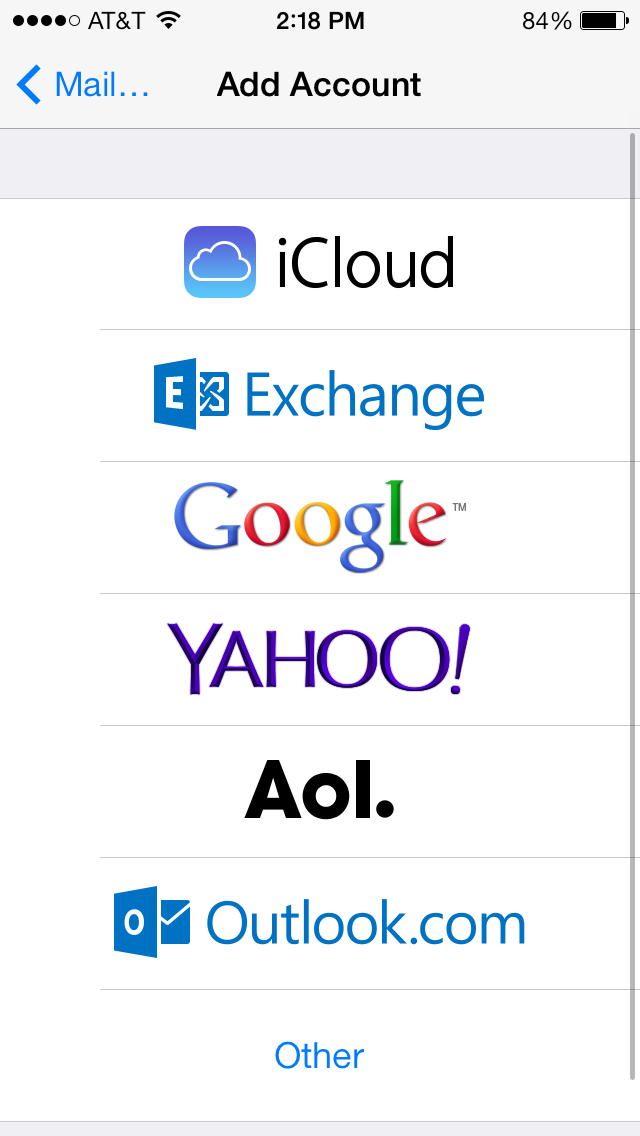
To do this, go to Mail, Contacts, Calendars in your Settings, click Add Account, and choose other, NOT Gmail.

User uploaded file


Once you have done this, click "Add Mail Account."


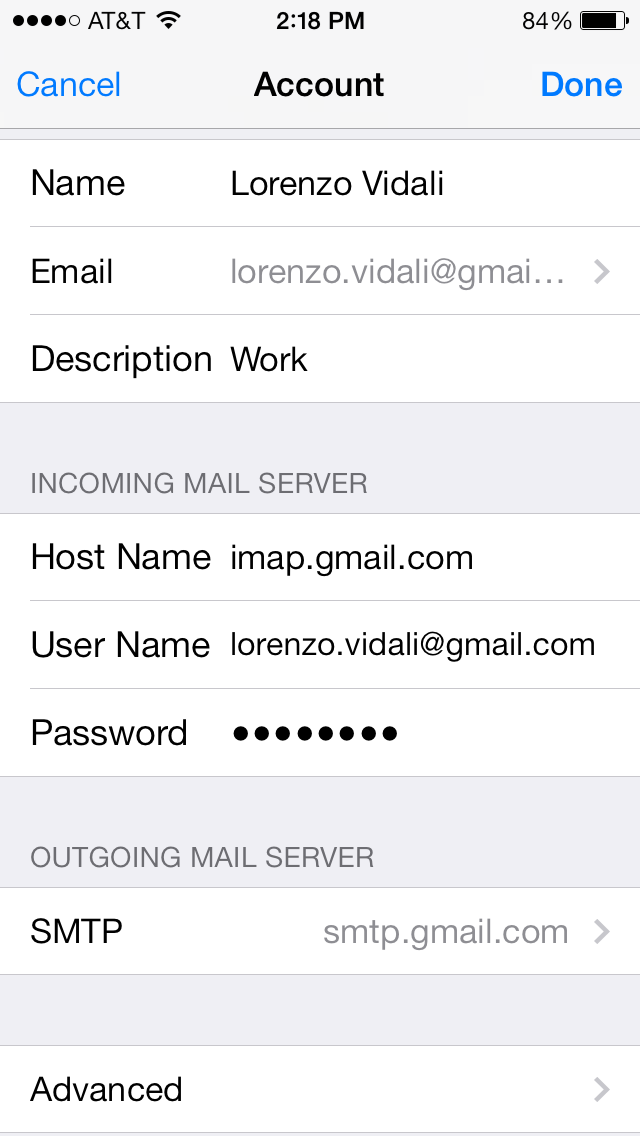
Enter your Name, The Primary Gmail Address you are using, Password and Description.


On the next page, make sure your incoming server is imap.gmail.com and your outgoing server is smtp.gmail.com


In the username field(s) on that page, make sure "@gmail.com" is included in the useranme.


Enter your password, and add the account.

User uploaded file


Once you have done that, you need to go back into your account settings.


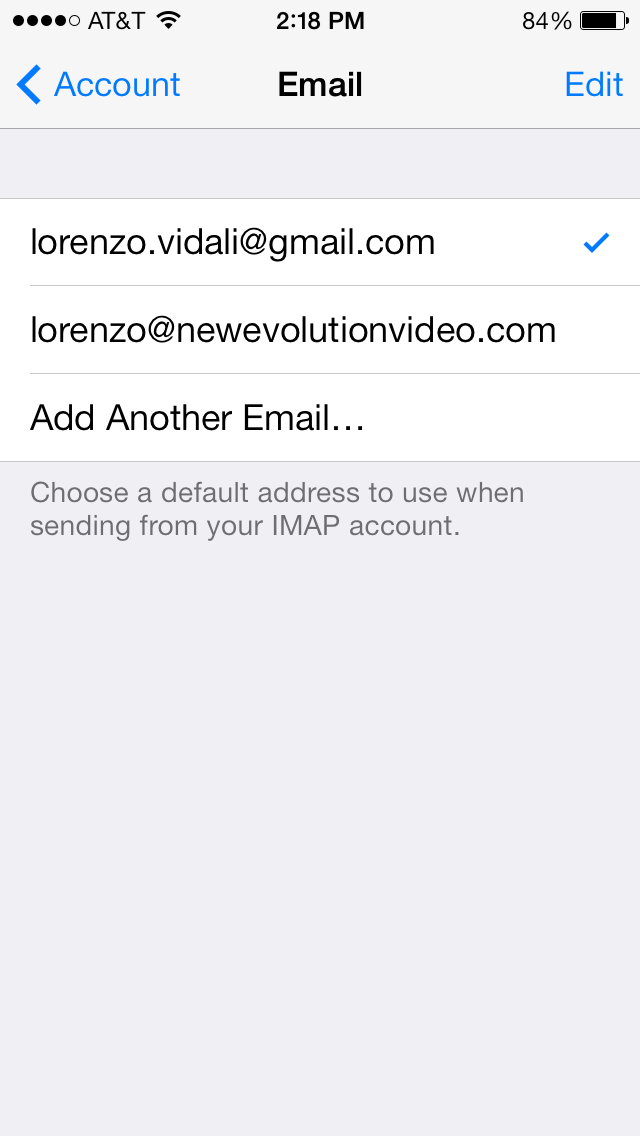
Go to settings > mail, contacts, calendars > "your gmail account" > "Account" > "Email"


That will take you to this page, where you click "Add Another E-Mail"

User uploaded file


Enter the e-mail address(es) you want to "Send as" on this page and you're done! NOTE: it will take anywhere from several hours to a day to begin working. I set mine up at night, and the next morning I was able to send mail from my phone again.


One it is set up and working, your "send as" addresses should display as regular choices in the From menu in Mail:

User uploaded file

This should work for the iPad as well.


Cheers!

May 11, 2012 10:07 AM in response to lindsdyn

lindsdyn wrote:


... now I get two emails everytime an email is sent to account 1. Since it is forwarding I get one from account 1 and one from account 2 in iPad mail. Any ideas on how to change that so I only get one email?

From a computer, log into your account 1 settings and see how you're forwarding mail to account 2. There should be an option to either (a) route incoming mail to the Trash at the same time as forwarding it to account 2, or (b) leave incoming mail in your Inbox but mark it as having been read before forwarding to account 2. That way only the only indication of New Mail is from account 2.


Another option is to use a filter instead of forwarding incoming mail. Filters let you forward incoming mail, but give you more options (like moving incoming mail to a particular folder).

Jun 10, 2012 4:02 PM in response to lindsdyn

Here's another iOS workaround... http://www.imore.com/2011/08/01/daily-tip-set-gmail-alias


Don't forget to go to the account's advanced settings and direct drafts, sent messages, and deleted messages to their appropriate server boxes if you want them stored online.


Also, for anyone looking to send email using a gmail alias from your lap/desktop/OSX (I'm using Lion/Apple Mail)... just include both addresses in the email field in your account settings. Seperate them with a comma (e.g. > alias@gmail.com, mainaddress@gmail.com), and whichever address is listed first becomes the default email address used for sending email.

Jun 11, 2012 8:25 PM in response to kgaddy

Please realize all of the information above, while true, is all for not when using an iDevice if you forget to visit this portal with your iOS device: m.google.com/sync. This page will prompt you to enter your gmail account and password. At this point, it will register your iDevice with google sync and allow you to take advantage of the "Send As alias". This is very slick and my recommendation.


Having said that, is there any work around for Apple Mail? I only read a resolution above for the iOS issue but nothing for the Lion problem.

Jun 11, 2012 10:44 PM in response to iHOPH

Agree... you must visit m.google.com/sync to register your device settings.


As for Lion/Apple Mail... I'm no pro... but this is what I did and my alias is working like a charm...


1. System Preferences >

2. Mail, Contacts, & Calendars >

3. Click on + Add Account and select Other.

4. Choose the first radio button, Add a Mail account > Create.

5. Place your alias email address in the email field and enter your password.


You will get a message saying Mail couldn't log into the Mail server "gmail.com." Just hit Continue anyway.


6. Select IMAP for Account Type.

7. Replace the User Name (was your alias) with your entire actual/primary gmail address > Continue.

8. Place smtp.YourAliasDomain.com in the Outgoind Mail Server field.

9. Check Use Authentication > and enter your entire alias email address in the User Name Field > Continue.


Apple Mail should create the account... you may need to "take the account online."


Hope this helps.

Jun 11, 2012 10:50 PM in response to kgaddy

I figured it out after posting my question--automagical solution when you add your "alias" address to the "address" field, separating the address for the account by a comma. The program automagically assumes you are attmepting to use an alias email for something, talks to the google server, and viola, honors your gmail pref's to "send as" with an alias. Ini my humble opinion, this is very slick and subtle--dare say elegant (although somewhat hidden). Thanks for the reply.

Oct 3, 2012 3:05 AM in response to kgaddy

kgaddy: "Also, for anyone looking to send email using a gmail alias from your lap/desktop/OSX (I'm using Lion/Apple Mail)... just include both addresses in the email field in your account settings. Seperate them with a comma (e.g. > alias@gmail.com,mainaddress@gmail.com), and whichever address is listed first becomes the default email address used for sending email."


______


Fantastic tip!


I've been trying to set up additional accounts for the alias with no luck but this worked great.


Thanks very much for this, it's much appreciated.


Cheers.

Mar 8, 2013 12:10 PM in response to kgaddy

Thank you kgaddy. This is brilliant and it likely works for all servers - mine is zoho and it worked flawlessly. Why don't they let us know when they build in these lovely features?


Even better, if you list ALL your alternate mail addresses in the comma separated list, you just need to tap the "from" field before sending and the complete list will appear in a drop-down menu, allowing selection of the desired alias for that particular email.


The alias placed second last (directly adjacent to the actual email address of the account) becomes the default.

Mar 8, 2013 5:03 PM in response to kgaddy

Exactly. Until I found this info I never even used the mail app because I have my own domain and all my emails addresses use it; I never use the actual user account address of the server.


NOTE: It looks like my secondary comment is missing: Once there are more than three aternate email addresses in the list, I cannot figure out how to specify the default alias. For some reason it just picks one in the list and I cannot chase it down .. when I've exchanged the desired default for the one in used in the list, it just used something else - no matter what position in the list I place the desired default, I can't seem to get it selected. I can't be bothered to test all the permutations.


I called tech support on this today, and they don't know either. I'm not actually sure that some of them knew this feature was even available, which is not unlike Apple (they don't always know what their systems are fully capable of doing until we users go ahead and challenge it by trying everything!)


If anyone can figure out how to specify the default alias to use (i.e., which alias is used automatically in the "from" field unless you manually change it by selecting another from the drop-down list) when the number of alternate addresses specified in the list in your settings is greater than three, please post it here.


Now, if we can only get apple to include alternate signatures based on alias rather than account, like the actual server does, we'd be sailing. But, being able to specify the "from" field with an alias is a HUGE step forward.


Thanks again.

May 13, 2013 9:04 AM in response to iHOPH

Hi,


I've tried to sync my iPad with google using the link you provided. It takes me to a page describing linking mail, contacts, etc with google. When I tap on the link "sync with a mobile device," it takes me to a help page. At the top of the help page, there is only the option to create an account. There is no prompt to sign in. If I tap on the link for "iphone, ipad. ipod touch," it takes me to another help page with the option of clicking on a link that says "sync Gmail, Calendar and Contacts on your iPhone and iPad. That link takes me to another help page which only gives me the option to either download the Gmail app or to create a new account.


How do I find what you're telling me I should be able to find? I have tried creating a new account using the recommendations in the imore article and so far cannot get it to find all my aliases.


Thanks very much!

This thread has been closed by the system or the community team. You may vote for any posts you find helpful, or search the Community for additional answers.

How do I send mail from my gmail alias?

Welcome to Apple Support Community
A forum where Apple customers help each other with their products. Get started with your Apple Account.


