MacBook Pro Retina display burn-in?

I first noticed this after my MBP [Retina] had gone to sleep, but: when returning to the login screen (since I have it set to require a password whenever the computer is idle long enough) I noticed what appeared to a very faint ghosting primarily noticeable on darker backgrounds.


After messing around with it a bit, there seems to be a fairly consistent in-display ghosting that occurs without much time at all; I was able to leave my screen on (a little above half-brightness) for about 10-15 minutes and the ghosted "burn" would be of the screen I left it on (which I deliberately reconfigured so that everything would be a new position).


Has anyone else experienced this? Is this a normal thing that I just have to get used to? It's not really noticeable at all in standard use.

MacBook Pro (Retina, Mid 2012), Mac OS X (10.7.4)

Posted on Jun 16, 2012 10:26 PM

Reply
9,629 replies

Oct 8, 2013 8:49 PM in response to Drew84

My Refurb rMBP (2012) has an LG display. Recently, it also began showing a defective pixel (which, in retina display terms, almost certainly means a CLUSTER of defective pixels).


I'll be heading over to the Apple Store later this week to see what transpires...hopefully, I won't have to vent any frustrations on this forum and it will be a smooth process.

Oct 9, 2013 10:33 AM in response to Merch Visoiu

Merch Visoiu wrote:


Dannyboy3D wrote:


I'll be heading over to the Apple Store later this week to see what transpires...hopefully, I won't have to vent any frustrations on this forum and it will be a smooth process.


Enjoy your yellow-tinted Samsung replacement.


So, you checked your display against a properly calibrated one and confirmed your suspicions?

If so, please post a side-by-side comparison photo so we can use it to start a separate thread about yellow Samsung rMBP display panels.


Thanks.

Oct 10, 2013 12:12 PM in response to Canuck1970

Just to add to the above:


Why you* have to calibrate in the first place, and why every monitor needs it, regardless of

  1. manufacturer
  2. quality of the manufacturing process
  3. cost of the panel you use
  4. printer you use for hard output


a.) http://blogs.scientificamerican.com/symbiartic/2012/01/09/professional-color-cal ibration-for-computer-screens/


Guidelines and tips from the same author as to how to get started calibrating your monitor:


b.) http://blogs.scientificamerican.com/symbiartic/2012/01/17/how-to-calibrate-your- monitor/


*I'm not a graphics professional (and haven't been in many years) so I don't really care about tinting so much - adjusted my Samsung replacement screen by hand / eye (ie without a professional calibrator) a couple of times, but this is personal preference in my case and I don't need to have a graphics-quality screen.


---


Sad story - those of you from a couple of years back may remember I talked about a robbery at the one reseller I went to, to ask about their experiences with retina display MBPs. Stopped in the day before yesterday and found out that the same bunch of thieves actually ended up going in a second time and held the place up at gunpoint a few weeks later. Crazy.

Oct 10, 2013 12:30 PM in response to northtwilight

northtwilight wrote:


Just to add to the above:


Why you* have to calibrate in the first place, and why every monitor needs it, regardless of


If I had bought this computer with this yellow display I would have returned it and certainly many people would have too. Having said that I did buy a Spyder4Elite and I took some photographs and I will post them when I'm prepared to do so.

Oct 10, 2013 1:31 PM in response to Merch Visoiu

Merch Visoiu wrote:

"Having said that I did buy a Spyder4Elite and I took some photographs and I will post them when I'm prepared to do so."


Thanks Merch! That would be great. We'll finally get to the bottom of this.


As unreliable as photographs of displays are for depicting the true color on a display, assuming you use the same camera settings, camera position, ambient lighting conditions, and displayed image, the relative color between photographs of different color profiles should be noticeable (i.e. one will look more or less yellow than another).


So, it would be good to see actually 3 photos: one photo with the default color profile that came with your rMBP, one photo with the best color profile that you were able to achieve manually, and one photo with the Spyder4 Pro color profile.


BTW, I'm assuming the calibration process completed without error, correct?


Anyway, I look forward to the results.

Oct 10, 2013 1:58 PM in response to Canuck1970

I don't think that will work unless you use a custom, static pre-calibrated white point in your camera as your camera will change its white balance depending on what it sees to make things look neutral.


Most high end DSLRs can do this white custom white point thing. Best thing to see relative differences is take one side by side because then you are guaranteed to have the same settings and exposure.

Oct 10, 2013 6:58 PM in response to Canuck1970

Canuck1970 wrote:


Thanks Merch! That would be great. We'll finally get to the bottom of this.


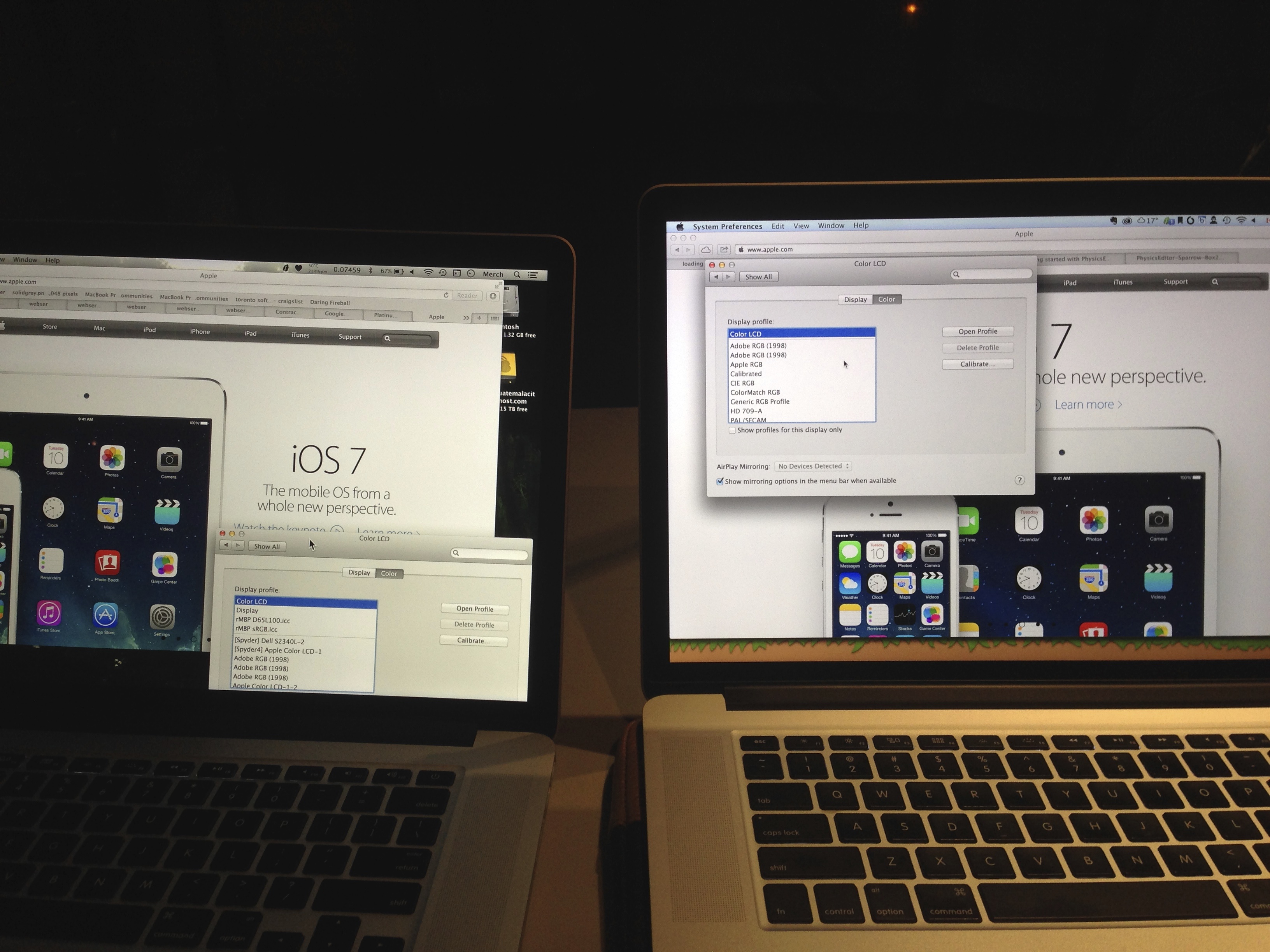
I have two photographs to share concerning colour calibration. I've been asked by Canuck1970 and Marty to buy a colour calibrator to correct the appearance of my display. I bought a Datacolor Spyder4Elite on sale for CDN$199.


I met up with a friend of mine who also has a 2012 15" Retina MacBook Pro. His display is also LSN154YL01001. His display wasn't yellow but he had a single stuck pixel, not a mura. His displays appears on the right and mine is on the left in both photographs (see Merch in the menu bar). I present these photographs with explanation but without analysis—you decide which one looks "better" and whether or not you should even have to go through this trouble in the first place.


The first photograph is with both displays set to the default colour profile, Color LCD, and maximum brightness.


http://merchv.com/Apple/IMG_2202.jpg


Then I set mine to the calibration I had made prior. I brought my Spyder4Elite with me so I asked my friend to also calibrate his display.


In the second photograph you can see that I set mine to [Spyder4] Apple Color LCD-1 which is the name of the profile I made after calibration. My friend on the right named his profile Calibrated.


http://merchv.com/Apple/IMG_2200.jpg


I leave it to you to make your own conclusions. I should have taken a shot with mine calibrated and his uncalibrated.


If anyone wants the .icc colour calibration files I made you can download them here:


http://merchv.com/Apple/Merch-Spyder4Elite-LSN154YL01001.zip


There are 3 .icc files in there. Copy them to ~/Library/ColorSync/Profiles. I don't know if they will help anyone but you can try.


The Spyder4Elite completed without producing an error.

Oct 10, 2013 7:40 PM in response to Merch Visoiu

Dear Merch, thanks a lot for sharing and telling us your experience.

In my opinion, Apple should callback all the mbpr and fix this differences of colors and tint among samsung and lg displays.


They have change 3 displays and finally the entire machine, but Im still stuck with this horrible yellow tint from an LG display.


I try your .icc files and it looks much better.


Once again thanks a lot for sharing. This is the real purpose of this threat.


Best regards from Colombia.

Oct 10, 2013 7:41 PM in response to millerrh512

I don't think that will work unless you use a custom, static pre-calibrated white point in your camera as your camera will change its white balance depending on what it sees to make things look neutral.


Its easy enough on most dslrs to choose the whitepoint, and you don't really have to calibrate it to see the kind of differences you are talking about. Just take the camera off of auto-whitepoint and set it at 5500 or 6500. It should work fine for this.

Oct 10, 2013 11:01 PM in response to Merch Visoiu

Merch Visoiu wrote:


Canuck1970 wrote:


Thanks Merch! That would be great. We'll finally get to the bottom of this.


I have two photographs to share concerning colour calibration. I've been asked by Canuck1970 and Marty to buy a colour calibrator to correct the appearance of my display. I bought a Datacolor Spyder4Elite on sale for CDN$199.


I met up with a friend of mine who also has a 2012 15" Retina MacBook Pro. His display is also LSN154YL01001. His display wasn't yellow but he had a single stuck pixel, not a mura. His displays appears on the right and mine is on the left in both photographs (see Merch in the menu bar). I present these photographs with explanation but without analysis—you decide which one looks "better" and whether or not you should even have to go through this trouble in the first place.


The first photograph is with both displays set to the default colour profile, Color LCD, and maximum brightness.


http://merchv.com/Apple/IMG_2202.jpg


Then I set mine to the calibration I had made prior. I brought my Spyder4Elite with me so I asked my friend to also calibrate his display.


In the second photograph you can see that I set mine to [Spyder4] Apple Color LCD-1 which is the name of the profile I made after calibration. My friend on the right named his profile Calibrated.


http://merchv.com/Apple/IMG_2200.jpg


I leave it to you to make your own conclusions. I should have taken a shot with mine calibrated and his uncalibrated.


If anyone wants the .icc colour calibration files I made you can download them here:


http://merchv.com/Apple/Merch-Spyder4Elite-LSN154YL01001.zip


There are 3 .icc files in there. Copy them to ~/Library/ColorSync/Profiles. I don't know if they will help anyone but you can try.


The Spyder4Elite completed without producing an error.


So, it looks like calibrating with a proper calibration tool fixed the problem. That's good to hear.

Oct 11, 2013 12:53 AM in response to Canuck1970

Canuck1970 wrote:


So, it looks like calibrating with a proper calibration tool fixed the problem. That's good to hear.


No, the calibration did not fix the problem. The problem is that I did not agree to buy this display. The display I agreed to buy was bright and vibrant and sharp and colourful. This display is muddy and dim and greenish and turns pink in direct sunlight. I would have returned this display. All the colour calibrator did was remove some yellow. It did not correct the problem with clarity or colour accuracy. Yes, my own eyes know better about colour accuracy than the Spyder4Elite. I don't care what it says. But I have 2 years of Apple Care left so the Genius Bar will be seeing me again for the 4th time soon.

This thread has been closed by the system or the community team. You may vote for any posts you find helpful, or search the Community for additional answers.

MacBook Pro Retina display burn-in?

Welcome to Apple Support Community
A forum where Apple customers help each other with their products. Get started with your Apple Account.