Mouse cursor disappears.

I tried with closing flash apps/websites, restarted iMac, updated to newest flash plugin but still using for example Photoshop, afer a few minutes cursors turns invisible.
I searched in forum for OSX Lion and there this problem was mentioned several times. Does it mean that it was NOT SOLVED?

iMac, OS X Mountain Lion

Posted on Jul 26, 2012 2:28 PM

Reply
501 replies

Sep 27, 2013 1:44 AM in response to Dmcleod

Actually I have had some amount of success by doing a repair permissions, but it is usually short lived.


That being said, my hard drive recently died on me. No worries, everything was backed up and I had a spare drive. However I didn't backup all of my applications, I didn't have enough room on Time Machine and I figured I could just redownload everything. Second, rather than straight restoring from my backup I went ahead and did a clean install and reimported the necessary bits once I was up and running.


Since doing a clean install I've had almost no problems with my disappearing mouse cursor and I gained nearly 30gb in free disk space. Near as I can tell I've got all my files, music, and movies and seem to have reinstalled all the apps I use so not sure where the extra 30gb was hiding out, but I'm glad I have it. My system had been migrated from system to system from my Powerbook G4 then to my Intel-based 24" iMac, then to my MacBook Pro and it's replacement when the first one died. Migration tools for Mac have been amazing, but a fresh install was probably long overdue.

Sep 27, 2013 1:54 AM in response to Augapfel

Interesting....I have completed the repair (which did find errors) and seems to be good.


At this moment AE CC and PS CC are in use... no issues?

Super strange you gained all that space back ? Sure your not missing stuff you misplaced or forgot about.

Perhaps its a huge page file or something 😕

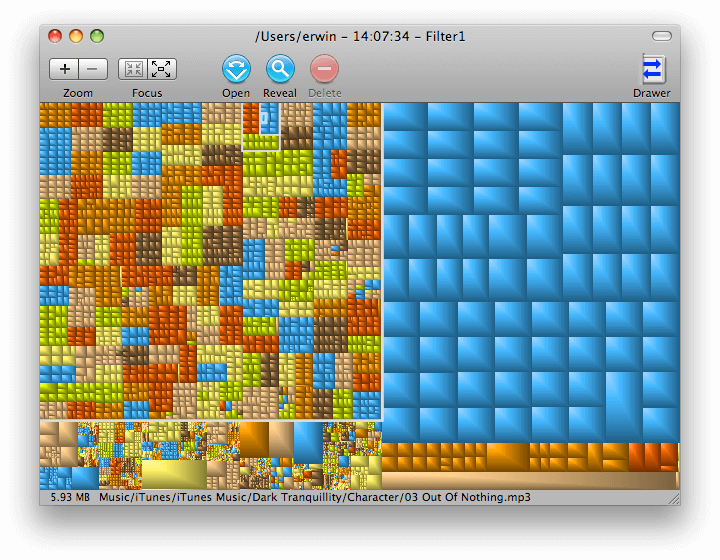
Try this tool out., i know its old but i love it ..helps to drill down and what is eating space up.

http://grandperspectiv.sourceforge.net/
User uploaded file

After install and you run a scan you can put your mouse over each block and see what it is and where.

So in this example what ever all that blue area is to the right is, its likely all in the same location on the drive and likely a similar type of file.

You can also delete and go to file locaton from that view as well.


Super useful!

Sep 27, 2013 4:31 AM in response to Dmcleod

Dmcleod, thank you for your advice, lately there are only post that confirm the problem and nothing else.


I'm sorry to you, the first solution I tried is to repari permission, I do it many times in a year, this solve many issues on mac os x.


Reparing permission solves the problem for few days.


Any solution we all tried is a temporally solution.


I think the best solution was when I upgrade JAVA manually but months after apple did many java upgrade and the problem come back


Sorry but I have no hope for this solution.


thank you

Sep 29, 2013 2:08 PM in response to fotohuta

I've been following the posts on the disappearing cursor. I have the same problem but was wondering if anyone has had any issues with the move tool in photoshop cs6. In Snow leopard, I could use the move tool to move an image into another image by simply dragging the image. I can't do that now under Mountain Lion.


Called Adobe and they have no answer. Any help?


Thanks

Oct 7, 2013 9:06 AM in response to NullUnit

I have had this happen in Safari and Mail without Adobe even being open.


It's too bad we can't remove CT from this thread, because their contributions are completely worthless, and I suspect they're just trying to aggravate people. I don't see how they can be level six with 13,800 points. It seems they have the intelligence of that stupid looking dog in their pic. Maybe it is the dog!

Oct 7, 2013 9:21 AM in response to charlesl80

CT is a well known troll. Apple monitors this thread and has censored statements with which it does not approve. Therefore, Apple has civil and criminal liability for perpetuating CT's troll dribble thus creating unfair business practices and unfair competition. Undoubtedly, we are stuck with CT and Apple's disregard of the chronic problems with its operating systems well documented here.

Oct 7, 2013 12:44 PM in response to charlesl80

It could be that when installing Adobe products (the installation alters the OS, not simply copying an application), this allows for the cursor to be modified to that ring of circles which rotate, (an Adobe feature). This might mess up the cursor in other applications even whan the Adobe produsc is not running.


The only way to test that would be to do a clean re-installatiuon of the OS and then run the Mac for some time without any Adobe product being installed. That would of course be very inconvenient. Perhaps someone has a second computer that does not need to have any Adobe stuff.

Oct 25, 2013 8:40 AM in response to Pixeleyz

I've noticed general overall performance improvements and less frequent glitches with Mavericks. I haven't encountered the disappearing mouse problem again so far either. I use multiple displays and Spaces has been pretty much rewritten for multiple displays in Mavericks. A second display now has it's own Space which makes things so much more convenient. The whole reason I bring that up is that I alwasy suspected my use of multiple displays as being one of the possible causes for the disappearing cursor.

Oct 29, 2013 4:48 AM in response to fotohuta

It's been happening to me since I got my Mac Pro about 18 months ago. Luckily I don't use it much, so I just swept this problem under the carpet.


But now it is annoying me.


I first noticed it while using Logic, but it doesn't really matter what application I was using at the time. However, my cursor only disappears when the machine goes into sleep mode, and I awake it. Sometime I will get the cursor back, sometimes it won't. It is completely random.


When it is gone, the only way it returns is to restart the machine each time.

This thread has been closed by the system or the community team. You may vote for any posts you find helpful, or search the Community for additional answers.

Mouse cursor disappears.

Welcome to Apple Support Community
A forum where Apple customers help each other with their products. Get started with your Apple Account.