iPod Touch Stuck in Preparing for Restore
Hey,
I posted a week ago about iPod problems with a brand new iPod Touch 32GB, and was referred to the Genius Bar. I went (without my computer, because it's raining) and they told me to do a DFU restore. I did, and ended up having other issues now.
Here is my process:
- I enter DFU mode on my computer (black screen when I enter), and it gives me a message saying: "iTunes has detected an iPod in recovery mode. You must restore this iPod before it can be used with iTunes".
- I click "OK", then "Restore".
- It checks for updates (which i downloaded earlier), then starts extracting the software.
- Once it's done, my iTunes verifies the restore with Apple, prepares the iPod for restore, then verifies again. At this point, the screen on the iPod turns on. My iTunes then gets to 'Preparing iPod for restore', but I just keep getting the loading bar and it never actually starts preparing the iPod for restore.
- My screen then shows the Apple symbol and a bar across the bottom that showed up when I first turned on the iPod after purchasing.
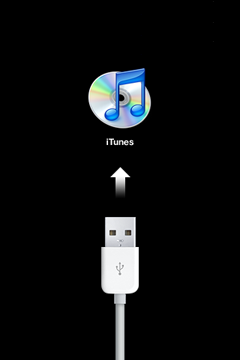
- This last stage goes on for multiple minutes before eventually the screen turns black, then back on again with the 'connect iPod to iTunes' graphic linked here: http://km.support.apple.com/library/APPLE/APPLECARE_ALLGEOS/TS3305/TS3305--conne ct_to_itunes-001-en.png
- I then get an error message in my iTunes saying "the iPod 'iPod' cannot be restored. An unknown error occurred (___)." The error code is either 21 or 1611.
I tried using a different port, turning off my firewall & security systems, restarting my computer, but none of them seems to have solved the problem.
Does anyone have any other possible solutions to this problem?
Message was edited by: reciprical at 5:45 pm to add additional details, format the question, and add Tags
iPod touch, Windows XP