2011 MacBook Pro and Discrete Graphics Card

I have an early 2011 MacBook Pro (2.2 GHz Intel Core i7, 8 GB 1333 MHz DDR3 memory) running OS 10.8.2. It has two graphics components: an AMD Radeon HD 6750M and a built-in Intel HD Graphics 3000. Since I've had the computer, the screen would get a blue tint when the computer switched between them.


However, as of two days ago, the problem has become substantially more severe. The computer was working fine, when all of a suddent the screen when completely blue. I had to force restart the computer. Since then, the screen has gone awry on numerous occassions - each time necessitating a hard reset.


I installed gfxCardStatus, and have discovered that the computer runs fine using the integrated card, but as soon as I switch to the discrete card - the screen goes .


I am just wondering what my options are (any input on any of these would be appreciated!):


1) Replace the logic board. Would this necessarily fix the issue?


2) Is there any way to "fix" the graphics card?


3) Keep using gfxCardStatus and only use the integrated graphics card. This is definitely the easiest/cheapest option, but to have such a computer and not be able to use the graphics card seems like a real shame.


4) Is there any other alternative?


MacBook Pro, OS X Mountain Lion (10.8.2), 2.2 GHz Intel Core i7, 8 GB memory

Posted on Feb 1, 2013 4:45 PM

Reply
Question marked as Top-ranking reply

Posted on Jan 17, 2018 12:30 AM

You could try these.


1. Find a repair shop that has a BGA -machine and does MacBook Pro GPU repairs. (no baking of the board). Had just my MacBook Pro 17' Early 2011 repaired in a local repair shop. Wasn't even Apple certified. Cost was 260 euros (including VAT).


2. Before you give them the laptop make sure they solder a new GPU chip - not the old one - as the the soldering quality won't be in that case equally good. The chip price was included in the 260 euros.


3. Use gfxCardStatus to take more control what GPU you are using and when.


4. Use your laptop only on hard surfaces to maximize the air ventilation. I admit it - little bit before mine broke I was watching La Vuelta VoD broadcast in HD in bed. Not having it on my legs but on bed. Bad airflow and HD video made it to heat too much.


5. You might consider also a temperature monitoring software. I haven't picked one yet myself. Any recommendations?


6. Prepare for it to fail again. Backups etc.

13,550 replies

Aug 28, 2013 6:32 AM in response to BiggAW

Ok guys,


Here's the latest and most important update for this whole issue.


It's official, Apple just gave us the proverbial finger.


After sending an email to Apple's CEO, I had a case openned with apple care and they looked at the issue.


Apparently their engineers think that there's no valid reason for a warranty extension or recall program. That's the verdict in my case.


Mind you that I gathered a HUGE amount of information with all the threads around here, all I could find really about the thermal paste issues, the user feedback with the black screens, screen glitches...you name it. I think I sent them like 10 emails with all the info I could find.


Still, the answer was...wait for it.... "We don't have enough feeback from users with this issue to justify a recall..."


Seriously Apple???


Anyway, my advice would be that we all keep sending feedback towards Apple.


http://www.apple.com/feedback/macbookpro.html


And, keep sending feedback directly to Apple's CEO (Tim Cook)


EDIT: Apparently I can't post the email here.


For me, if in the next couple of months there aren't any news i'm selling my macbook for parts.


Then, as Nickelback once said in a rock song.... NEVER AGAIN, APPLE!!!


<Email Edited by Host>

Sep 27, 2013 1:10 PM in response to jamesarm97

Holy moly. I thought I had a weird fluke of a system, but it sounds like there are lots of people fighting the same issues. Here's the post about my story:


https://discussions.apple.com/thread/5377159


In short, I've had the main logic board replaced twice and the LCD panel replaced once all in the past three weeks. Yet, I'm still having problems. In my case, any app that tries to use the discrete graphics processor causes the computer to freeze. That includes Silverlight, and even just attempting to uncheck the "Automatic graphics switching" checkbox in the Energy Saver preferences pane.


I downloaded gfxCardStatus thinking I might be able to use it to force the computer to use only the integrated graphics processor. However, if I select either "Integrated Only" or "Discrete Only" the computer freezes instantly.


I spent another hour talking to Apple tech support this morning, and they're insisting on trying to fix this problem one more time. So I'm sending it in for repairs a third time. It's been a month since I've been able to do any video editing on this computer, which is a very bad thing given that I'm a freelance videographer.


The weird thing is that all the Apple Geniuses I've worked with at the Apple Store on this issue and the tech support guy I worked with on the phone all acted like they've never heard of this problem before and that it's totally baffling. Is it really possible that enough people are having these issues to create 25 pages of Support Community posts in this thread (not to mention many other similar threads), and yet nobody at Apple knows anything about this? Or do you think all the technical people I've worked with are just "playing dumb" about it?

Sep 28, 2013 12:43 PM in response to abelliveau

Same problem here. Early 2011 MacBook Pro 15". Was randomly freezing in the exact same ways as described in the thread. It was the discrete video card and the switching between the two. Running fine with integrated only (although losing the ability to have an external monitor is really unfortunate). Now my operating system won't boot after i just shut it down. Don't know if there's a real good solution other than getting a new logic board (which would be my third on this machine) and new graphics card. I do not feel paying for this is justified. AppleCare, no AppleCare, this is a defect for sure. We all can't be at fault for this. I've sent in some feedback and awaiting a response and I suggest if you are reading this and you haven't, do so (http://www.apple.com/feedback/macbookpro.html). I'm not exactly sure on what other actions that can be done to get Apple to acknowledge and do something on this, but any and all suggestions at this point would be helpful.

Sep 28, 2013 8:10 PM in response to abelliveau

I have the same issue. My MBP is 15-inch, Late 2011 and I am freelancer iOS developer. This is my Second MBP before that I purcahced 2nd hand MBP 2008 model in 2010 but I got this issue http://support.apple.com/kb/TS2377?viewlocale=en_US&locale=en_US and could not free repair becuase I have no warenty and now I puracshed new one but have the same issue and I again I had 1 year deault warenty.


Definately I wont purcase new MBP. I prefered Mac Mini and placed it any cold place then use throug remote contrrol because MBP is not designed for exensive programs for long run. I think due to heat the contact point of graphic card chip melts and start this type of issue. My Hp dv62090eo still working which I mostly use for Windows Programming and Gamming. So I don't know it is apple design issue or by purpose then any extensive MBP user will purchase after year or two.

Oct 4, 2013 3:28 AM in response to Matt_Gough

All,


I have just sent this to Mr Cook.....maybe a naive attempt to get Apple to look into this issue but I am fuming at the cost of two logic boards in two years!


Dear Mr Cook,


I would like to take this opportunity to draw your attention to a very grave hardware fault that is currently being experience by many, many owners of a MacBook Pro Early 2011 notebook.


Similarly to the Early 2010 MacBook Pro, there appears to be a design fault that is causing the GPU to overheat and eventually fail that requires a Logic Board replacement at a huge personal cost to the owner. It is clear from this thread on the Apple Support Community this is a common problem and points to a design issue with this model of notebook for which I would like Apple to investigate and provide a formal response or at a minimum advice how I can raise this formally with Apple.


https://discussions.apple.com/thread/4766577?answerId=23274748022#23274748022


My MacBook like many others is currently having it Logic Board replaced (for the second time in two years) at a cost of over £400! (Repair Number: R104198586). This is an astronomical cost for such a young laptop - and nothing I have ever experienced having owned Lenovo, HP and Dell noteboooks. Considering the price point and build quality of Apple products I would not expect this issue to occur.


I look forward to hearing from you on this matter.


Thank you in advance.


Kind Regards

Oct 9, 2013 2:27 AM in response to clintonfrombirmingham

Well, I can't claim that my attempts to gather and synthesize information are particularly scientific, but they have produced some numbers and trends that I'd be happy to share.


Of the 184 early 2011 MBP owners who have responded to the survey, 112 have the 6750M and 56 have the 6490M. Nearly all of these respondents report graphics issues, regardless of which GPU they have.


Of the 220 people whose information I've logged from threads about this issue, only 104 provided enough information about their affected early 2011 models to know which GPU they have. Of these 104 users, only 11 have the 6490M, and the remainder have the 6750M. (This sample size should be a lot larger once I've made it through more posts on the largest thread about this issue.)


I'm not incredibly surprised by these numbers, as only one of the standard early 2011 models offered the 6490M, and the remainder used the 6750M. By comparison, only one of the standard late 2011 models offered the 6750M, and the remainder used the 6770M. And, in case you're wondering, the mid-2011 iMacs whose faulty GPUs are being replaced through the latest video card replacement program use a 6970M. I've seen a number of complaints from other mid-2011 iMac owners whose models were not covered under the replacement program even though they have graphics issues as well, and - guess what? - the rest of the mid-2011 line used a 6750M or 6770M. The more I look, the bigger this gets. In 2012, the iMacs and MacBook Pro models switched to using NVIDIA graphics processors, which had been heavily used in MBPs before 2011 (most famously, in the 2007 and 2008 models that ended up covered under a GPU replacement program).


There are certainly affected late 2011 users posting in the threads about these issues, though so far their numbers seem to be a bit smaller than the affected early 2011 users - but not insignificant. If the early 2011 models have so many with the 6750M that are affected, then it would seem logical that the late 2011 models with the same GPU could have the same problems. I'm actually more curious about whether there's a problem with the 6770M, because we know the 6490M, 6750M, and 6970M have issues. All of these are part of the AMD Radeon HD 6000M Series, and share many specs and features among them.


When I started the survey over the summer, I had no idea how big this would turn out to be. If I were doing it all over again, I'd structure the survey quite differently to accommodate owners of any of the affected 2011 MacBook Pros or iMacs. If someone else is interested in creating a broader survey, I'd be glad to provide the form I created as a basis to manipulate - I'd work on this, but my hands are a bit full with the thread logging and the governent shutdown. 😝


Oct 15, 2013 4:16 PM in response to nudoru

nudoru wrote:


I wonder if some of these issues could be causeed by OS versions / revisions and hardware conflicts?

I wondered the same thing at first, too. The speed with which my problems started made it seem like there must have been a bad update to my Thunderbolt driver or something. But then it seemed very much like a hardware problem while I was troubleshooting it (and given that they replaced the main logic board to "fix" it - three times).


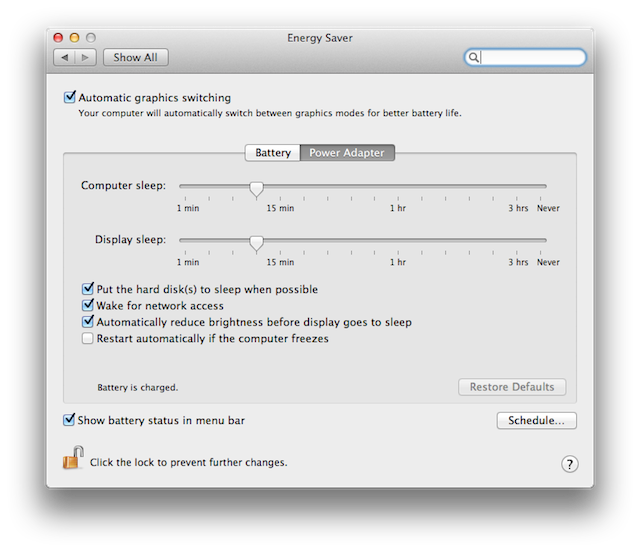
However, when I got the MBP back from service after the third repair, I noticed that the Energy Saver preferences screen subtly changed. When I sent the unit in for the final repair, it looked like this:


http://km.support.apple.com/library/APPLE/APPLECARE_ALLGEOS/HT2412/HT2412_x3---- en.png


But when I got it back, it looked like this:


http://www.co-bw.com/Images_Audio_Server/Energy_Saver.jpg


The control to enable or disable the computer to stop using the discrete GPU changed from a checkbox to a radio button. Very mysterious.

Oct 16, 2013 10:11 AM in response to dxhyp

"dxhyp


What so interesting is that we are all experiencing this issue for the first time at around the same time."


NOT TRUE...after a month of owning (bought brand new) my mbp 2011 (17in I7 2.2ghz) I started getting the "blue" screen now and again...And brought it to the local Apple store where I bought it for this and another minor issue...At the store, I was not able to reproduce the blue screen and they could not find anything wrong with it. My solution to date, when I get the "blue" screen is to close the lid, wait a few seconds and reopen the lid...Hopefully now that MANY have the same problem, I will be able to get this fixed BEFORE it gets worste (took Apple care on this laptop).

Oct 25, 2013 7:46 AM in response to abelliveau

Dear Team:

Hello! kindly proceed on below Apple product feedback link.

Admin recommended on this case, to post the feedback on suggested link below.

as they block any innapropriate link survey report regarding the MBP 2011 GPU issues.

Lets work together to help apple and help ourselves on this isue. 🙂


Dear (Rimshots),

Please read our Apple Support Communities Use Agreement so that you may discover what constitutes an appropriate post to our service. Section two, "Submissions," is most germane.

Your post, copied below, has been removed from Apple Support Communities. This area is intended to address technical issues about Apple products. Posts that do not conform to the Apple Support Communities Use Agreement are inappropriate.

Please see the Apple Support Communities Use Agreement athttps://discussions.apple.com/static/apple/tutorial/tou.html for more information on the proper use of Apple Support Communities.

Each Discussion user is required to agree to these terms before gaining posting privileges. You reserve the right to not post on Apple Support Communities should you disagree with these terms.

If you would like to send feedback to Apple about a product, please use the appropriate selection at http://www.apple.com/feedback As part of submitting feedback, please read the Unsolicited Idea Submission Policy linked to the feedback page.

Sometimes you have comments or concerns for which there is no technical response. If you need the kind of help that a troubleshooting expert can't provide, you can call Apple's Customer Relations group.

Best Regards,
Apple Support Communities Staff


<Link Edited By Host>

Oct 25, 2013 8:09 AM in response to Rimshots

Contacting Apple via the MacBook Pro feedback form has been recommended since the early days of these very long threads - hundreds of people have said they've done it. It's good to continue doing it, but I am not convinced that feedback alone is going to be the tipping point that gets attention. Even with hundreds of reports, we've still heard about various Apple reps all the way up to Tim Cook's office saying that they haven't heard about this issue before. So I firmly believe that you fill out the feedback form.


<Edited by Host>

Oct 24, 2013 6:52 AM in response to abelliveau

Has anyone had any success in keeping their original logic board when having a new one put in?

I'm keen to hang onto it if at all possible and send it in for a reballing to keep as a "spare" as I have little to no faith that the replacement will work.


edit: Just found the conditions... looks like apple retains the faulty part


Point 1.1.2

https://www.apple.com/legal/sales-support/terms/repair/generalservice/Service_Te rms_English.pdf

Oct 26, 2013 9:40 PM in response to ThyForsakenOne

Hi ThyForsakenOne, This thread only concerns the 2011 model of MacBook Pro with Discrete Graphics, as you can see from the title. Our problem here is that the computer relies internally on "AMD Radeon HD 6750M" video hardware, and this hardware appears not to have been built to last.


Please find and post to a more appropriate thread ( perhaps https://discussions.apple.com/thread/3839361). Best of luck finding a solution to your problem.

Oct 27, 2013 7:52 AM in response to ThyForsakenOne

There is a Apple repair program in place for the iMacs already, chech to see if you qualify...


"Apple has launched a replacement program for the graphics card in some mid–2011 iMac configurations, reports 9to5Mac. According to a note sent to Apple Support employees, the AMD Radeon HD 6970 video cards in some 27-inch May 2011 iMacs have experienced issues, causing them to fail.

The affected iMacs contain serial numbers with the last four characters of DHJQ, DHJW, DL8Q, DNGH, DNJ9, DMW8, DPM1, DPM2, DPNV, DNY0, DRVP, DY6F, or F610. The errors have been previously noted on both the MacRumorsforums and the Apple Supportforums.

Apple will replace the graphics card of affected iMacs with the aforementioned serial numbers at no cost for up to three years from the date that the computer was purchased, which makes early adopters eligible until May 2014.

Replacements can be initiated through AppleCare, the Genius Bar, or Apple Authorized Resellers and iMac users that paid to have the graphics card replaced are also eligible for a refund."

This thread has been closed by the system or the community team. You may vote for any posts you find helpful, or search the Community for additional answers.

2011 MacBook Pro and Discrete Graphics Card

Welcome to Apple Support Community
A forum where Apple customers help each other with their products. Get started with your Apple Account.