2011 MacBook Pro and Discrete Graphics Card

I have an early 2011 MacBook Pro (2.2 GHz Intel Core i7, 8 GB 1333 MHz DDR3 memory) running OS 10.8.2. It has two graphics components: an AMD Radeon HD 6750M and a built-in Intel HD Graphics 3000. Since I've had the computer, the screen would get a blue tint when the computer switched between them.


However, as of two days ago, the problem has become substantially more severe. The computer was working fine, when all of a suddent the screen when completely blue. I had to force restart the computer. Since then, the screen has gone awry on numerous occassions - each time necessitating a hard reset.


I installed gfxCardStatus, and have discovered that the computer runs fine using the integrated card, but as soon as I switch to the discrete card - the screen goes .


I am just wondering what my options are (any input on any of these would be appreciated!):


1) Replace the logic board. Would this necessarily fix the issue?


2) Is there any way to "fix" the graphics card?


3) Keep using gfxCardStatus and only use the integrated graphics card. This is definitely the easiest/cheapest option, but to have such a computer and not be able to use the graphics card seems like a real shame.


4) Is there any other alternative?


MacBook Pro, OS X Mountain Lion (10.8.2), 2.2 GHz Intel Core i7, 8 GB memory

Posted on Feb 1, 2013 4:45 PM

Reply
13,548 replies

Nov 14, 2013 1:49 PM in response to abelliveau

Add me to the club. I have an early 2011 MBP and I started having major issues last week. My screen randomly distorted and crashed the computer. I had to hard shut down and after trying to restart my computer it froze on the gray screen. This was well before I was familiar with the major issues with the AMD discrete graphics cards switching from the integrated intel. I tried numerous fixes ...starting up in Safe Mode, resetting the PRAM...I finally got it up and running again and it worked throughout the weekend.


On monday this week...bam same problem and stuck on gray screen. Ran through all the same fixes with no luck and finally to it to the Genius bar. They tried many of the fixes I tried as well and ended up recording i erase the hard drive doing a clean install then reverting to a backup.


Did all that and luckily I'm able to get into my computer. Still having issues with the screen freezing and bugging out on me. Sometimes when it goes to sleep I can't restart, and i'm still on occasion getting the grey screen of death. I'm happy to see so many other people are experiencing the same issues...share my pain, but Apple really needs to do something about this.


I called apple support this morning and spoke to a Sr tech. He mentioned the AMD 6750M version was a known issue and they were offering repairs Unfortunately, my computer is running the AMD 6490M. They are forwarding my case to the Engineering department. With 1000's of people having the exact same issue and with 85 pages of complaints on this forum alone..not to mention all of the other forums/news articles/lawsuits about this exact issue you would think Apple would want to address this.

User uploaded fileUser uploaded file

Nov 14, 2013 1:49 PM in response to SpaceBacon

SpaceBacon wrote:


@apple_power my first GPU error I can find to date is


Nov 12 22:18:51 Macintosh com.apple.cmio.VDCAssistant[442]: AVDCreateGPUAccelerator: Error loading GPU renderer

Nov 12 22:31:24 Macintosh com.apple.cmio.VDCAssistant[648]: AVDCreateGPUAccelerator: Error loading GPU renderer

Nov 12 23:22:04 Macintosh com.apple.cmio.VDCAssistant[324]: AVDCreateGPUAccelerator: Error loading GPU renderer


... I have yet to find the "hang" error. But am convinsed this is the same issue or likely related as the symptoms reported by everyone in this thread are dead on the same.


Ok have a look at this:


User uploaded file


You can usually go one week back in history.


Enjoy your 

Nov 17, 2013 7:57 PM in response to abelliveau

Hi all, first I want to say that I know the pain everyone is going through here since I too own an early Macbookpro with the 6750M. For me all started 3 days after I update to Mavericks when everything went south, I tried everything from resetting the SMC, NVRAM, AHT and at last a fresh installation back to 10.8.5 & no luck. That was till I decided to rip my mac apart & get to the cpu & gpu to do the all famous reapplication of the thermal compound to both. I dont know if I was lucky or the problem really is just a bad case of thermal compound. What I did was clean the entire cpu & gpu (when I say clean I mean spotless) reapply just the necesary amount of the paste (a really small amount about the size of a rice grain for the gpu and a bit more for the cpu) I reset the SMC and for my surprise the machine came back to life. As you can see in the screen shot those are my new temperatures after I was done. I hope this will give some of you some hope and a way out of this mess.


User uploaded file

Nov 18, 2013 11:59 PM in response to bga_repairs

bga_repairs wrote:


...This is a Chipset replacement on a Macbook Pro 2011 6490m with GPU Failure we have recently repaired. Here are some pictures if anyone is interested.


Below: New GPU fitted and Logic board cleaned of flux residue.


User uploaded file


This is the repair you need done if you get one. Brand New GPU in lead With picture proof...


Since you did such a beautiful job removing that cornerbond, maybe you can tell us what it actually is? I've gone back and forth on this. Is it actually cornerbond in the traditional sense of the term? I can't tell by looking at mine or looking at the pictures. (FYI: There has been some drift in how these terms are used, but cornerbond traditionaly means something that is heat-cured as part of the reflow process and edgebond, even when placed in the corner, means something that is cured post assembly by other means like time, UV light, or lower heat).


The first time that I saw the iFixit teardown, the thing that caught my eye was the lower left corner of the GPU package. What do you think is going on there? You can find similar pictures of boards for sale on eBay. My first impression was that the bonding material was beginning to harden in the middle of the package collapse. It seems like a weird thing to happen in 2011, but they appear to have used at least two different types of compounds for both early and late assemblies? Why? Supply problems? One not behaving as expected?


I'd think that switching between two compounds would at least raise the possibility of human error when it comes to storage temperature. A small mistake there (or a faulty thermostat on a refrigeration unit) would be all that is needed to change the properties of the material just enough. It's supposed to allow enough movement for self-center and collapse before it cures. A second or two can mean the difference between perfect joints and opens (fails QC and will not make it out the door). But somewhere in the middle and you end up with what we're seeing here. You've got machines that pass QC, but go to market with solder joints under constant stress. You start seeing infant mortality spread over a wide timeframe.


Just a shot in the dark, but I get the feeling that it's going to come down to something mundane like this. Apple generally does get the math right on the complicated stuff like CTE variables. Heck, they wrote the book on half that stuff. It would be nice if we can rule out both a design flaw and a problem with the AMD solder (either on its own or in relation to other variables). Then the solution would be very simple and straightforward: A new GPU installed by a competent professional with high-end equipment will put your MBP like it was originall intended. Would you agree? If evidence eventually leads in this direction, would you stop reballing with lead and just install the packages like they come? Actual evidence would also be very handy for people when they send the bills for this repair work to Apple!


Thoughts?


Also, have you had a chance to do an endoscopic inspection of these joints prior to your rework?


Here is that other picture for reference:


User uploaded file


I get that some of what we're seeing here are just stray fibers that got caught before it cured, but it's the thicker lines right at the corner that look like cracks to me. You can see a few smaller fibers elsewhere on the board, but I guess that actually raises another question. Why did so many get caught there at that particular time? Was too much heat invading from another reflow zone? Was the i7 getting greedy with territory?

Nov 24, 2013 6:07 PM in response to abelliveau

A week later graphic issue happened again, after 1-2 hours trying, system is back, what i tried was, safe mode, repair permissions, change memory, apple hardware test.....

i removed my 8 gb ram and put back 4 gb one, apple hardware test couldnt find any issue, here are some phortos i am gonna just upload a few photos.


My macbook pro is, antiglare early 2011.....


Safe boot

User uploaded file


lots of lines 😟


User uploaded file


i am going to upload more photos propaply next week, each week i am having this issue at least once 😟

Nov 24, 2013 6:15 PM in response to abelliveau

Also tried to boot windows on bootcamp...


User uploaded file


the only think i can do is restarting till i can log in safe mode and fix harddisk permission, each restart i am getting those error messages...

User uploaded file

i also tried internet recovery, no success, didnt even start...

The thing is all logos, apple logo etc has horizantal lines on boot screen when i have that graphiccard issue...

User uploaded file

Nov 27, 2013 11:29 AM in response to ARCape

Disclaimer: As I've mentioned before, don't take my posts here as the final word on anything. I feel the need to say this because I think my writing style sometimes leads people to assume that I know more than I really do. That would be an incorrect assumption. Honestly, even on my best days, I'm little more than a hack. Ignore my writing style and just know that my intention here at this time is not to provide answers, but to hopefully play a small part in figuring out what questions we should be asking.


ARCape wrote:


...That was till I decided to rip my mac apart & get to the cpu & gpu to do the all famous reapplication of the thermal compound to both. I dont know if I was lucky or the problem really is just a bad case of thermal compound...


My guess is that you were lucky. Specifically, I suspect that the order in which you tightened down the heatsink screws (possibly combined with thicker compound?) slightly altered the mount pressure in favor of a broken solder joint. To paraphrase Spock from episode # 35 TOS, random chance seems to have operated in your favor.


I've seen this pop up a couple of times, but it never seems to be permanent. This person, posting in another thread in August, said that it lasted about a month:

I managed to change the thermal paste about three months ago. It worked at first, but one month later, GPU problems appeared again hence I had to install smcFanControl and put my fans up to 6200 RPM.


Generally, I am highly in favor of replacing factory compound. I did mine when it was only a few days old and got about an 8 degree difference at load. This is about what most people report on the 2011 models. Very nice for about 40 minutes of work. Cooler temps mean better performance (less throttling and more thermal headroom for turboboost to do its thing).


That said, let me get a couple of things out of the way in relation to this discussion:


1) Thermal compound will not repair a broken solder joint.


2) If I am correct above about why this seems to work for a short while for a few people, then there also exists a possibility that you could make things worse. That is, if you've managed to lock down to the HD3000 and have bought yourself some time to see if Apple is going to do anything, I'd be very cautious. I could also, of course, be completely wrong about all of this.


Why do I even bring it up then? For those planning to do it anyway, I want to provide some additional information that is missing from the popular links and videos. I also want to revisit a previous statement that I made on the subject and I'm curious about those who have had the motherboard replaced only to experience the same problem again after a short time. There may be some questions worth asking for those who have had the motherboards replaced and have not yet experienced any problems.


Reattaching the heatsink:


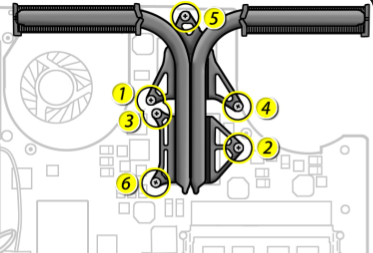
The screws should be tightened down in this order:

User uploaded file


The specific wording from Apple's Technician Guide is this (page 213):


"Install heatsink screws in the order shown, 1/2 way first, then tighten the rest of the way."


The wording isn't perfect, but they mean for you to follow the same pattern for both the "1/2 way" and "rest of the way" steps.


This would have come from Apple engineers and I've seen no indication that it isn't the exact best way to do it to get the most even distribution.


My advice on choosing a compound: In this case, I would suggest paying very little attention to the benchmarks and endless pages of debate about which product might be a third of a degree cooler than the other. Depending on how information is presented, the graphs can look impressive. But when you realize that these graphs only indicate about a three degree difference between the top 20 or so products and the results should be read with a 2 degree margin of error, there isn't that much difference. By all means, get a top tier product, but focus more on the differences. Focus more on things like viscosity, texture, and its ability to perform well under different amounts of pressure. Generally a low viscosity compound is more desirable when two well-finished surfaces meet perfectly and high viscosity compounds are more desirable when dealing with imperfections. The word "tacky" is sometimes used as a negative description in these reviews. It's true that a "tacky" compound can be a little more difficult to work with, but it can also be very helpful in some situations.


Mine fit together very well and I got good results from my favorite low viscosity compound on both chips, but I don't think that's true of all of these. I think we're dealing with some significant manufacturing variations in these heatsinks.


Which brings me back to a previous comment that I made on this subject. About 10 pages back, I said that I think the excessive use of thermal compound at most only plays a role in causing these problems to appear a little sooner than later. All else being equal, that's a true statement. Tests show only a few degree difference between the right amount and way too much. The rest of the difference that we see when reading user "before & after" reports comes from the higher quality of the compound chosen. But taking a step back from everything that I think I know about this, things are not always going to be equal when you're dealing with two heatsinks on the same assembly.


For an example, we can take another look at the popular iFixit teardown:


User uploaded file


To my eye, the CPU part (top) looks okay. Yes, a lot was used, but the extra got squished out the sides. And it looks like there was a good flat meeting between the heatsink and the CPU die. On mine, both chips looked like that. That bottom picture, though? I'm not even sure what we're looking at there. If this were my machine, I'd consider using two different types of compounds for reassembly. At minimum, I think we're looking at different mount pressures here, but it's not obvious to me that the GPU die and heatsink have ever even met or would recognize each other in a bar. It's not the amount, but the quality of factory compound that could be problematic in this case. If the bulk generic stuff is being left to play the role of thermal conduit on its own in some cases, that would lead me to believe that this could be playing a bigger role as contributing factor. It would necessarily mean that more heat is being displaced through the PCB.


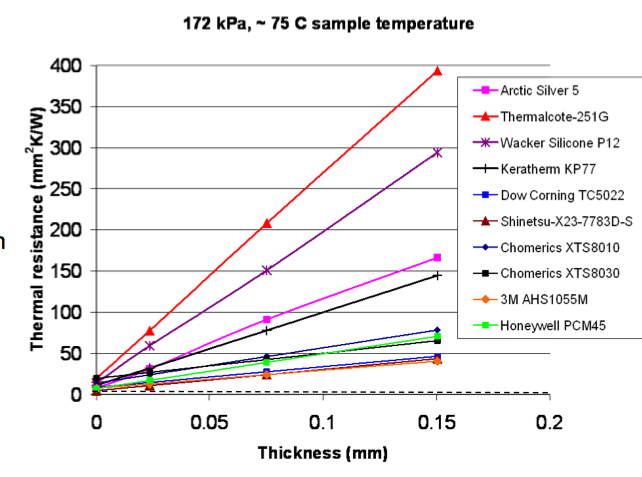
To understand what I mean, see this 2009 study by The United States Department of Energy. Yes, it's a little dated, but it mentions compounds that are still popular today. Also, it's far more sophisticated than the average benchmark comparison on an overclocking website. In this image, you can see how 1/20th of one millimeter can effect the thermal resistance of some popular compounds:

User uploaded file

Thermal compound isn't really intended to play the role of thermal conduit on its own. It's intended to fill the micro-imperfections between the surfaces that meet. Still, as you can see from the graph, some do far better than others when asked to play this role. And all of these are likely far superior to the generic OEM stuff.


In another example, in this thread, the owner got "not so satisfactory" results from AS-5 and "really great" results from MX-4. There would be no reason in the world for this if we were talking about things that fit together well. Those are both fine quality products. But MX-4, even though it doesn't stand out in any one particular category, can perform well under a wide range of conditions. With AS-5, you're instructed to spread it out flat on this type of bare die surface. A lot of user reports that previously confused me make sense when looked at in this context.


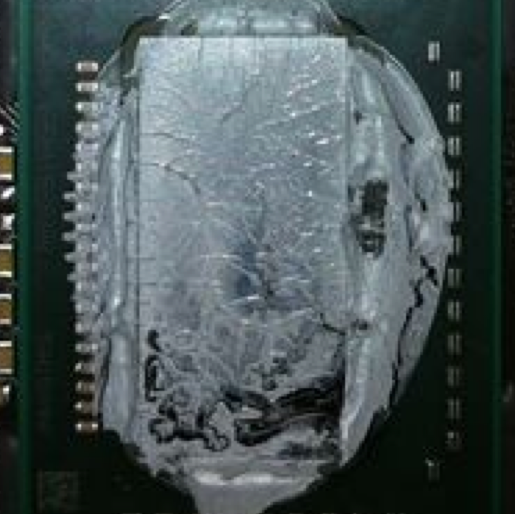
In this picture, we appear to be looking at an uneven spread:

User uploaded file


Much thicker at the top. Why? Were the screws not tightened in the right order? I don't know much about automated assembly, but I assume that this is still something that's done by hand? Or is the problem here with the heatsink itself? Or the heatsink mount points? Also notice that we're already seeing signs of cracking in the compound at just under the two year mark for this photograph.


If you're using a new board with the old heatsink, it might be worth investigating? I don't know if the depot repair uses the same compound that is used at the factory, but I'd imagine it's still a bulk generic low-quality type of stuff. If there is an actual gap between the two surfaces, corrective measures beyond a different type of compound may be in order. Ask a trusted technician about a new heatsink, a shim, or other modification. A repair person who works on all major laptop brands will already be well familiar with this type of issue.


For those planning to redo the compound yourself, I'd take a minute to study the old stuff before cleaning it up. I might then do a couple of test applications before putting it all back together. Put a few small drops of compound in several locations and then screw down the heatsink following above instructions. Then take it back off and see if you're satisfied with what you find. Are they even? To give yourself a baseline for comparison, put about the same size drop of your chosen compound between two flat surfaces (a mirror and a small piece of glass would be very nice for this). Slowly press down on the glass and you can see for yourself how the compound spreads.

Nov 29, 2013 7:28 AM in response to abelliveau

Yeah Apple, no problems here. Few "sporadic" users with some unknown, non-related gripe about a very specific set of Macbook Pros. This is what happens about 30 minutes into using mine (i7, Radeon HD 6490M). I've found that having my display resolution preferences open....ALL THE TIME...is useful as toggling from 1080p to 1600x900 seems to at least clear things up temporarily so I can keep working. The top screenshot here is from my external Samsung LED, connected via DVI out from the Thunderbolt port:

User uploaded file

Oh yeah, I forgot to mention....it takes three or four hard boots / power off actions to actually get as far as blueness above. Here's what the laptop screen itself looks like going through that exercise.

User uploaded file

And noting here that the *only* way to successfully boot is to pick Open. Clicking Cancel here hangs my machine 100% of the time.

Nov 29, 2013 7:32 AM in response to abelliveau

Last night the GPU of my Macbook Pro 17'' Early 2011 (Antiglare screen) decided to die once more.

User uploaded file


This was my 3rd logic board (the original one + 2 replacements).

So far I've been "lucky" and the 2 replacements died within the 90 days of warranty (the original one was out of warranty and I had to pay 496€).

What am I going to do when the GPU dies out of the warranty period?


Regards,

Álvaro.

Nov 29, 2013 9:01 AM in response to abelliveau

While I working on my homework.

The screen down.

So I hold the power button then boot.

And this is what I saw.User uploaded file

After long time waited.It gave me a blank screen.

If I boot to recovery hd.Also waited,it gave me a white screen.And more and more waited to a blank screen.

😮

I confused why you could boot success.

This shxt happened 11early.My mbp still down.

I have school till Jan.Handly to make time for go to Apple Store for solve this problem lately .

Dec 4, 2013 9:33 PM in response to abelliveau

My MacBook Pro Early 2011 17-inch just stopped working today.

II'm running the lastest OS X (10.9). I'm pretty sure all the firmwares were updated.

Here's a photo of the pink vertical stripes:

User uploaded file


-SMC reset, PRAM reset didnt fix this issue.

-Tried booting from the recovery volume, and safe boot. I got a black screen with no mouse pointer.

-I also noticed the GPU section (the part between two fans) of the logic board got really hot if I left it on.

-After reading some posts, I also have the hard freeze issue from time to time.

-Plus, I remembered sometimes few black rectangles with small colored dots will appear on the screen. not sure if anyone have the same scenario.


Im taking my MacBook Pro to the Apple Store tomorrow.


I hope Apple acknowledged this issue.

This thread has been closed by the system or the community team. You may vote for any posts you find helpful, or search the Community for additional answers.

2011 MacBook Pro and Discrete Graphics Card

Welcome to Apple Support Community
A forum where Apple customers help each other with their products. Get started with your Apple Account.