Phew.
The script now detects the selection on any table of any sheet on the front document (in case the original data isn't in table 1 of sheet 1). It creates a new table on the same sheet as the original data, with the stripped values in a single column. All alpha characters are stripped from the original values, as are the character "+" and anything that comes after it.
Again, copy and paste the script into an AppleScript Editor window.
In Numbers, select your data:
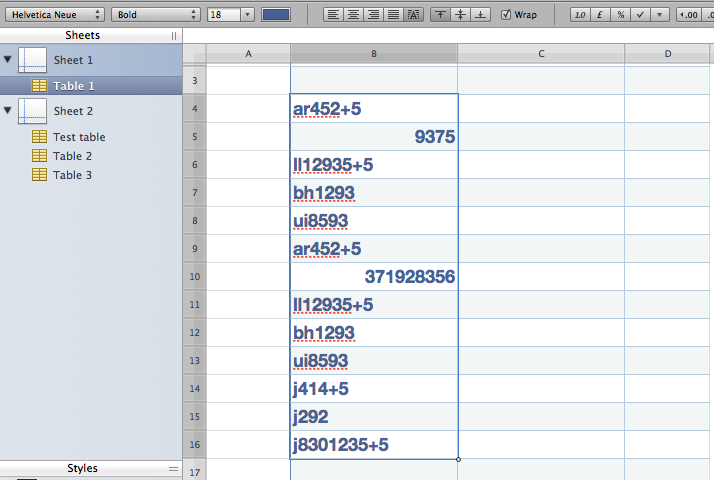
Run the script:
on detect_table()
tell application "Numbers"
tell front document
repeat with x from 1 to count sheets
set this_sheet to sheet x
tell sheet x
repeat with y from 1 to count tables
set this_table to table y
tell table y
try
column of selection range
return {this_table, this_sheet}
end try
end tell
end repeat
end tell
end repeat
end tell
end tell
end detect_table
tell application "Numbers"
try
set {this_table, this_sheet} to my detect_table()
on error number errnum
if errnum = -2763 then
display dialog "Select some data and try again"
end if
return
end try
set the_digits to "1234567890"
set the_cells to cells of selection range of this_table
set cell_count to countthe_cells
tell this_sheet to set nu_table to (make new table at end with properties {row count: (cell_count + 1), column count:1})
repeat with z from 1 to cell_count
set each_cell to itemz of the_cells
try
set the_content to ((value of each_cell) as integer) as text
on error
set the_content to (value of each_cell) as text
end try
set nu_content to ""
set char_count to (countcharacters in the_content)
repeat with x from 1 to char_count
set next_char to characterx of the_content
if next_char is "+" then exit repeat
if next_char is in the_digits then set nu_content to nu_content & next_char
end repeat
set target_cell to cell (z + 1) of column 2 of nu_table
set value of target_cell to nu_content
end repeat
end tell
When I run the script, I get this:
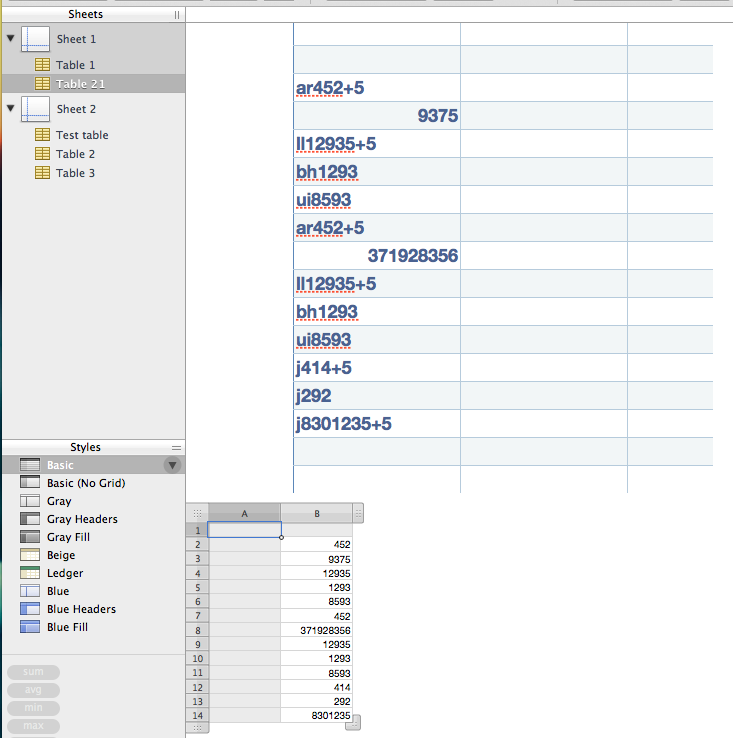
I would strongly suggest that you try it on a copy of your original spreadsheet.
Hope it helps.



