Iphone 5 can't connect to wifi at all

My iphone 5 can't connect to wifi even after entering the right password. The thing is it keeps displaying incorrect password for every different wifi I tried to enter. Reset network settings doesn't work, neither is reset all setting. Anyone has this problem?


Posted on May 27, 2013 7:34 PM

Reply
Question marked as Top-ranking reply

Posted on Nov 1, 2013 6:18 AM

I was going crazy, trying to connect to wifi. I backed up the phone, restored it and I still couldn't connect. I was a Sprint customer and had trouble with them for so long, I switched. But when I was trying to wipe the Sprint phone when I got the new AT&T phone... I discovered a trick! You have to put the phone into recovery mode and restore and then add your backup... Here are the instructions. Now the wifi works!


How to perform a recovery-mode restore

If your iPhone, iPad, or iPod touch is already showing the "Connect to iTunes" screen, please go to step 5.

  1. Connect your USB cable to your computer but not to the iPhone, iPad, or iPod touch until step 3.
  2. Turn off the device: Press and hold the Sleep/Wake button for a few seconds until the red slider appears, then slide the slider. Wait for the device to turn off.

    If you cannot turn off the device using the slider, press and hold the Sleep/Wake and Home buttons at the same time. When the device turns off, release the Sleep/Wake and Home buttons.

  3. While pressing and holding the Home button down, connect the USB cable to the iPhone, iPad, or iPod touch. The device should turn on.
  4. Continue holding the Home button until you see the Connect to iTunes screen. When this screen appears, you can release the Home button:
    User uploaded file
    Note:
    If the image of a battery appears, let the device charge for at least ten minutes to ensure that the battery has some charge, and then start with step 2 again. If you don't see the Connect to iTunes screen, try these steps 1 through 4 again.
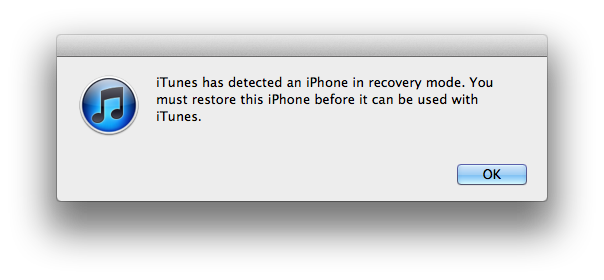
  5. iTunes should automatically open and display the following message:
    User uploaded file
77 replies

Nov 11, 2015 3:00 PM in response to kimbui

None of the suggestions works. I believe it has to do something with the type of 802.11 network protocol -- the iPhone somehow stops working with certain type of networks. I need to verify that with known networks. All in all I suspect it is either an iOS problem or even hardware error. As this seems to be a wide-spread issue hardware malfunction would reflect badly on Apple.

This thread has been closed by the system or the community team. You may vote for any posts you find helpful, or search the Community for additional answers.

Iphone 5 can't connect to wifi at all

Welcome to Apple Support Community
A forum where Apple customers help each other with their products. Get started with your Apple Account.