Hi Mr. H,
Sorry to hear that you don't have VPP in your country yet. Hopefully Apple will introduce it in the near future.
1. For paid apps, you will need to use a separate Apple ID for each iPad. You can load separate iTunes gift cards into each Apple ID account and use those funds to purchase paid apps.
2. Without VPP, you will need to have a separate Apple IDs for each iPad for paid apps. But for free apps, you can use Apple Configurator to install apps using a single Apple ID. See my quote at the end of this from another post on how to download and install apps with Apple Configurator. I talk about VPP in the post, but you can disregard that part. As long as you download the app with iTunes using the same Apple ID that you use to distribute apps in Apple Configurator, you'll be fine.
3. Yes. You can use Apple Configurator to prepare and/or supervise your iPads. You can also use Apple Configurator to install configuration profiles and free apps without using VPP. Here's a link to the iOS 6 Education Deployment Guide that has a lot of good information:
http://images.apple.com/education/docs/ios_6_education_deployment_guide.pdf
4. You don't *need* a sync cart, but it sure is nice to have one if you are using Apple Configurator, especially if you do get VPP in your country and are dependent upon Apple Configurator to install paid and free apps.
Here's a link to more on how to use Apple Configurator:
http://help.apple.com/configurator/mac/1.0/
One more link for you… I.T. Resources for Apple in Education. There are some great video tutorials on the left side of the page about half way down under iOS Deployment Model Videos:
http://www.apple.com/education/resources/information-technology.html
Hope this answers your questions!
~Joe
---From a previous post of mine on installing apps with Configurator---
Here's how I've been doing it using the latest Apple Configurator 1.1.2.
First, go into iTunes and authorize with an Apple ID (iTunes -> Store -> Authroize this computer). It doesn't have to be a VPP Apple ID…just an ordinary Apple ID used to associate with the app. Then download the app(s). They will go to ~/Music/iTunes/Mobile Applications. These apps will be linked to the Apple ID you authorized in iTunes. Next go into Apple Configurator and add the apps on the Prepare -> Apps screen. When you try to add the app in AC (clicking on the "+" at the bottom of the screen), you should be prompted to enter an Apple ID and password (see screenshot below).
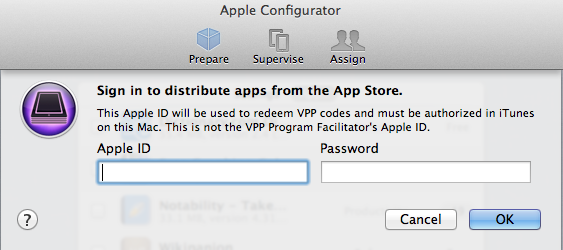
It will say that "This Apple ID will be used to redeem VPP codes…" It is NOT the Apple ID used to purchase the VPP codes… The VPP codes can be redeemed by any Apple ID.
You must enter the same Apple ID and password that you used to download the app in iTunes, and you should be good to go.
Hope this helps!! Good luck everyone.
~Joe



