How to manage iPads in schools where VPP not available?

I am trying to set up an iPad scheme with 24 iPads in a school in Portugal, where Apple's VPP program is not available yet. I understand that, in this environment (multiple users and multiple devices) you have to purchase each app for each device, and I think we will have to use iTunes Gift Cards to purchase apps for each iPad.


I have a few questions which I am hoping members of this community will be able to help me with:


  1. Am I right in thinking that I will need a different iTunes Gift Card for each iPad?
  2. Can all 24 iPads be linked to the same iTunes account, or will I need multiple accounts?
  3. Is it possible to use Apple Configurator to set up the iPads if you are not using the VPP scheme?
  4. If not, then is there any point getting a trolley that syncs as well as charges, or will each iPad have to be sync'ed individually if not using Apple Configurator?


Many thanks in advance for any answers or advice!


Mr. H

Posted on Jun 27, 2013 2:15 AM

Reply
14 replies

Jun 27, 2013 7:28 AM in response to misterharrison

Hi Mr. H,


Sorry to hear that you don't have VPP in your country yet. Hopefully Apple will introduce it in the near future.


1. For paid apps, you will need to use a separate Apple ID for each iPad. You can load separate iTunes gift cards into each Apple ID account and use those funds to purchase paid apps.


2. Without VPP, you will need to have a separate Apple IDs for each iPad for paid apps. But for free apps, you can use Apple Configurator to install apps using a single Apple ID. See my quote at the end of this from another post on how to download and install apps with Apple Configurator. I talk about VPP in the post, but you can disregard that part. As long as you download the app with iTunes using the same Apple ID that you use to distribute apps in Apple Configurator, you'll be fine.


3. Yes. You can use Apple Configurator to prepare and/or supervise your iPads. You can also use Apple Configurator to install configuration profiles and free apps without using VPP. Here's a link to the iOS 6 Education Deployment Guide that has a lot of good information:


http://images.apple.com/education/docs/ios_6_education_deployment_guide.pdf


4. You don't *need* a sync cart, but it sure is nice to have one if you are using Apple Configurator, especially if you do get VPP in your country and are dependent upon Apple Configurator to install paid and free apps.


Here's a link to more on how to use Apple Configurator:

http://help.apple.com/configurator/mac/1.0/


One more link for you… I.T. Resources for Apple in Education. There are some great video tutorials on the left side of the page about half way down under iOS Deployment Model Videos:

http://www.apple.com/education/resources/information-technology.html


Hope this answers your questions!

~Joe


---From a previous post of mine on installing apps with Configurator---


Here's how I've been doing it using the latest Apple Configurator 1.1.2.


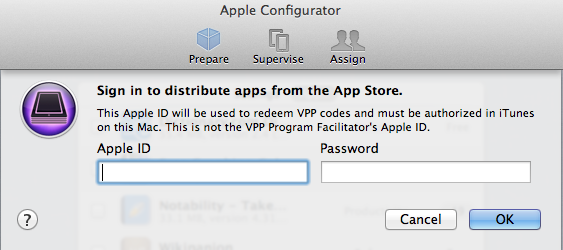
First, go into iTunes and authorize with an Apple ID (iTunes -> Store -> Authroize this computer). It doesn't have to be a VPP Apple ID…just an ordinary Apple ID used to associate with the app. Then download the app(s). They will go to ~/Music/iTunes/Mobile Applications. These apps will be linked to the Apple ID you authorized in iTunes. Next go into Apple Configurator and add the apps on the Prepare -> Apps screen. When you try to add the app in AC (clicking on the "+" at the bottom of the screen), you should be prompted to enter an Apple ID and password (see screenshot below).

User uploaded file


It will say that "This Apple ID will be used to redeem VPP codes…" It is NOT the Apple ID used to purchase the VPP codes… The VPP codes can be redeemed by any Apple ID.


You must enter the same Apple ID and password that you used to download the app in iTunes, and you should be good to go.


Hope this helps!! Good luck everyone.

~Joe

Jun 28, 2013 11:47 AM in response to misterharrison

No issues with using multiple Apple IDs on one iPad. This is the recommended way to distribute apps in Apple's "Layered Ownership" model (outlined on page 33 of the iOS 6 Deployment Guide):


http://images.apple.com/education/docs/ios_6_education_deployment_guide.pdf


We've been doing it in our school district's iPad deployment and its been working just fine.


Hope this answers your question!

~Joe

Jun 29, 2013 2:36 AM in response to nsdjoey

Thanks again, Joe. I really appreciate your time.


However, having read through the differences between personal, institutional and layered ownership, I'm pretty sure I want to go the institutional ownership route, at least for the first year when we are only trialling 20 iPads in one class. That way I can retain full control over what apps are installed on them and they should all behave identically.


From your first reply, though, it sounds like I would still need each iPad to have its own Apple ID for installing paid apps via the gift card route, and an overall "master" Apple ID for installing free apps and setting up identical profiles via Apple Configurator. Have I understood that correctly?

Jul 4, 2013 9:00 AM in response to misterharrison

Is this even legal?


I cannot speak to the legality, but it's quite common. I think the common thought is that it is acceptable if you have licenses for all software on each machine.


iPad cloning:


Note: to perserve all settings, you need to encrypt the backup.

http://learninginhand.com/blog/clone-an-ipad-or-ipod-touch.html

http://wiki.canby.k12.or.us/groups/ipodusergroup/wiki/82783/Imaging_iPod_touch_d evices_using_iTunes_restore.html

http://ipadmike.tumblr.com/post/27505756737/cloning-apple-configurator-from-one- computer-to


Still alive?

Backup/restore deployment strategy and steps

http://www.techlog.ca/ipad-deployment-backup-restore-deployment-strategy-and-ste ps/

http://www.techlog.ca/ipad-deployment-ios-5-upgrade-strategy-and-steps/

Jul 8, 2013 7:53 AM in response to misterharrison

Hi Mr H.


On page 23 of Apple's iOS 6 Education Deployment Guide it states, "For app purchases, education institutions have the option of redeeming one app code per iTunes authorized computer, or “configuration station,” and retaining the rest of the codes as proof of purchase. For these configuration stations, the End User iTunes account may be created using a school-controlled email address, and the configuration station administrator should be an authorized user."


So Apple supports you (as an educational institution) downloading the app(s) once and tracking licenses on all of the devices you install the apps on. If you purchased the same number of licenses as iPads, but used one Apple ID to install the app on all of your devices then according to Apple you are in compliance.


Hope this helps!

~Joe

Aug 16, 2013 2:12 AM in response to nsdjoey

Hello Joe,


Also thanks from the Netherlands (where my Apple Business Consultant agrees VPP is long over due).

Two questions on your advise:

purchased the same number of licenses as iPads, but used one Apple ID to install the app on all of your devices


  1. How can I purchase multiple licenses with one Apple ID? Again, no VPP here. I have an iPad admin ID for our school, but the store simply says the app is allready downloaded.
  2. With one Apple ID on 16 iPads in our school (current situation), Are we able to use user based apps like FaceTime that are linked to that ID/e-mail address?
    Note: Disabled the option with Apple Configurator, so I didn't try yet, but my guess is all devices are called at the same time (worth trying, just for the fun of it 🙂)

TIA for a reply,


Eerk Hofmeester

Aug 16, 2013 2:19 AM in response to misterharrison

Same here in the Netherlands: no VPP and even my Dutch Apple Business Consultant sighs when I ask about it...


A suggestion he made, and I didn't see in earlier posts: set-up an admin Apple ID connected to your school's credit card and gift the paid apps to your iPads. Big advantage over Gift Cards is that you don't need a Gift Card balance per iPad (which adds up if you have 200 of them, as we will next school year).


I'm still in the pilot phase with 16 iPad minis set-up, but my assumption is that this also (as with the Gift Cards) requires each iPad to have its own ID. Still figuring out how to easily manage that with Apple Configurator (suggestions welcome 😉).


Regards,

Eerk Hofmeester

Aug 26, 2013 10:27 AM in response to Eerk

Well, I'm now in the process of setting up 22 iPads without using the Volume Purchasing Programme.


For the time being, this is how I'm doing it:


1. Have one master Apple ID with the school's credit card associated with it. I am the only one with the password.

2. Have 22 other Apple IDs operating as sub-accounts, with no payment method specified. Each iPad also needs its own email address.

3. Gift apps from the master Apple ID to the sub-accounts, noting the redemption code as proof of purchase.

4. Set up a master iPad exactly how we want them and then back it up.

5. Restore from that back up to all the other iPads.


I have been assured by an Apple advisor that this would be legal.


My only issue is that to actually see the redemption code, you have to open the email at the receiving end AND click redeem. Once you've gone that far, you might as well just install the app there and then, which is what I'm trying to avoid having to do 22 times every time a teacher asks me to install an app on all the iPads!


What have I got myself into...?

Aug 30, 2013 5:20 AM in response to misterharrison

Ok, there is now the added complication that Apple (for some reason...) do not automatically provide a VAT receipt when businesses purchase apps in the iTunes Store. They are required to by European law, of course, but since when did that matter...?


Apparently the only way for businesses operating in countries where VPP has not yet been set up to get a proper tax receipt is to submit a support request through the iTunes support page on the apple website. You have to do this each time you make an iTunes purchase. Sheesh.

This thread has been closed by the system or the community team. You may vote for any posts you find helpful, or search the Community for additional answers.

How to manage iPads in schools where VPP not available?

Welcome to Apple Support Community
A forum where Apple customers help each other with their products. Get started with your Apple Account.
