iPhone 5s 'This cable or accessory is not certified and may not work reliably...' help?

What is happening here?


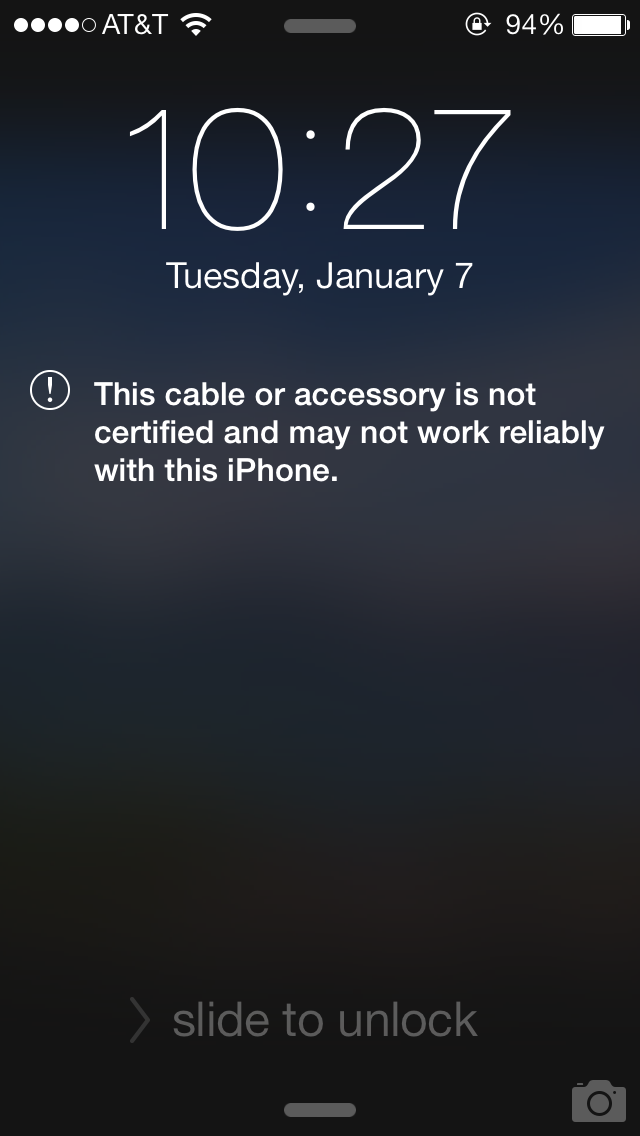
I keep getting this stupid message even when no charger is plugged in!


I'm using the official charger that came with the iphone 5s box. I have other lightning connectors and thought maybe switching them would fix it but it hasn't.


Is there something wrong with my 5s? Do I need to clean the port on the bottom of the phone? I've only had the 5s for about a week. I am using official apple chargers.


This started happening after my batter drained and I put the phone on charge. Is it a software bug?


Any help would be appreciated.


P.s. The message ONLY appears when it is not on charge. Which is studpily weird.

iPhone 5s, iOS 7.0.2

Posted on Sep 28, 2013 9:25 AM

Reply
340 replies

Jan 8, 2014 9:22 AM in response to englishdad

The dust I found was lodged behind/beneath the 2 "tension" springs that are used to hold the lightning cable in place when it is plugged in.


There was a significant dust 'glob' that was not visible at all but upon some plucking with a needle and toothpick while my phone was off I was able to dislodge it and found it to be quite a sizable portion of fuzz (approximately a 3-4mm ball)


I've found this to be the cause of this cable error now on 4 phones total from friends and family and have yet to find an issue related to software thus far.

Jan 12, 2014 6:58 PM in response to JezzerR

Jeezer, this is actually not TYPICALLY caused from 3rd party cables alone, I have over a dozen charging cables, some apple, some not, and after a proper cleaning of my contacts in my lightning port I was able to have each and everyone of them working without error, including the cheap POS chinese 1$ ones.


Your point is not coming from one of assisting users but attempting to initiate a flamewar in a thread meant to otherwise help people.

Jan 13, 2014 8:51 AM in response to SamsMochi

Hey all. Thought I'd share my story and solution (thus far).

User uploaded file


Sure enough I started getting this message incessantly. One day all was fine, and then boom, at least 50 times a day, seamingly at random with nothing plugged into the port. The only thing that changed on my phone was that I upgraded to IOS7 about a month prior. Otherwise, no obvious changes.


I immediately began searching online for solutions and found no real satisfactory answer. Here's what I knew at the time:


- I only use the cable that came with my phone (iphone 5 - bought 8-2013), so it couldn't be a unapproved cable issue.

- My thunderbolt connection appeared completely clean with no obvious indications of dust or "gunk". Still, I very carefully cleaned it out with paper, toothpicks, and modified q-tips. I even used compressed air to get in there. There was no obvious obstruction or dust. I was very frustrated and the message kept on coming.

- Obviously downgrading back to IOS 6 was not an option...although I completely loathe ios7 and would downgrade in a hearbeat. Don't even get me started about my horrible battery life now.

- Full resets and even a full restore from factory defaults didn't fix the issue.


So far I did stumble up on what appears to be a solution (either that or it randomly went away):

- First i went to the apple store and presented my problem and told the technician that a full restore didn't solve the problem. Here is what he told me..and I quote:

"Yeah, I was getting that same message after I upgraded to IO7 too. Couldn't get it to go away, but eventually it just healed itself, not sure how, but there's no patch or fix from apple. You either have to get a new phone which will cost you 200 bucks (since you're out of warranty now), or just live with it."


Seriously his expert techinal advice was to "live with it"


I started thinking hard about anything else that might have changed and I remembered something that I thought insignificant at the time. A few weeks ago, just before starting to get the message, I had a weird glitch where I went to turn up the volume on my phone, but for some reason it thought I had headphones plugged in. It indicated my headphone volume going up. Weird. It was odd since I obviously didn't have headphones plugged in. I blew in the headphone port, and did a full reset and the glitch was solved. This got me wondering though, I've been spending all my time focusing on the thunderbolt port, what if it's the headphone jack? What if there's something messing with that port that's making the IOS 7 think a non-approved device is plugged in? I know there are some devices that plug in and get power through the headphone jack. So I took some q-tips, pulled off some of the cotton so it would fit in the jack, and cleaned out the headphone port thoroughly. I also used some toothpicks and compressed air to make sure the pins were clean. Needless to say, there was A LOT of crap in the port. I usually carry my phone in my cargo pants pocket with the headphone port facing up, and so it doesn't surprise me that it would accumulate particles and dust. After this full cleaning, of the HEADPHONE port, with no other change, the message has not returned now in 5 days. Seems like too much of a coincidence not to be related.


I hope this helps some of you. I know how absolutely frustrating this message can be and if it starts coming back like it was, I might seriously consider a different brand of phone for my next....as much as it would pain me.


--j

Jan 14, 2014 10:20 AM in response to trower-mb

...well so much for that.


Error message started coming back again not even 2 hours after I posted this. I guess that puts me back in the camp of "it's a software glitch, that needs a patch...and not a dirt in a port, issue"


****. Really thought it was gone for good. Nothing else changed on my phone between yesterday morning and night, so it really does seem to be some sort of weird glitchy thing.


sigh


-j

Jan 16, 2014 11:10 AM in response to trower-mb

Another update folks.


Started frantically getting the error again seemingly for no reason. Popping up several dozen times an hour for the past two days. Last night I tried several resets and as soon as the phone booted, it'd pop up the message again. The ports are absolutely clean at this point so I'm fairly certain something else is going on here.


Last night when googling some more, I did find someone that posted about popping out their SIM card and reseeding it. I used the tool that came with my phone, poppped out the card, shot some compressed air in there just to be sure, and reseeded it. I rebooted the phone and so far the error has not come back in about 16 hours. Again, could just be cooincidence, but I thought I'd at least share my troubleshooting.


No other changes were made and the error stlll was only popping up with nothing plugged in. When charging, the error message never appeared.


-j

Jan 19, 2014 11:19 PM in response to trower-mb

Dont you think its time Apple themselves reaponded to this threas being over 9pages of comments


1. It isnt dirty ports as original cables work

2. It isnt the sim as tried

3. We arent stupid as some may imply

4. This IS greed of apple and imo is no different to monopolisation that other companies have attempted and been told to back down from (MS being one)

5. Holding down buttons and inserting cables at odd times or putting in usb ends before turning on etc etc is nonsense shouldnt need to be done and doesnt work anyway

6. It is an environmental cost decision as now all cables and none working products are defunct

7. I purchased a 30pin to LP adapter to use my old 4s 30pin cables and therefore can use all my original devices and cables - again that work fine


In summary Apple there is a glitch in the software and your greed is unwelcome - get it sorted!

This thread has been closed by the system or the community team. You may vote for any posts you find helpful, or search the Community for additional answers.

iPhone 5s 'This cable or accessory is not certified and may not work reliably...' help?

Welcome to Apple Support Community
A forum where Apple customers help each other with their products. Get started with your Apple Account.