Horrible battery on Maverick
MacBook Pro, OS X Mountain Lion (10.8.5)
dearest john galt,
apple engineers are currently, it's quite obvious, pulling their hair on this "little problem" you are quite lucky knowing nothing about.
What these engineers need right now is a LOT of informations on the machines, settings, programs of those affected by the glitch !
This SINGLE discussion is certainly an excellent source of info for them. They don't need to be browsing 444 discussions.
That's why we definitely encourage everyone who has this problem NOT to create a new discussion.
And for those who
1- do not have the problem AND / OR
2- do not have ANY idea of a solution,
not to clutter this discussion,that i repeat is an important source of " problem info " that the " UP THERE " engineers can find nowhere else !!!
So far I've done what I've been advised; nothing worked. Again I have a late 2013 Retina Macbook Pro. The only thing that did in fact help me was completely wiping the computer. And it HELPED it did NOT fix the problem.
Once I reinstalled everything, the battery percentage is at least calibrated correctly. I had issues where the battery was at 0% after 2.5 hours of use and the system kept operating for another hour-hour and a half.
My battery reader now updates correctly; the massive drain has stopped to a point but I'm still not up to the 8-9 hours that I was before mavericks.
Every time I chat, talk to, communicate with apple, they always have "No idea" what I'm talking about it it must be from "something I have processing" on the computer. lol. Losing faith...
Hi clodo9
This SINGLE discussion is certainly an excellent source of info for them.
Apple does not use this site for engineering feedback, but even if they did you provided no information that could help anyone, most of all you.
What these engineers need right now is a LOT of informations on the machines, settings, programs of those affected by the glitch !
To provide diagnostics and usage information to Apple, enable "Diagnostics & Usage" in System Preferences > Privacy by selecting the box "Send diagnostic & usage data to Apple". That is their best source of accurate information, other than running specific diagnostic programs that Apple Support may send to you along with specific instructions should you need to contact them about a problem.
This site is designed and intended for user to user support. If you want to solve your problems please start a new Discussion so that your fellow users may effectively address your unique circumstances. Knowledgeable users in a position to help you would require information similar to that collected by Apple. Thanks!
Hi john,
the "Send diagnostic & usage data to Apple" is default checked, and sends only "error reports" . It will not send a " the battery here seems darn short-lived " message.
The apple engineers now working on the problem that affects a minute percentage of Mavx are looking for related data, and i'm sure some of them have layed an eye on this 138 -reply thread.
One other thing this thread gives them is what DOES NOT work, which is precious info. Takes out a lot of "what if"s.
clodo9 wrote:
Hi john,
the "Send diagnostic & usage data to Apple" is default checked, and sends only "error reports" .
That is not correct. User and System Diagnostics are sent as well. They occasionally contain extremely comprehensive and specific power usage reports for both desktop and portable Macs. They are de-identified and no personal information is sent.
It will not send a " the battery here seems darn short-lived " message.
Exactly, because a subjective statement like that contains no data useful to an engineer. If you don't want to start your own Discussion that's OK but I shall assume you are not interested in addressing your problem.
I just discovered an interesting fact...
I was transcoding/streaming a movie from my MBP Pro with Plex to my TV and set the display light to the lowest level during streaming.
My battery dropped for 10% in 45 minutes, which would be a total of 7,5 hours fully charged (hypothetical...)
I'm not sure whetere Plex takes much CPU usage, but streaming and "just" 10% for 45 Minutes isn't that much...
Maybe it could be a hint for further guesses...
hi john,
they " occasionnally contain" isn't enough here.
By the way, you're absolutely right on directing everyone who has this problem to make sure the "send diagnostic & data to apple " box IS checked.
This being said, the problem here is not an "individual" one ( a team of top-ranking apple engineers wouldn't brainstorm over that ), it is a collective one and is best "displayed" in one thread , both for the benefit of those affected,and for the benefit of those who seek to solve it.
P.S. "a minute percentage" of a million is still a not negligible number
Pierrick35 wrote:
I bought my MBA 13" in september (2013) in France. Until yesterday, I have always had about 19 hours of battery. Now, it is reduced to about 5/6 hours and spotlight is shown as a very heavy app.
I have the exact same problem as Pierrick35 above (I have a new Macbook Pro 13 Retina, model A1502, with Mavericks), namely:
Spotlight has a constant energy impact of around 100, for no apparent reason (indexing supposedly already finished). Have tried the various suggestions here for a fix, all without success.
I hope Apple is busy looking into this, because it is draining my battery (I have about a third of the actual battery time I had before), and my Mac is extremely hot in the back where the battery is...which probably is not healthy for the system.
If anybody finds a (working) fix, or hears from Apple, please let us know - thank you.
Hi Guys
I finally got my computer into Apple to get my system fixed and I brought the battery issue up as well they said they will look into it when the repair guy has it. They turned my machine around in two days with new display and all kind of hard ware changes including the battery but as soon we started the machine I got the same message 95% and only 3 hours life left. noting was really running . So when I spoke to one of the geniuss they said it has to do with my display settings they are to bright etc I tried to explain to her that those settings have not changed from before and with Mountain Lion I had very good battery life, When I stated that one advertising statement was that maverick should increse the battery life they tried to say not relly. Anyway she then got their in store technicaion and he said it must be software ( they can not explai why Spotlight would take so much resources but I think on mine it has to do the bootcamp and he windows partion) Anyway the guy was pretty friendly and said nothing he can do just hoping Apple will fix that with a future update. So then I ask the question if they would report to apple our issues and he said no .they do not do that I as customer need to call them Now if that is relaly true then going to the Genius bar does not make to much sense as they do not report that they had so many customers coming in with the same issues. Now imagine that with the car dealer , you go in and said your brakes have an issue wiht your new car and they would not pass on the inofrmation the manufactor so they can see if it is only a one time incident or if more have the same issues And I hope one from apple is reading that and as they are already on their Ipad's there should be checklist of fault summery of issues reported and sent straight to a databas to apple so apple can work faster on it . Also would like them to admit ( I guess if they would their shares would drop) that there is an issue as the one guy I spoke did not really admit but also did not deny the issue as the lady did. So guys the only chance for apple to solve that issue all of you who have posted to that forum pick up the phone and call them ,
I have a MacBook from 2009 and I encountered the same problem with the battery life. There is no universal solution for this issue, acknowledged by any forum.
I found that the primary source of battery draining is Spotlight which usually go beyound 90 in Energy Impact from Activity Monitor.
My solution was to force the reindex of Spotlight, by using the command (in Terminal)
sudo mdutil -a -i off
and then
sudo mdutil -a -i on
followed by a reboot.
One other source of spotlight abnormal activity is the indexing of some application's content, such as "Encyclopedia Britannica" which goes forever without finishing, therefore I disabled the indexing for this app.
The result is now a Spotlight wit an Energy Impact with a value less than 1 (usually 0.1 - 0.5) and a better battery behaviour.
Having a MacBook from 2009, even with a new battery you cannot expect more than 4 hours of battery life (with Wi-Fi on an a minumum websurfing activity).
But fact is, that after I managed to calm down the Spotlight's activity the battery draining is much less aggressive and also the cooler fan is at a low rate, no heating of the laptop etc. which demonstrates the validity of the solution.
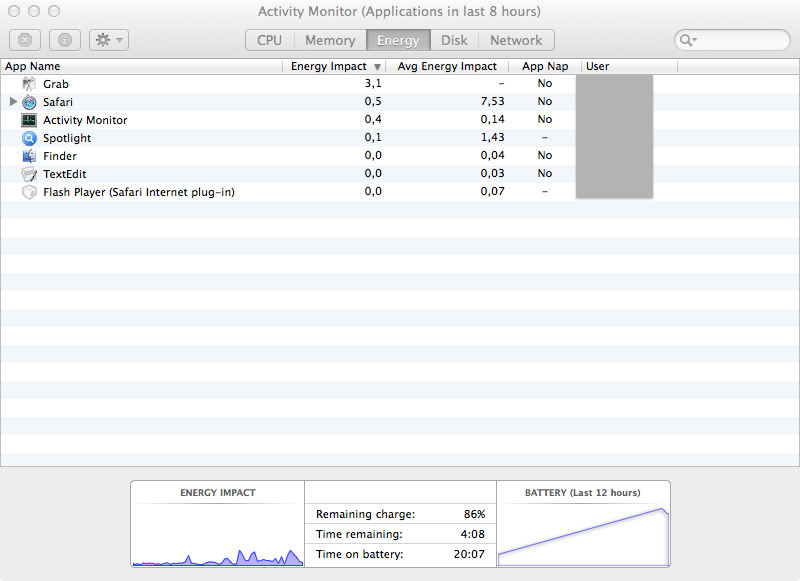
Thanks !
The reindexing of / did the job for me, it was pleasant to see the battery to jump from 3 to 6 hours of life.
I have a MacBook Pro 15" mi-2009 (manufacture date : 2009-07-06)
My battery with coconutBattery:
Maximum charge : 6838 mAh (Design capacity : 6900 mAh)
Manufacture date : 2012-01-05
Loadcycles : 161
So I did the SMC reset as you suggested, and it brought the estimated battery life up to 8:49 (from 4:30 on a full charge). Which was great, it seemed like it worked. However, it is going down significantly fast (8:49 - 8:19) in the last four minutes. Could this be because the indicator is inaccurate? I thought you said resetting the SMC would help with that?
Anyways,
I have the Macbook Pro 15" (Mid-2014) 2.2 Gh, 16 GB RAM, 256 GB Storage
Horrible battery on Maverick