Horrible battery on Maverick
MacBook Pro, OS X Mountain Lion (10.8.5)
I just made an appointment at the Genius Bar about this issue. My 2012 rMBP is getting less than 3 hours of battery life with moderate use and medium brightness levels. Is it more effective to call Apple tech support or will the Genius Bar be able to help me? With all do respect Mr. Galt please do not bother responding to me, I've seen the condescending way you responded to others and I do not desire to create another thread nor do I care about how battery life on your Mac has improved.
After much more testing on 3 new machines, 2 macbook Air and one 1 macbook Pro,
...I dont say this lightly, but yes,..there is beyond any possible doubt that Mavericks has a flawed "time remaining" readout.
Eliminating all variables of tasks, brightness, spotlight, and checking battery temp on all 3 units and performing NVRAM and SMC resets, there is no question that a flaw in Mavericks exists which causes a faulty "time remaining readout"
As I have already verified many times on 2 diff. machines, SMC reset brought battery indicator from 4+ hours "remaining" (at 85% charge) to instantly 10+ hours remaining......
...however upon
A: opening flash video or
B: performing 2 other energy intensive APPS,
.....both Macs immediately went from 10+ hours remaining down to 3 or 4 hours remaining on the same amperage remaining charge levels
verified same on a third Macbook independently of the 2 (however on the Pro the initial and changed results were different to reflect the Pro battery vs. that of the Air)
all during this time I was verifying amperage remaining on coconut battery.
Verified this fault 5 times now on 3 different machines and eliminating ALL variables.
This is a fault that obviously is known and is being worked on for a fix.
Recommend anyone ignore "time remaining" estimates as wholly inaccurate currently
➕This (faulty time remaining) has NO bearing on the actual battery life, and certified just under 13+ hours of use on 2 macbook Air down to 12% remaining according to 3 battery indicators
1. Mavericks resident batt. indicator.
2. coconut battery (coconut doesnt estimate time however but mAh)
3. Battery time v 2 (mAh and % remaining, not time remaining)
**For those receiving ACTUAL LESS battery life, other variables are in play.
Peace 😊
I sincerly doubt the fact that the battery indicator would be wrong. Just measure the battery time yourself. Use flash, mail or photoshop and your battery time will be les than half and not only on the indicator but in real terms.
As stated in the last line
**For those receiving ACTUAL LESS battery life, other variables are in play.
actually I have tested photoshop pro on 2 machines and got no abnormal power drain.
I've used plenty of Flash in testing
peace
Hi reverret
Pleasestart a new Discussion so that your individual circumstances can be addressed. Thanks!
How old are your macs? I did your "tutorial" twice and tried with smc like you have said before. No difference. If you really want to be a part of this talk stop glitching about the smc or making a huge deal of yourself. If does work for you - ok congrats, but it surely doesn't for others.
Further.
I had a talk with one of apple's engi's. They said that they do know about this problem and that they are looking for a fix so far. Some other guy told me to do a discharge to 0% and charge again, three times in a row.
I asked for this tip on my country forum, but someone answered about destroying the battery, but didn't say anything about fixing the problem.
So I went with my charge and discharge process 10 times. I've got 84% battery healh, current capacity at 4840 mAh and the battery gives me 5:50 to even 6.30 hours. I've changed my main browser from chrome to safari and disabled flash from the system and ofcourse I stopped running e-mail in the background. So far that's my biggest score on the battery.
I also have 292 charges. The guy from apple said that my let's call "fix" doesn't appear to be usefull for everyone. So use it at your own risk!
Some other guy told me to do a discharge to 0% and charge again
Whoever told you to do that, dont listen to them. You NEVER want to do a full discharge, EVER. period.
Drop it down to 10% minimum (approx) and recharge.
Even then, in the future dont 'often' drop it low.
The two macbook Air are both new and a borrowed one 9 months old. Macbook Pro is new
As to "often" discharging low, a lithium or lithium polymer (same thing but with gelled electrolyte added) there is absolutely no question on this earth or even 1% doubt, that doing same is BAD for the battery.
There isnt a battery expert on earth that hasnt said repeatedly that "deep discharges on Lithium batteries BAD PERIOD"
Ive seen endless reports of premature LiPo battery mortality upon which the user admitted to "OFTEN draining the battery very low or next to nill before recharge".

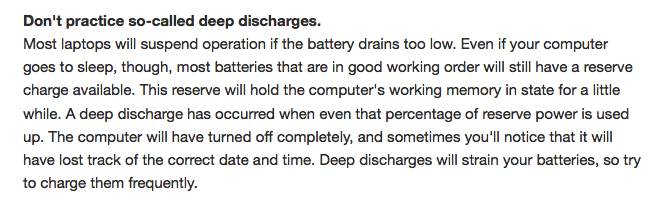
There isnt hearsay, or conjecture, or hyperbole about deep DoD (depth of discharge),... but a mountain of empirical facts for same. You NEVER let your macbook
A: power off from power loss or
B: "often" deeply discharge your LiPo battery cell LOW
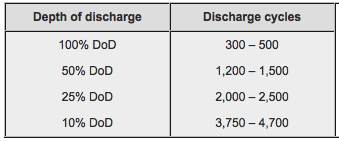
Expected Lithium charge cycle "LIFE" based on DEEP DISCHARGE (generally)
not specific to macbook cells but lithium cells in general
ℹThe entire macbook series DOES HAVE a shutoff threshold in which the unit WILL power down to protect itself, the SSD and the battery from ZERO, or "shutoff from power loss".......HOWEVER,.....if left uncharged after such a shut down and you "shelf it" for a while, there is nothing to prevent NORMAL BATTERY self-discharge down to very very low and zero
tomblack90 I had a talk with one of apple's engi's. They said that they do know about this problem and that they are looking for a fix so far.
~Yes, I know that
Important useful info on your Lithium cells as compiled from battery experts:
Heat increases battery performance but shortens life by a factor of two for every 10°C increase above 25–30°C (18°F above 77–86°F). This is yet another important reason for the cooling of any notebook, not just keeping the processor and GPU cool. Mavericks lower power tasking (app nap) and combined with the cool running Haswell processor both greatly protect battery life on your Macbook now more than ever before.
Good news: *Mavericks not only increases a single charge cycle for longer battery use off a full charge,… but also prolongs the overall long term life of the LiPo battery in a Macbook by reducing the load conditions the battery experiences from heavy peak-use.
Counting cycles is not conclusive because a discharge may vary in depth and there are no clearly defined standards of what constitutes a charge cycle on a Lithium Ion battery empirically. Similar to a mechanical device that wears out faster with heavy use, so also does the depth of discharge (DoD) determine the cycle count.
The shorter the discharge (low DoD), the longer the battery will last. If at all possible, avoid full discharges and charge the battery more often between uses. Partial discharge on Li-ion is fine.
Frequent HIGH depth of discharge rates (draining the battery very low) on a Lithium battery will hasten the lowering of maximum battery capacity.
Although better performing when warm, lithium polymer batteries live longer when kept cool.
Lithium cells prefer draining conditions at a steady pace rather than fast pulsed or quick discharges, …this fact is idealized now with the Haswell and Mavericks app-nap low power tasking for battery use.
App nap:
http://www.apple.com/osx/advanced-technologies/
Peace 😊

tomblack90 I was asked if the battery is getting hot even if unplugged? Yep, mine is so hot that my wrist hurt while typing.
Your specific macbook likely has a major fault. Contact Apple for an appt. for in shop full diagnosis and possible repair.
Further still you indicate no major application or game use during same, ...as such there is substantial evidence for defect.
Peace 😊
Anyone found a reliable fix/solution or spoken to an Apple specialist about this problem? Would appreciate some updates.
I am from Singapore. I have spoken to 3 Apple specialist and final routed to a Apple Senior Advisor.
I have done whatever people could have recommended here.
My lousy battery life after Mavericks: 3-4.5 hours
Upon their advice, I have tried draining. Does not improve.
And tried switch Chrome to Safari browser. Does not improve.
Last advice: erase and reinstall. I am delaying this because the lack of time.
They convinced me saying all users are unique, their system settings and each Macbook is different.
Hi,
Here is my story.
Same problem as everyone, got MacBook Air 13" mid 2013, and battery sucked after Mavericks Update. For information, my battery is quite recent, only 93 battery cycles.
I went to the AppleStore, they took my computer for a night to test battery and other things, and they said that was normal (On 100% charge, no application launched, no process in background except the Apple's ones and no Wifi, I got 9H autonomy). When wifi is activated, it drop to 7H +-.
A man in the background of the store (Certainly the senior of the store), come to me and said that was not a problem with my battery, but how I use my mac, and said that battery depends a lot on utilsiation of the mac blabla.. I know that, so I tried to explain him why there was a problem with the battery or Mavericks, it's not normal after 90 cycles, the battery lost 4 hours of autonomy (Or maybe more), but he just talked louder than me, said the same thing, and said that I had to leave the store because they had a lot of people.
That's how Apple treat their customers ? Incredible.
So I called the Apple Technical Service, we tried in 30 mintues a lot of manipulations, and finally he confirmed that there is a problem with the battery. He asked me to call him back the next day, give me back my ticket number. So I just called them, but the guy on the phone told me that I had to go to the store, and they had to test my battery. I said him that was not supposed to be like that, the guy before him had to send a ticket to the "engineers" and will give me ETA in 5 days after my call.
So now, just returned to the start case, I'm really disapointed that Apple is not communicating with it's customer service. See the number of threads on the Forum related with the battery (Search for , it's OBVIOUS there is a problem, it's now 1 month since the update, and still no information. Incredible.
What about your stories Bro' ?
since we don´t have apple stores here in Brazil, I took my Macbook Pro to an Apple authorized service provider and I'm still waiting for their response, it's been 1 week already
I suggest we start sending emails to tech blogs/websites, maybe we can catch some attention? like 9to5Mac, engagdet, gizmodo or whatever
Ok. So here is my solution. I tried the "bad idea battery discharge" - see it a few posts higher. I did it and the battery went from 3:30 to 6:30-7:40.
Coconut battery showed up at 89% now, it went from 78%. I also disabled flash from the system and stopped using chrome, going to safari. Now I'm happily done with this tread, at least.
Good luck for all of you!
but changing the way you use it is hardly a solution...
at this point, I don't even want the battery improvement from Mavericks, just want it to work the same way like before, since I didn't change the way I use it, settings, nor installed new apps
I had the same problem with my 2013 Macbook Pro 15" 3 days ago.
I then noticed that my sleep indicator light (SIL) not working correctly, it always On while sleep. Therefore i tried to reset the system management controller (SMC).
http://support.apple.com/kb/ht3964.
After that i charge to 100% and it shown 7:50 remaining.
Now i left 17% and it shown 1:19 ( i am a light user, my macbook pro often in sleep mode). I think the reset fix my problem.
Hope this help.
Regards,
Chen
Horrible battery on Maverick


