keybord, keybord

Help

Hello!


I have a MacBookPro 17 with Japanese keyboard layout, logos after I installed the new system 10.9 Maverick, my keyboard simplimente was wrong.

Already checked the configurations and the layout is correct Kotoeri input as Romaji, however even then dial the next etcla entar this as the wrong configuration and the @ key is above the 2 key, as fose U.S. layout,.

MacBook Pro (17-inch Late 2011), OS X Mavericks (10.9)

Posted on Oct 23, 2013 2:10 PM

Reply
20 replies

Oct 24, 2013 5:15 PM in response to Tom Gewecke

my keyboard layout and Japanese, since I changed the layout to USA and placed again in KotoerUser uploaded filei, however still does not work, the @ key remains above the 2 key, and in this example the Japanese layput right, but in fact the keys next key enter all station misconfigured.


The problem can only be in the new system because as said before was 100%, the error made ​​after upgrading the system.


User uploaded file

this is the layout of the keyboard, as I said this the right configurations and still near the enter keys where's my @, this is a mess, in this case the @ above the 2 key, but the keyboard is not USA.


I have a Mac Pro and the keyboard layout Japanese, but I will not upgrade due to this problem because probably will also give

Oct 25, 2013 5:06 AM in response to davsonirom

It's driving me crazy,


I changed the keyboard for Unicode Hex, to my surprise keys station all in the right place

@ retonnou to the place and the other keys too, but now I can not write in Japanese.

To sofendo with this problem on the keyboard, if continuation writing in Japanese does not have the keys in the right place, if I leave the keys in the right place I can not write in Japanese.

Oh God!


Really do not understand what is happening, it will be seen by derei to reinstall the whole system again, this can not be reminds me of windows xp, when urged on the sound card and the solution was uncia reistalar entire system,

I hope this is not the solution, then reinstall.

Oct 26, 2013 5:15 AM in response to Tom Gewecke

This is a bug in either Mavericks or in the upgrade to it.


I have a Japanese keyboard on this new mac pro(2013), and as soon as I upgraded to mavericks the keyboard mapping was wrong.


User uploaded file


After the upgrade the only inout source was shown as Kotoeri, and although the key mapping displays correctly on the preferences screen, the @ had moved to Shift-2 when you type and the key to the right of p resulted in a ]
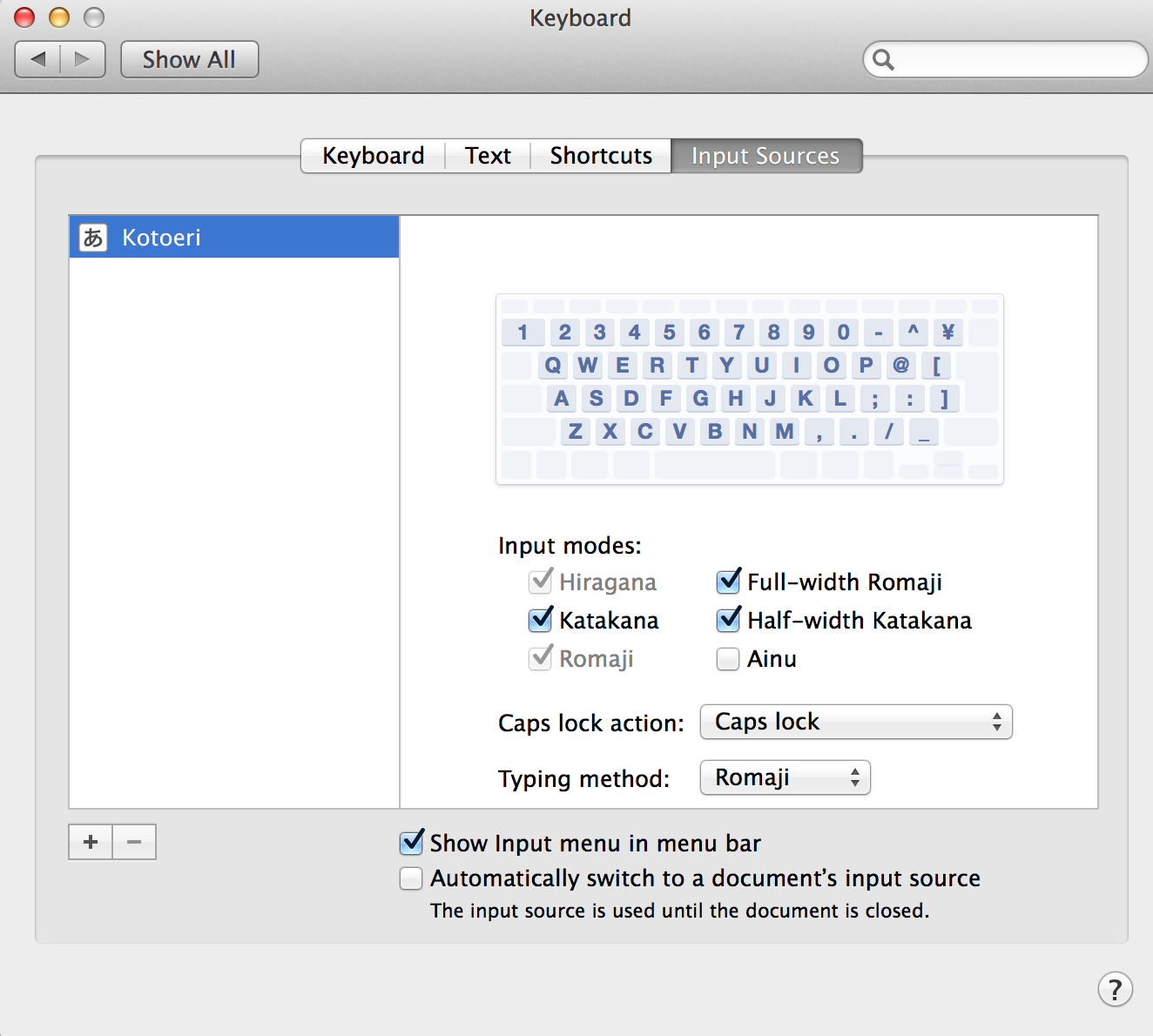

User uploaded file


Adding a US keyboard and selecting this as the default input is a workaround...
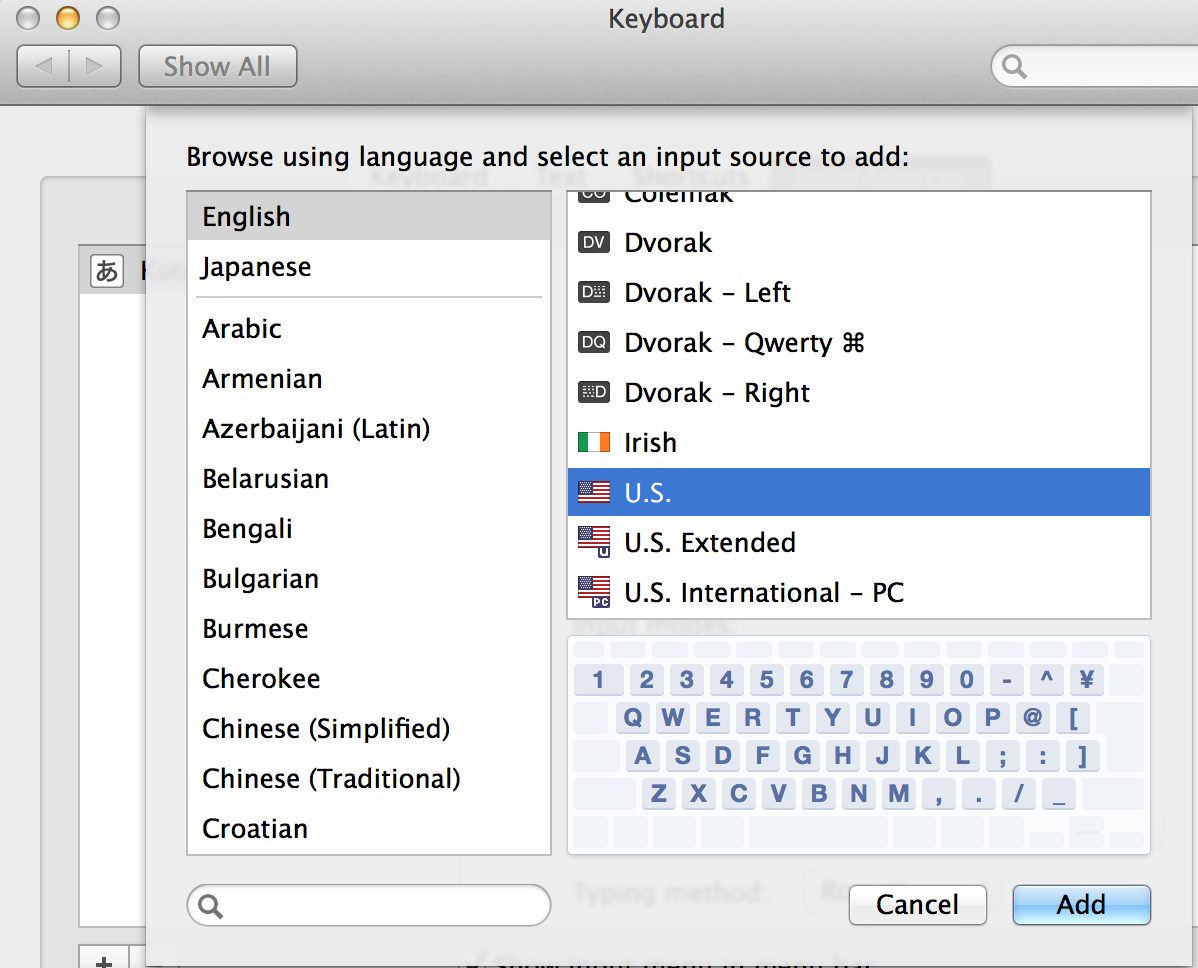
User uploaded file

and I notice that after adding the US keyboard it must be selected as the default input.


BUT after swapping betwen US and Kotoeri a few times the @ in the correct position seems to have stuck. I have never used a US keyboard on mac, so I dont know if the mapping displayed below is correct ?


User uploaded file


I am sure there is some logic to this sequence, but since it's a very basic and unacceptable QA escape, Apple should just fix it urgently and stop wasting everyone's time.


Oct 26, 2013 9:40 PM in response to grumpypedant

@grumpypedant


Do you have an Apple JIS (Japanese keyboard) attached to your machine?


I see the same issue, and it manifested itself first when trying to input accented characters (é, è, etc - key sequence is option+e, followed by e to get é). I had both Kotoeri and US-extended activated, with Romanji selected. That worked perfectly under 10.8.5, but failed with 10.9. Adding the US (not exteded) input method in the Keyboard prefs finally solved the problem.


My normal user account runs in French (OS language), testing with a user account that runs in English worked fine on my side (only Kotoeri active). Dunno where the bug is exactly, but there is obviously some issue with Kotoeri or/and with the keyboard mapping file(s).


I’ll make sure to report the issue to Apple.

Oct 26, 2013 9:57 PM in response to phiw13.2

phiw13.2 wrote:


there is obviously some issue with Kotoeri or/and with the keyboard mapping file(s).


Prior to 10.9 there was a setting in Kotoeri Preferences for the keyboard, which defaulted to US and produced the correct behavior from a JIS keyboard. This is now gone and it seems the behavior is not correct unless you have the US layout active and possibly also the "last selected" one. Apple probably just needs to add back the old preference setting.


User uploaded file

Oct 27, 2013 4:55 PM in response to davsonirom

Yesterday I installed 10.9 on my Mac Pro, also with the Japanese keyboard, and the same layout again Kotoeri nonfunctional in making your mapping.

already checked all the possibilities and my solution was to add the U.S. keyboard enternational PC - with him as the keyboard mapping is correct not need this as he tucked the active input just added in the settings, if I remove and leave only the Kotoeri automatically lose the mapping of the keys, and I can not just let the USA Intenational PC because it does not support me to write in Japanese, and very strange, it just gets added and let Kotoeri selected both in hiragana, katakana or romaji mapping and perfect .

Now waiting for a response from Apple.

This thread has been closed by the system or the community team. You may vote for any posts you find helpful, or search the Community for additional answers.

keybord, keybord

Welcome to Apple Support Community
A forum where Apple customers help each other with their products. Get started with your Apple Account.
