Late 2013 Macbook Pro Retina 13'' Wifi Issues

My new MBPR's wifi is very slow and constantly drops the connection, although it is showing that it is always connected. If I restart the computer it fixes the problem for a little bit then it starts again. I have a 2012 Macbook Pro on the same network with no isseues, and I will have to use it sometimes just to be able to browse the web. Is there any way to fix the issue on the new Macbook?

MacBook Pro (Retina, 13-inch, Late 2013), OS X Mavericks (10.9)

Posted on Nov 7, 2013 7:38 AM

Reply
814 replies

Jan 17, 2014 12:51 PM in response to Carl_UK

After further experimentation this evening I have also confirmed what some of the earlier posters have pointed out with regards to this being linked to 'power saving' in OS X. If you copy a file, the observed latency will drop back down to normal, indicating that once there is activity on the network link, the link goes back to 'normal'.

Jan 17, 2014 12:52 PM in response to ShaneD90

i came by a store today and was curious.. they had a haswell retina MBP right next to a non-haswell non-retina MBP. On the non-retina, Ping was consistent under 1ms. On the retina it was all over the place. So i am pretty sure now that all of the haswell retinas are affected.


I cant buy another one before i know that this can and will be fixed by a driver update.

Jan 18, 2014 1:21 AM in response to nirmalts

i find it hard to believe that these are really seaparate isues. Mine had the latency, sometimes more, sometimes less, depending on the network and wheter vpn was used or not (i think vpn improves it, keeping the wifi "awake"?). It sometimes had random short request timeouts and eventually it would disconnect. On some other networks it got really really slow so pages would load very slowly and often get stuck at 30 or 50%.

Jan 18, 2014 3:00 AM in response to ShaneD90

I live in Thailand and travel daily. So have to reley on the wireless in the hotels and condomeniums.

Picked up a new Macbook pro 13 2.6, 8gb, 512gb. I tried to download some big files and it was just horrible. My PC was working fine. After 6 days I googled it and found this. I went to the airport card and it clearly shows it dropping for 4 secs. Then reconnects for 6 secs. I was pulling my hair out.


Went back to apple and theres was doing the same thing. But they said it was my wireless in my hotel. After they checked the wireless here in the hotel. They confirmed it was the hotel wireless. So, went back to the store.

I went to a display model and turned it on and it was doing the same thing. I told them then. If they fix the display model while I was there I would be happy and would not want a refund.


To make a long story short. I was issued a refund. NEVER got the store unit working properly.


What a mess. But for 1800 dollars here in Thailand. THEY can figure it out. Kinda ****** me off they would push out a high dollar unit with known problems.


At this point I put them in with the PC's being thrown out with no testing. Glad they had the 14 day return window. I took it and ran.

Jan 18, 2014 4:31 AM in response to tomsidebottom77

I have a MacBook 13 retina, 2012.


I have two problems:

1) wifi unable to connect after sleep (or takes a long time to connect)

2) wifi drops intermittently


But I do not have the ping problem. My pings are 4 miliseconds.


I posted on this thread sometime ago about setting a fixed IP address on the router over DHCP and that allowed me to reconnect after sleep 90% of the time. Wifi drops reduced too.


What I did 2 days ago was setting the DHCP lease to 24 hours plus a fixed IP address (it was set to 1 hour out of the box). With that, I seem to be able to connect everytime after sleep, and all within a short period of time. I do not have enough time to conclusively measure wifi dropping intermittently but it seems to be doing well so far. If you do try this out, remember to reboot all clients and the router, just to be sure.


I suspect wifi dropping may be related to negotiating of a new IP address and re-newing of an IP lease. And it may be router specific, depending on how the DHCP packet is packaged. If I am right, I will have problem with public networks but I do not use them often.

Jan 18, 2014 4:48 AM in response to tomsidebottom77

It's more a workaround and it worked for me. I unchecked "Wake for Network Access" in System Preferences>Energy Saver. The Wifi now reconnects each time the mac wakes up from sleep (there is a delay of around 1sec, which I guess is acceptable)


Since I do not have a Airport base station enabling this feature does not help me anyways. As I understand "Bonjour Sleep Proxy" is necessary for the wake up network from sleep to work http://support.apple.com/kb/HT3774

Jan 18, 2014 8:56 AM in response to ShaneD90

I'm noticing that if I ping on the 2.4ghz n network my pings are fine. Then if I switch to 5ghz n/ac network my pings get higher and more inconsistent. Now the weird thing is if I switch back to the 2.4ghz network my pings are still high and inconsistent.


Thankfully my machine works well enough if I just keep it on the 2.4ghz band but Apple really needs to fix this.

Jan 18, 2014 10:26 AM in response to ShaneD90

Before sending my late 2013 macbook pro retina 13 to be traded for a new one, as suggested by apple, I did more tests.


My conclusions:

- Immediately after reboot the pings are normal, but a couple of seconds later they go to higher values.

- As noticed by other posters if I ping my router with an interval of 0.1 ou 0.2 the pings are also normal.

- I tried to rollback the driver but it has not succeded.

- I reinstalled the OS and it didn't do anything

- I used wi-fi analyser to choose less crowded channel to my home network but it didn't help either.


Anyone with the same conclusions? Or more to add?

Jan 18, 2014 4:22 PM in response to ShaneD90

I also have had terrible issues with wifi. My wifi connection is fine, my iPhone 5s, iPad Mini, ancient old PC all work perfectly and can all stream high def video.

I ordered a late 2013 retina MacBook Pro and the speed of wifi was so slow it was unusable, unable to even stream I player at its lowest setting, the bbc speed checker said my connection was barely enough to stream audio only, barely much more than dialup speeds!

Then for a few minutes it would work then go slow again!

This was brand new out the box.

I tried switching wifi channels and that didn't work.

Tired reinstalling mavericks fresh and that didn't work either

It was estimating iMovie to take 2-3 hours downloading. Oddly when I switched to a guest account it suddenly said iMovie was downloaded and working, but when switching back to admin account it was still downloading.... In the end I sent the item back. I've looked on twitter and for the search words "macbook wifi" found about 5 other users in as many minutes with the same issues.... Anyone ever find out what the issue is? Is it just defective units?

Jan 18, 2014 5:15 PM in response to nirmalts

Good news!


The ping latency is fixed in 10.9.2 Beta 2


Ping after 10.9.2 beta2 install


64 bytes from 192.168.178.1: icmp_seq=103 ttl=64 time=1.837 ms

64 bytes from 192.168.178.1: icmp_seq=104 ttl=64 time=0.982 ms

64 bytes from 192.168.178.1: icmp_seq=105 ttl=64 time=1.616 ms

64 bytes from 192.168.178.1: icmp_seq=106 ttl=64 time=1.611 ms

64 bytes from 192.168.178.1: icmp_seq=107 ttl=64 time=1.607 ms

64 bytes from 192.168.178.1: icmp_seq=108 ttl=64 time=1.699 ms

64 bytes from 192.168.178.1: icmp_seq=109 ttl=64 time=1.611 ms

64 bytes from 192.168.178.1: icmp_seq=110 ttl=64 time=0.916 ms

64 bytes from 192.168.178.1: icmp_seq=111 ttl=64 time=0.963 ms

64 bytes from 192.168.178.1: icmp_seq=112 ttl=64 time=1.842 ms

64 bytes from 192.168.178.1: icmp_seq=113 ttl=64 time=1.117 ms

64 bytes from 192.168.178.1: icmp_seq=114 ttl=64 time=1.277 ms

64 bytes from 192.168.178.1: icmp_seq=115 ttl=64 time=1.766 ms

64 bytes from 192.168.178.1: icmp_seq=116 ttl=64 time=1.807 ms

64 bytes from 192.168.178.1: icmp_seq=117 ttl=64 time=1.841 ms

64 bytes from 192.168.178.1: icmp_seq=118 ttl=64 time=1.548 ms

64 bytes from 192.168.178.1: icmp_seq=119 ttl=64 time=3.052 ms

64 bytes from 192.168.178.1: icmp_seq=120 ttl=64 time=1.556 ms

64 bytes from 192.168.178.1: icmp_seq=121 ttl=64 time=0.922 ms

64 bytes from 192.168.178.1: icmp_seq=122 ttl=64 time=1.662 ms

64 bytes from 192.168.178.1: icmp_seq=123 ttl=64 time=0.942 ms

64 bytes from 192.168.178.1: icmp_seq=124 ttl=64 time=0.818 ms

64 bytes from 192.168.178.1: icmp_seq=125 ttl=64 time=0.918 ms

64 bytes from 192.168.178.1: icmp_seq=126 ttl=64 time=1.293 ms

64 bytes from 192.168.178.1: icmp_seq=127 ttl=64 time=0.892 ms

64 bytes from 192.168.178.1: icmp_seq=128 ttl=64 time=1.311 ms

64 bytes from 192.168.178.1: icmp_seq=129 ttl=64 time=0.981 ms

64 bytes from 192.168.178.1: icmp_seq=130 ttl=64 time=1.631 ms

64 bytes from 192.168.178.1: icmp_seq=131 ttl=64 time=1.777 ms

64 bytes from 192.168.178.1: icmp_seq=132 ttl=64 time=1.657 ms

64 bytes from 192.168.178.1: icmp_seq=133 ttl=64 time=2.430 ms

64 bytes from 192.168.178.1: icmp_seq=134 ttl=64 time=1.103 ms

64 bytes from 192.168.178.1: icmp_seq=135 ttl=64 time=1.693 ms

64 bytes from 192.168.178.1: icmp_seq=136 ttl=64 time=1.819 ms

64 bytes from 192.168.178.1: icmp_seq=137 ttl=64 time=1.872 ms

64 bytes from 192.168.178.1: icmp_seq=138 ttl=64 time=1.030 ms

64 bytes from 192.168.178.1: icmp_seq=139 ttl=64 time=1.789 ms

64 bytes from 192.168.178.1: icmp_seq=140 ttl=64 time=0.910 ms

64 bytes from 192.168.178.1: icmp_seq=141 ttl=64 time=0.785 ms

64 bytes from 192.168.178.1: icmp_seq=142 ttl=64 time=0.829 ms

64 bytes from 192.168.178.1: icmp_seq=143 ttl=64 time=0.749 ms

64 bytes from 192.168.178.1: icmp_seq=144 ttl=64 time=1.085 ms

64 bytes from 192.168.178.1: icmp_seq=145 ttl=64 time=1.221 ms

64 bytes from 192.168.178.1: icmp_seq=146 ttl=64 time=1.052 ms

^C

--- 192.168.178.1 ping statistics ---

147 packets transmitted, 147 packets received, 0.0% packet loss

round-trip min/avg/max/stddev = 0.749/1.656/3.196/0.435 ms


I have made sure that there is absolutely no other network activity in background.


The Broadcom version is now Broadcom BCM43xx 1.0 (6.30.223.154.62). With 10.9.1 it was Broadcom BCM43xx 1.0 (6.30.223.154.45)
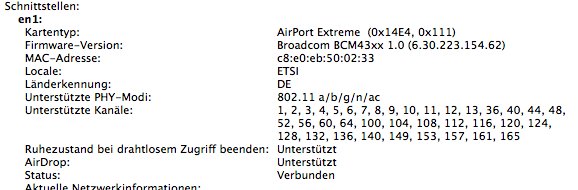


User uploaded file


This means the ping latency was indeed a bug and no feature. I can't comment on other problems like wifi drops as I don't suffer from these.

Jan 18, 2014 9:11 PM in response to ShaneD90

I gave a bit of an update late last year. Since then I've tried everything in this thread - and even purchased a new 802.11ac Time Capule. No dice.


I now have a direct ethernet connection to a colleague's previous generation Macbook Pro. Then have Internet sharing turned on.


I know Apple has a policy of not commenting on this sort this thing - but pretty disappointing they've not made any comment. Have wasted too much time on this.

This thread has been closed by the system or the community team. You may vote for any posts you find helpful, or search the Community for additional answers.

Late 2013 Macbook Pro Retina 13'' Wifi Issues

Welcome to Apple Support Community
A forum where Apple customers help each other with their products. Get started with your Apple Account.