Numbers 3.1 MacOS X Nanosecond Duration Bug

My duration data has resolution down to the nanosecond. Hence, my raw data is: 17:16:22.931355.


When I input this number into Numbers, the application knows it is a duration, it incorrectly auto-converts the number to 17:31:53.355.


It really should be 17:16:22.931.

OS X Mavericks (10.9.1)

Posted on Feb 10, 2014 5:19 PM

Reply
4 replies

Feb 10, 2014 6:13 PM in response to ttcheng@rci

I don't think Number knows about durations down to nano seconds. I think you may want to import the data into a table formatted as text (so that Number won't change the data) then reassemble the duration in terms of HH:MM:SS:MS then copy and paste the "corrected" duration back with your data.


like this:

User uploaded file

B1=SEARCH(":",A1)

C1=SEARCH(":", A1, B1+1)

D1=LEFT(A1, B1−1)

E1=MID(A1, B1+1,C1−B1−1)

F1=RIGHT(A1, LEN(A1)−C1)

G1=DURATION(0,0,D1,E1,F1)

select B1 thru G1, copy


select the column headers for column B thru G, paste to fill down


now you can select column G and copy, then paste the "corrected" durations where you need them by using the menu item "Edit > Paste Formula Results"

Feb 10, 2014 8:31 PM in response to ttcheng@rci

Hello


I can confirm the said defective behaviour with Numbers v2 as well. It is bug of duration parser which failed to parse sub milliseconds properly. It appears to parse 17:16:22.931355 as 17:16:22.355 + 0:0:931, that is it arbitrarily shifts 0.931355 [sec] by three decimal places to yield 931.355 [sec] and add this bogus value to integer part of seconds.


A workaround is not to let the miserable parser parse the duration value by, for instance, using raw days value 0.719709853645833 (= (17 * 3600 + 16 * 60 + 22.931355) / 86400) instead of 17:16:22.931355.


E.g.,
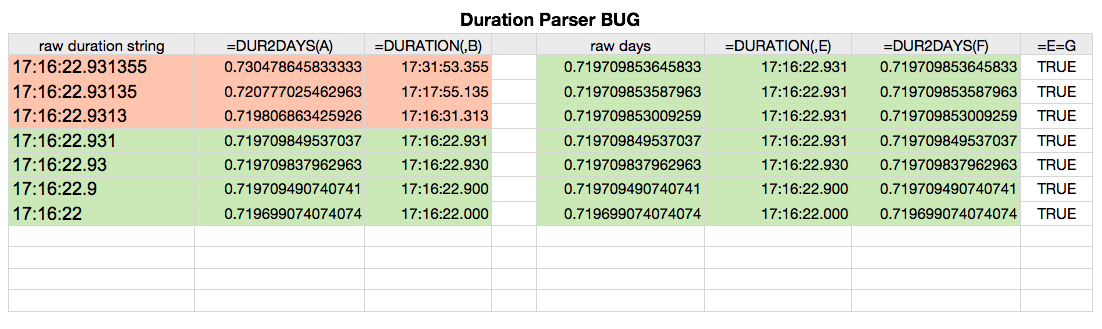

User uploaded file


I myself always use real number reperentation of date and duration, i.e., days since 1904-01-01T00:00:00 and duration [sec] / 86400 respectively, in spreadsheet and never use date or duration object in Numbers except for display purpose.


Regards,

H

Feb 10, 2014 9:25 PM in response to ttcheng@rci

It does seem to be a bug. You're good all the way to 17:16:22.931 but if you include any additional digits, it doesn't round like it should, it does something odd. It is taking the last three digits as the ms and using the preceding digits as additional seconds. So, instead of 17h 16m 22s 931.355ms it becomes 17h 16m 22s 355 ms + 931s = 17h 31m 53s 355ms. If you use one less decimal (leave of the last "5"), it uses the "135" as the ms and adds 93 extra seconds to the duration. It makes absolutely no sense to treat the input this way so it must be a bug.


As noted already, your other problem is that the duration is 17h 16m 22s 931ms. It is not 17m 16s 22.931(355) ms


EDIT: This forum really bugs me sometimes. Hiroto's response was not there when I opened this thread a few minutes ago. But it should have been there because it was an hour ahead of mine. Sorry for the duplication.

This thread has been closed by the system or the community team. You may vote for any posts you find helpful, or search the Community for additional answers.

Numbers 3.1 MacOS X Nanosecond Duration Bug

Welcome to Apple Support Community
A forum where Apple customers help each other with their products. Get started with your Apple Account.

