"E11 =VRUNDEN(ABRUNDEN(E10 * 8,33%; 2); 0,05)
although correctly in German it's =VRUNDEN(E10 * 8,33%, 0.05) I only needed comma after 8,33% and 0.05 (point)
I couldn't find a solution for rounding down (because this here is up)?"
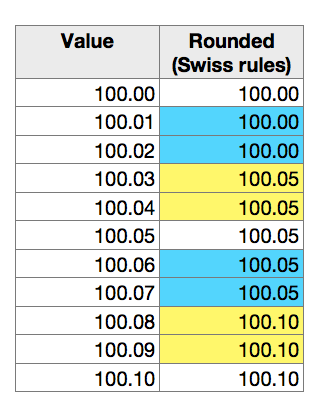
VRUNDEN, like RUNDEN, will round up OR down to the nearest value meeting its rule. Here is a table showing values in 0.01 increments from 100.00 to 100.10 in column A, and the result of rounding to the nearest five hundredths, using VRUNDEN(A,0.05) in column B. Conditional formattig has been used to show the values that have been rounded down (blue) and the values that have been rounded up (yellow).
SGIII:
When I have 34.56 -> must become 34.55
When I have 34.58 -> must become 34.60
I need to round to the next decimal of 5!
I haven't found the solution to put the right formula when I have the invoice as follow:
E10 Total = 1'100.-
E11 8,33% = 91.63
E12 Total = 1'191.63
Do I need a extra row to put the formula in E11? Or a 4th row to put the EndTotal of 1'191.65? I can't just put it in E11 nor E12. Won't accept the formula as I mentioned it above."
If Zwischentotal 2, in E12, should be rounded, you can include that rounding in the formula in E12:
current: E12: =SUM(E10:E11)
revised: E12: =MROUND(SUM(E10:E11),0.05)
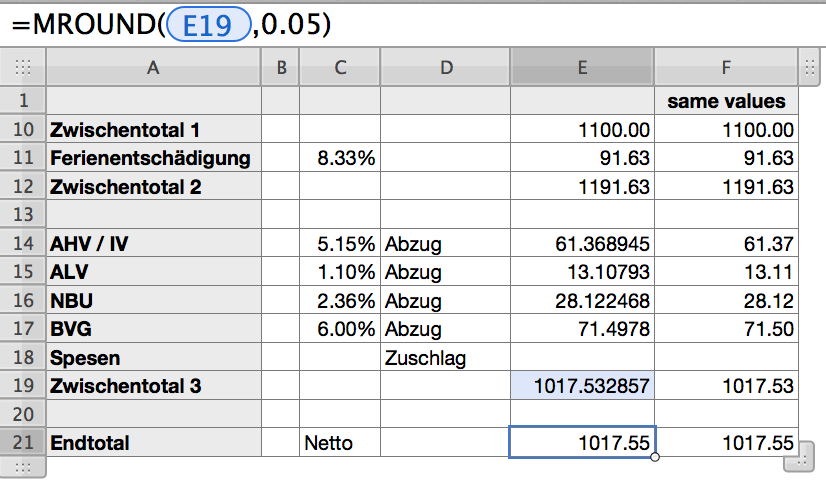
BUT all of the values in the table you display in your second post yesterday appear to be 'as calculated, with the display showing the result to the nearer hundredth of a Swiss Franc, with only one exception. The end total has been rounded to the nearest five hundredths of a Swiss Franc.
If that is correct,then the only place where VRUNDEN is needed is in the Endtotal row (as shown on the table below).
Here's a reconstruction of your tables, done in a single table, and with no rounding done to any results in column E except the last.
(Column F contains a copy of the same values as column E, formatted to display to the nearest hundredth.)
Regards,
Barry
