How to change scanner default from Feeder to Flatbed?

I have a Brother MFC-J870DW all-in-One printer. How can I change the Preview scan default preference from "Document Feeder" to "Flatbed?" Is there a Terminal command for this?


Mavericks 10.9.2

iMac (21.5-inch Late 2009), OS X Mountain Lion (10.8)

Posted on May 13, 2014 1:15 PM

Reply
19 replies

May 13, 2014 5:02 PM in response to Kingoftypos

I just tried Preview and the window that opens when I hit View Details (see below) is the exact same window as you get in Image Capture. So, my take is that although Preview is open, it is using Image Capture's capabilities just as I can open an app called "Epson XP-810 Series" which will give me the exact same window and is, in fact, using Image Capture. Regardless of that fact, the fact that the OP can choose to use the Flatbed instead of the Document feeder in that window is still the point I was trying to make: the choice is available, albeit one window later than the OP wishes it to be. At least that is how I understand this entire dialog.
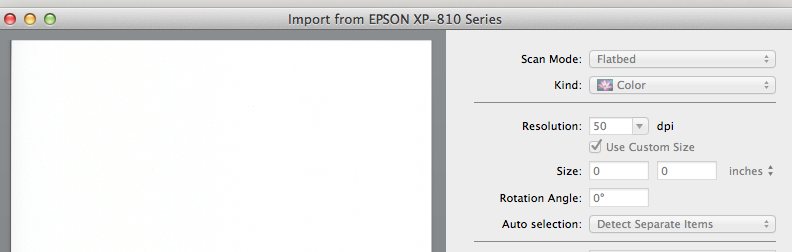

User uploaded file

This thread has been closed by the system or the community team. You may vote for any posts you find helpful, or search the Community for additional answers.

How to change scanner default from Feeder to Flatbed?

Welcome to Apple Support Community
A forum where Apple customers help each other with their products. Get started with your Apple Account.