Split PDF, name odd pages and name even pages in sequence

I need help creating a script to ask the user for a PDF file then do the following:

-Extract even pages and rename name with "_Front#" ending where "#" is a number sequence starting with 1.

→ ex: the PDF I choose when prompted is "anatomyBook". The extracted even pages would be:

- anatomyBook_Front1, anatomyBook_Front2, anatomyBook_Front3,...

-Extract odd pages and name them similarly except replace "Front" with "Back"


Thanks for the help!

Posted on Jul 31, 2014 4:08 PM

Reply
20 replies

Jul 31, 2014 8:03 PM in response to kevnm67

Hello


You may try something like the following applescript script, which is a wrapper of rubycocoa script. It will let you choose the source pdf file and split it into odd and even files in the same directory as the original.


set infile to (choose file of type {"com.adobe.pdf"} with prompt "Choose source pdf file.")'s POSIX path

do shell script "/System/Library/Frameworks/Ruby.framework/Versions/1.8/usr/bin/ruby -w <<'EOF' - " & infile's quoted form & "
require 'osx/cocoa'
OSX.require_framework 'PDFKit'
include OSX

raise ArgumentError, \"Usage: #{File.basename($0)} pdf [out_directory]\" unless [1, 2].include? ARGV.length 
infile = File.expand_path(ARGV[0])
outdir = ARGV[1] ? File.expand_path(ARGV[1]) : File.dirname(infile)
raise ArgumentError, \"No such directory: #{outdir}\" unless File.directory?(outdir)

url = NSURL.fileURLWithPath(infile)
doc = PDFDocument.alloc.initWithURL(url)
bname = File.basename(infile).sub(/\\.pdf$/i, '')
front, back = '_Front', '_Back'

(0 .. (doc.pageCount - 1)).each do |i|
    page = doc.pageAtIndex(i)
    doc1 = PDFDocument.alloc.initWithData(page.dataRepresentation)
    doc1.writeToFile(\"#{outdir}/#{bname}#{i % 2 == 0 ? front : back}#{i / 2 + 1}.pdf\")
end
EOF
"


Hope this may help,

H


PS. If copied code has extra spaces in front of every line, which appears to be the case with some browsers including Firefox, please remove them before running the script. Also note that the line holding EOF must be of only three characters EOF without any leading or trailing spaces. Fora software often corrupts the source code in this regard.

Jul 31, 2014 8:34 PM in response to kevnm67

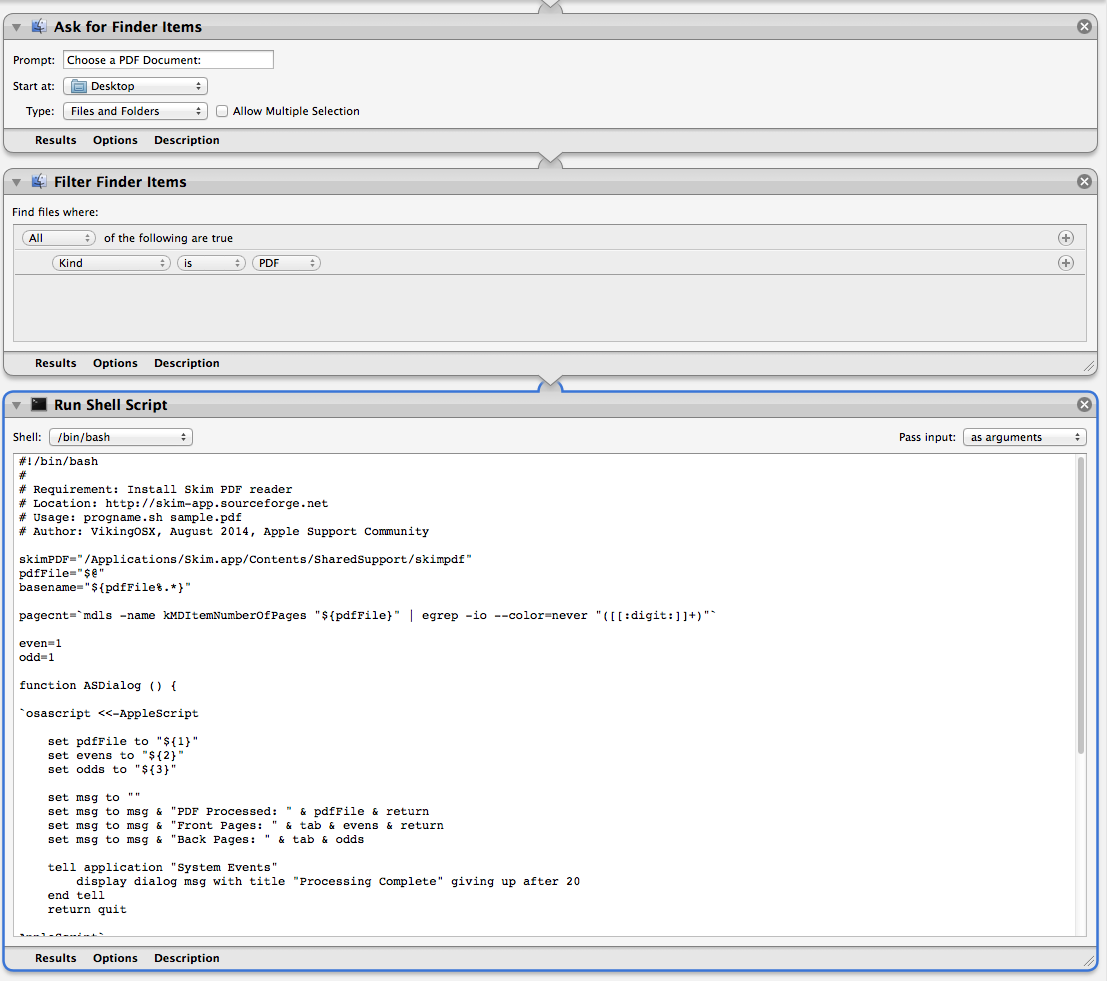
Here is an Automator application that prompts for a file, validates that it is a PDF document, and passes the filename to a Bash script that decides even or odd page, and extracts these specific pages into pdfname_front1 ... pdfname_frontn, pdfname_back1 ... pdfname_backn until the entire document is processed. When finished, it pops an AppleScript dialog showing the name of the processed PDF, and the number of front and back extractions completed.


This solution is best used where the PDF file is in a folder, as by default, the extraction process writes the output files back to the original document location.


It requires the Skim application installed in /Applications. This was written and tested on OS X 10.9.4.


Automator Application

User uploaded file


The Bash script that replaces the contents of the Run Shell Script window.


#!/bin/bash

#

# Requirement: Install Skim PDF reader

# Location: http://skim-app.sourceforge.net

# Usage: progname.sh sample.pdf

# Author: VikingOSX, August 2014, Apple Support Community


skimPDF="/Applications/Skim.app/Contents/SharedSupport/skimpdf"

pdfFile="$@"

basename="${pdfFile%.*}"


pagecnt=`mdls -name kMDItemNumberOfPages "${pdfFile}" | egrep -io --color=never "([[:digit:]]+)"`


even=1

odd=1


function ASDialog () {


`osascript <<-AppleScript


set pdfFile to "${1}"

set evens to "${2}"

set odds to "${3}"


set msg to ""

set msg to msg & "PDF Processed: " & pdfFile & return

set msg to msg & "Front Pages: " & tab & evens & return

set msg to msg & "Back Pages: " & tab & odds


tell application "System Events"

display dialog msg with title "Processing Complete" giving up after 20

end tell

return quit


AppleScript`

}


for mypdf in "$@"

do

for page in $(seq 1 $pagecnt)

do

if [[ $((page % 2)) == 0 ]]; then

#even extractions

`${skimPDF} extract "${pdfFile}" "${basename}""_Front"$((even)) -page ${page}`

((++even))

else

#odd extractions

`${skimPDF} extract "${pdfFile}" "${basename}""_Back"$((odd)) -page ${page}`

((++odd))

fi

done

done

ASDialog "${pdfFile}" $((--even)) $((--odd))

exit 0

Jul 31, 2014 8:59 PM in response to Hiroto

Hiroto,


Thanks! seems to work well. Do you know how to execute the script using an IBAction in Xcode? I've never done this before but heres my first attempt:


- (IBAction)runAppleScript:(id)sender

{

NSLog(@"Running apple script-------------------");


NSDictionary* errorDict;

NSAppleEventDescriptor* returnDescriptor = NULL;

NSString *path = [[NSBundlemainBundle] pathForResource:@"PDFscript"ofType:@"scpt"];

NSAppleScript* scriptObject = [[NSAppleScript alloc] initWithSource:path];

returnDescriptor = [scriptObject executeAndReturnError: &errorDict];

Aug 1, 2014 1:52 AM in response to kevnm67

Hello


You're welcome. Glad to hear it helped.


If the script is saved as a compiled script, you may use NSAppleScript's -initWithContentsOfURL:error: method. Something like the following snippet.


    NSDictionary *errdict;
    NSAppleEventDescriptor *desc;

    NSString *path = [[NSBundle mainBundle] pathForResource:@"PDFscript" ofType:@"scpt"];
    NSURL *url = [NSURL fileURLWithPath: path];

    NSAppleScript *scpt = [[NSAppleScript alloc] initWithContentsOfURL: url error: &errdict];
    if (!scpt)
        fprintf(stderr, "Failed to load script: %s\n", [[errdict description] UTF8String]);
    else
    {
        desc = [scpt executeAndReturnError: &errdict];
        [scpt release];
        if (!desc)
            fprintf(stderr, "Runtime error in script: %s\n", [[errdict description] UTF8String]);
    }


However, if you're writing code in objective-c, you can do everything in objective-c without using applescript script which is running rubycocoa script which is invoking cocoa methods in the first place. 🙂


Regards,

H

Aug 1, 2014 4:57 AM in response to kevnm67

What version of OS X?


Using the exact same script that I posted, I ran it the following ways. Each time, I removed all extracted pages.

  1. Script and PDF in same folder, with just pdf-file.pdf name as command-line argument to script.
  2. Same as [1], but pdf-file with no extension. One extraction to _Back1 on 17 page PDF.
  3. Script in local bin folder and ~/test/pdf-file.pdf supplied on the command-line.
  4. As Automator application on Desktop, choosing the PDF within the test folder location.
  5. As [4], but choosing only the containing folder results in no processing and zero dialog results.

    Fix: Change the Ask for Finder Items Automator action Type: to Files from Files and Folders.


Items 1, 3, and 4 worked as expected on 5-page and 17-page PDF test files. As currently written, the script misbehaves when the .pdf extension is missing from the supplied PDF file. Apparently, mdls will return 0 page count for PDF files without the customary extension. Looking into tweaking the mdls part of the script.

Aug 1, 2014 7:15 AM in response to VikingOSX

That's my fault... I overlooked setting passing the input of the script "as arguments". Works now. I appreciate the demo and will find a use for it to handle other tasks. Do you know how to use bash to evoke the screen capture utility (i.e. Shift command 4) & store the names of the pictures taken as previously mentioned + store the images in a defined folder? I know I can create a directory (mkdir -p ${HOME}/NewFolder/) but not exactly sure how to change where images from screen shots are stored without permanently changing the default storage location. I guess I could finish the script by returning the default image storage (for screenshots). But that's not the best solution

Aug 1, 2014 10:36 AM in response to kevnm67

Ok, I have solved some issues I found with the previous script and Automator configuration.


  1. The Filter Finder Items action apparently uses kMDItemKind to determine the file type, and if you choose a PDF file without an extension, this action will not pass the file to the Bash script. Result: 0.
  2. The mdls command, for the same reason will always fail to get a page count when it encounters a extensionless PDF file.

    Remove the entire mdls/egrep command sequence from the script.

  3. Wrote a shell function that runs Python, imports the CoreGraphics module, and returns the page count for PDF files with/out extensions. The function takes as its argument, the input PDF filename, which it passes into Python as a command-line argument ($1). It returns a page count.

    Replace entire Bash script in Automator with the following code.


New Bash Script

#!/bin/bash

#

# Requirement: Install Skim PDF reader

# Location: http://skim-app.sourceforge.net

# Usage: progname.sh sample.pdf

# Author: VikingOSX, August 2014, Apple Support Community


function PDFpagecnt () {


/usr/bin/python -c \

"import sys

from CoreGraphics import *


pdfdoc = sys.argv[1]

provider = CGDataProviderCreateWithFilename(pdfdoc)

pdf = CGPDFDocumentCreateWithProvider(provider)

print('{}'.format(pdf.getNumberOfPages()))" "${1}"

}


function ASDialog () {


`osascript <<-AppleScript


set pdfFile to "${1}"

set evens to "${2}"

set odds to "${3}"


set msg to ""

set msg to msg & "PDF Processed: " & pdfFile & return

set msg to msg & "Front Pages: " & tab & evens & return

set msg to msg & "Back Pages: " & tab & odds


tell application "System Events"

display dialog msg with title "Processing Complete" giving up after 20

end tell

return quit


AppleScript`

}


skimPDF="/Applications/Skim.app/Contents/SharedSupport/skimpdf"

pdfFile="$@"

basename="${pdfFile%.*}"


even=1

odd=1


pagecnt=$(PDFpagecnt "${pdfFile}")


for mypdf in "$@"

do

for page in $(seq 1 $pagecnt)

do

if [[ $((page % 2)) == 0 ]]; then

#even extractions

`${skimPDF} extract "${pdfFile}" "${basename}""_Front"$((even)) -page ${page}`

((++even))

else

#odd extractions

`${skimPDF} extract "${pdfFile}" "${basename}""_Back"$((odd)) -page ${page}`

((++odd))

fi

done

done

ASDialog "${pdfFile}" $((--even)) $((--odd))

exit 0

Aug 1, 2014 2:40 PM in response to Hiroto

Hiroto, when I try to hard code the file path on the script vs. set infile to (choose file of type {"com.adobe.pdf"} with prompt "Choose source pdf file.")'s POSIX path" I receive various errors and not sure why my attempts aren't working. How can I replace the "inFIle" variable to a path for a folder on my desktop?


I mainly tried to replace the outdir variable:

File.dirname(POSIX path of theFolder)


I also tried ${HOME}/Desktop/notecards using do shell script but also unsuccessful.


I appreciate your help. Very new to this 😉

Aug 1, 2014 7:11 PM in response to kevnm67

Hello


I presume you're talking about how to specify hard-coded path in AppleScript. In AppleScript, you need to specify the full path. $HOME does not work whilst you can get the POSIX path of current user's home directory by


(path to home folder)'s POSIX path


and its desktop by


(path to desktop)'s POSIX path


and so on. Note that these directory paths have trailing /, which in some cases you may need to remove in shell script.


As for the output directory, I've written the rubycocoa script so that it can accept it as the second argument. So you can call it like this:


set infile to (path to desktop)'s POSIX path & "infile.pdf" -- => "/Users/your-user-name/Desktop/infile.pdf"
set outdir to (path to desktop)'s POSIX path & "notecards" -- => "/Users/your-user-name/Desktop/notecards"

do shell script "/System/Library/Frameworks/Ruby.framework/Versions/1.8/usr/bin/ruby -w <<'EOF' - " & infile's quoted form & " " & outdir's quoted form & "
require 'osx/cocoa'
OSX.require_framework 'PDFKit'
include OSX

raise ArgumentError, \"Usage: #{File.basename($0)} pdf [out_directory]\" unless [1, 2].include? ARGV.length 
infile = File.expand_path(ARGV[0])
outdir = ARGV[1] ? File.expand_path(ARGV[1]) : File.dirname(infile)
raise ArgumentError, \"No such directory: #{outdir}\" unless File.directory?(outdir)

url = NSURL.fileURLWithPath(infile)
doc = PDFDocument.alloc.initWithURL(url)
bname = File.basename(infile).sub(/\\.pdf$/i, '')
front, back = '_Front', '_Back'

(0 .. (doc.pageCount - 1)).each do |i|
    page = doc.pageAtIndex(i)
    doc1 = PDFDocument.alloc.initWithData(page.dataRepresentation)
    doc1.writeToFile(\"#{outdir}/#{bname}#{i % 2 == 0 ? front : back}#{i / 2 + 1}.pdf\")
end
EOF"


Hope this helps,

H

Aug 1, 2014 10:08 PM in response to kevnm67

Or possibly are you trying to make the script accept directory of source pdf files instead of single source pdf file?


If so, it is not what your original question says and you need to rewrite the ruby script or applescript script so as to iterate through the pdf files in the given input directory. It is not difficult at all but computer is such a simple-minded thing that you have to tell it exactly what you want it to do. 🙂


H

This thread has been closed by the system or the community team. You may vote for any posts you find helpful, or search the Community for additional answers.

Split PDF, name odd pages and name even pages in sequence

Welcome to Apple Support Community
A forum where Apple customers help each other with their products. Get started with your Apple Account.