Here is an Automator application that prompts for a file, validates that it is a PDF document, and passes the filename to a Bash script that decides even or odd page, and extracts these specific pages into pdfname_front1 ... pdfname_frontn, pdfname_back1 ... pdfname_backn until the entire document is processed. When finished, it pops an AppleScript dialog showing the name of the processed PDF, and the number of front and back extractions completed.
This solution is best used where the PDF file is in a folder, as by default, the extraction process writes the output files back to the original document location.
It requires the Skim application installed in /Applications. This was written and tested on OS X 10.9.4.
Automator Application
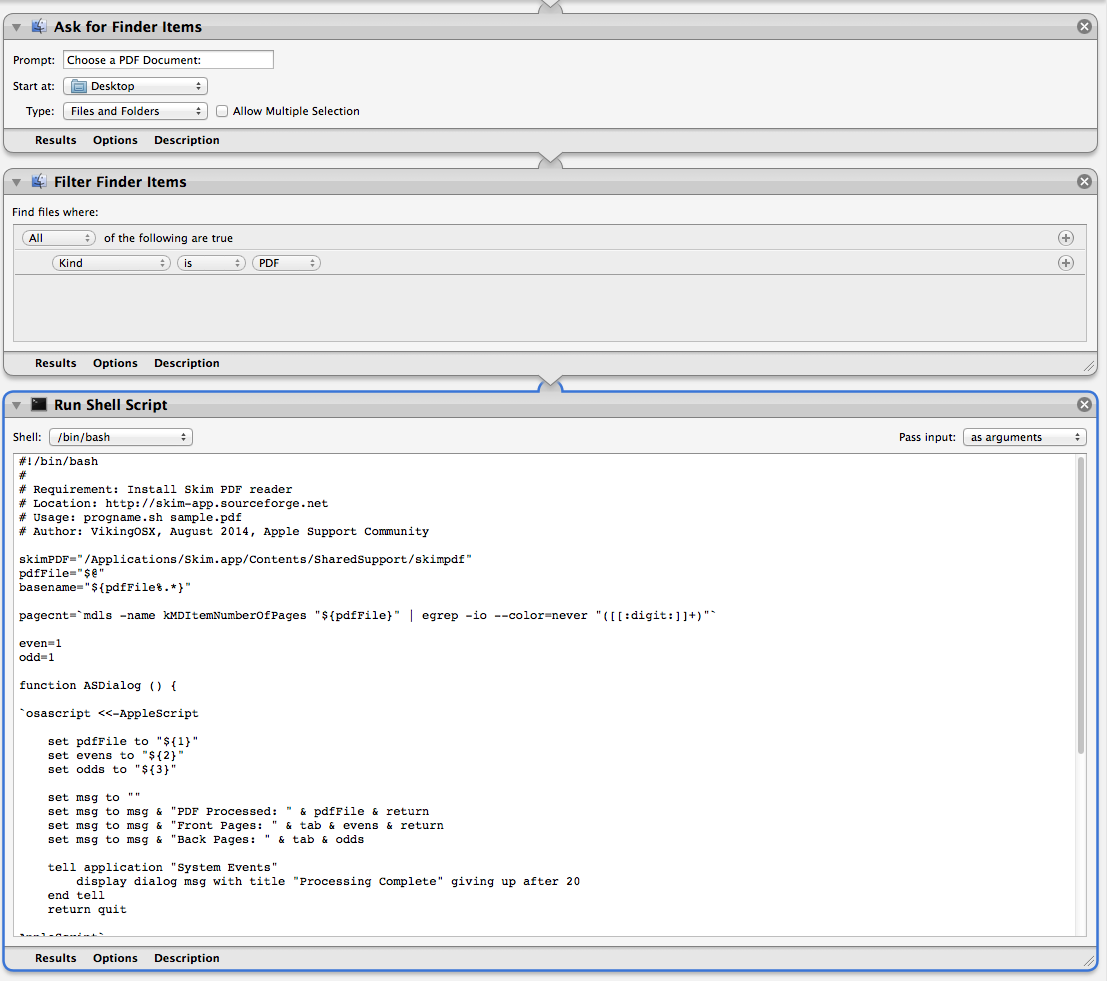
The Bash script that replaces the contents of the Run Shell Script window.
#!/bin/bash
#
# Requirement: Install Skim PDF reader
# Location: http://skim-app.sourceforge.net
# Usage: progname.sh sample.pdf
# Author: VikingOSX, August 2014, Apple Support Community
skimPDF="/Applications/Skim.app/Contents/SharedSupport/skimpdf"
pdfFile="$@"
basename="${pdfFile%.*}"
pagecnt=`mdls -name kMDItemNumberOfPages "${pdfFile}" | egrep -io --color=never "([[:digit:]]+)"`
even=1
odd=1
function ASDialog () {
`osascript <<-AppleScript
set pdfFile to "${1}"
set evens to "${2}"
set odds to "${3}"
set msg to ""
set msg to msg & "PDF Processed: " & pdfFile & return
set msg to msg & "Front Pages: " & tab & evens & return
set msg to msg & "Back Pages: " & tab & odds
tell application "System Events"
display dialog msg with title "Processing Complete" giving up after 20
end tell
return quit
AppleScript`
}
for mypdf in "$@"
do
for page in $(seq 1 $pagecnt)
do
if [[ $((page % 2)) == 0 ]]; then
#even extractions
`${skimPDF} extract "${pdfFile}" "${basename}""_Front"$((even)) -page ${page}`
((++even))
else
#odd extractions
`${skimPDF} extract "${pdfFile}" "${basename}""_Back"$((odd)) -page ${page}`
((++odd))
fi
done
done
ASDialog "${pdfFile}" $((--even)) $((--odd))
exit 0



