Eriksimon wrote:
And this is an LP X feature, or an OS feature? Or both? Would what I said still be true for Logic 9 in Mavericks?
This is a LPX feature. They changed the file structure of a Project file to be a Package file where it stores away all those goodies (Autosave, Backup, Alternatives, Media Browser files, etc).
BTW, this is a typical Apple move. Taking the time with a feature and making it better instead of rushing it out in a "me too" move. We asked for autosave in Logic for years. Other DAWs had it for years. If you think about it, it wouldn't be so difficult to make that feature possible, you actually could do it yourself with a simple script. But remember, other autosave features just automatically saved your "whole" project set by a specific time interval. Two problems with that. It was a trade off. First of all, you were still vulnerable between the autosave depending how long you set the interval (5min, 10min, etc). And, you always saved the entire Project, which could take time with bigger Projects and could be interruptive when the save happens while you are recording. So overall, autosave yes, but not very good.
The new LPX solution with those incremental backups is much more efficient and elegant. This is a concept used in databases where you always enter data "hot", they are written to the file as you make the changes. They introduced it in Final Cut pro X before and now in LPX and if you think about it, these apps are databases after all, all your recordings edits of Events, Regions, etc., these are all time-stamped entries into a database with attributes (metadata). You just constantly change those data entries and LPX constantly saves those database entries.
Autosave + Backup
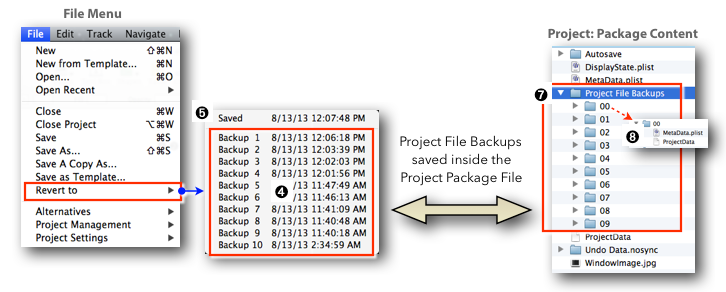
The real power comes in with the combination of the new Backup and Autosave features, another overlooked but powerful feature. Like a built in "Save as Copy". Here is my new LPX workflow: Usually I don't use the save command anymore. I work in Logic maybe for an hour without saving (I know that sounds scary but it is autosaved). I save a Project when I finished a major step (recording, editing) that I might come back to. All those special cornerstones, (the manual saves) are now saved as Backup FIles (up to ten) and you can use them to revert the Project to any of those stages, even go back and forth if you want to look up some edit you did (little trick: use copy paste to bring back elements, i.e. Regions, Events, of the paste without restoring).
Here is a diagram my book where I explain that workflow:
Hope that helps
Edgar Rothermich
http://DingDingMusic.com/Manuals/
'I may receive some form of compensation, financial or otherwise, from my recommendation or link.'



