There is an indirect way to alter your line-height (spacing) in Apple Mail.
Write your email, or the part that you want to apply the special spacing too. Start a new TextEdit document (not plain text), and copy/paste a couple of lines of text from your Mail compose into TextEdit for boilerplate. In TextEdit, Format ▸ Text ▸ Spacing… . Try the setting in the attached screenshot, to see if it provides the expected spacing. Set the font and font-size to that in the Mail compose window. For this example, the font was 16pt Georgia.
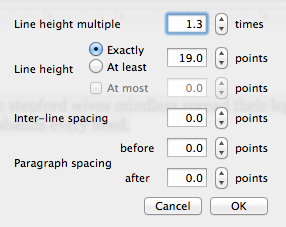
Now, Format ▸ Font ▸ Copy Style. In the Mail Compose window, select the recipient text, and then apply Mail's Format ▸ Style ▸ Paste Style. Your spacing will change to the TextEdit setting.
Technically, one can create a custom, Favorite paragraph style in TextEdit after the font characteristic settings and spacing values are set for a segment of text. One could then right-click on selected text in Mail Compose, and from the contextual menu, choose Font ▸ Styles… . Although this approach has worked in the past on my Mavericks installation, it has now stopped working for an unknown reason, even with custom TextEdit paragraph styles that worked previously such as a red-strikethru text effect.





