BC,
If you are content with compounding once per month, and your payments are one per month, it's a simple matter. You don't need the template.
The main difference between the usual case where the rate is fixed, is that you will need to have a column for rate, rather than taking it from a separate parameter table. If you do this, you can change the rate every month and all will be well. The burden in that case is that you will need to enter the rate every month, a simple matter of dragging the Fill handle to copy the last month's rate if it didn't change.
This is the referenced template, first month.
Payment Due Date | Payment Number | Beginning Principal | Payment made | Extra payment | Extra Payment Date | Interest Payment | Total Interest | Principal Payment | Remaining Principal |
Jan 25, 2009, | 0 | $7,000.00 | $0.00 | $100.00 | Jan 27, 2009 | $0.00 | $0.00 | $100.00 | $6,900.00 |
You can modify it for your needs. Here's an approach that might be acceptable to you:
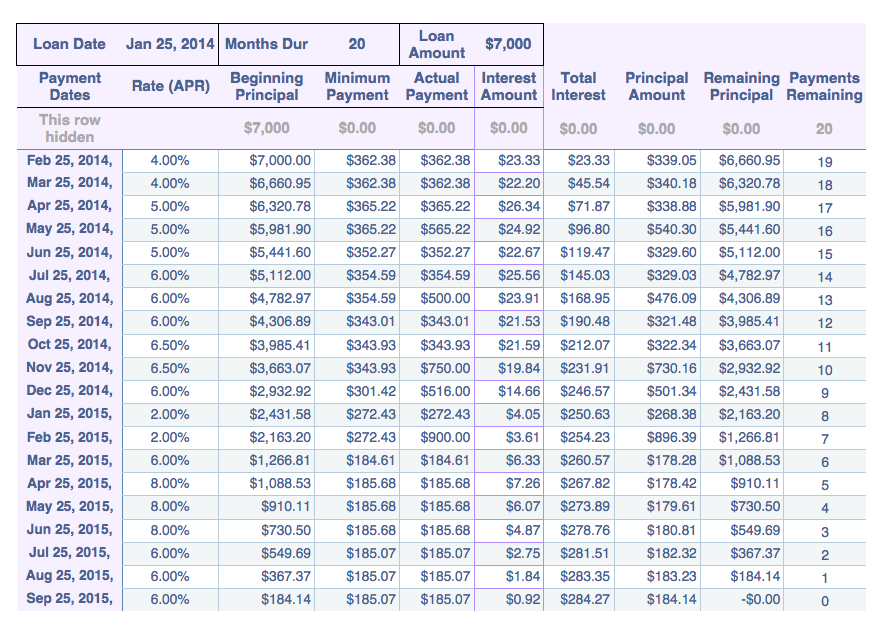
If you examine it, you will see that the interest rate changes several times, as does the actual amount paid in a given period, yet the loan balance goes to zero as of the last payment.
The programming is as follows...
C3: =F1
J3: =D1
A4: =EDATE($B$1,ROW()-3)
C4: =C3-H3
D4:=-PMT(B4/12,$D$1-ROW()+4,C4,0)
F4: =B4/12*C4
G4: =SUM(F$4:F4)
H4: =E4-F4
I4: =C4-H4
J4: =$J$3-ROW()+3
After pasting those formulas into Row 4, Fill Down as far as you need, the last row being number of periods in the loan plus 3.
Regards,
Jerry

