My iPhone 6 is locked in vertical mode. How do fix this?

I Have a brand new iPhone with current update. I am not able to turn my phone horizontal and have the picture rotate with the phone. I understand this is a setting lock but how do I fix it with this version. I had a 4s model and it had the same issue that I never resolved. Can this be fixed stil?

iPhone 6, iOS 8.1

Posted on Nov 30, 2014 12:12 PM

Reply
Question marked as Top-ranking reply

Posted on Dec 2, 2014 8:37 AM

Hey there Nstengel4,


It sounds like your phone does not go into landscape mode form portrait. From what you describe it seems to me that Rotation Lock might be enabled, or there could be something else afoot preventing this action. Use the following article to help determine what might be the issue here:


If the screen doesn't rotate on your iPhone, iPad, or iPod touch

Check your settings and test with an app that rotates

Some apps don't rotate. Some might use only portrait or landscape mode, or switch depending on the content. To test screen rotation, open the Calculator app that comes with your device. If the screen doesn't rotate when you rotate the device, try these steps:

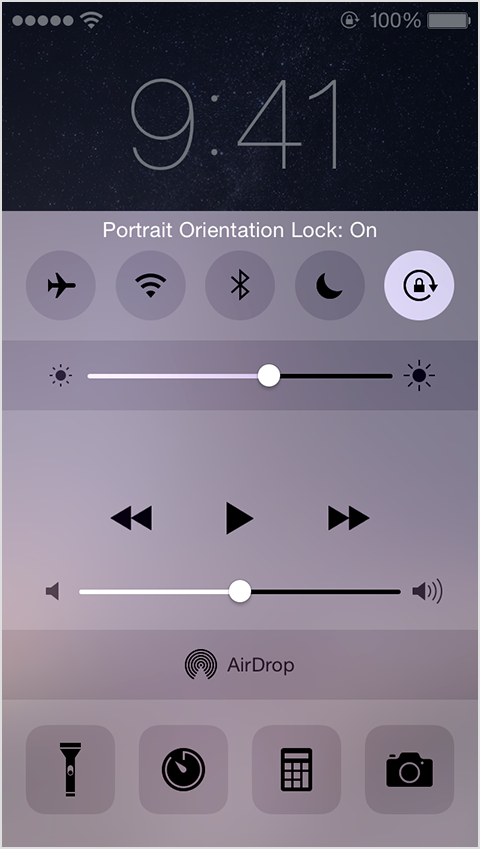
  1. Check for User uploaded file in the status bar. If you see this icon, Orientation Lock is on. To turn it off, swipe up from the bottom of the screen to reveal the Control Center and tap User uploaded file.
    User uploaded file
  2. If you have an iPhone 6 Plus, turn off Display Zoom to rotate the Home screen.
  3. If you have an iPad with a Side Switch, turn the Side Switch on or off.

Get more help

If you checked your settings and your screen still doesn't rotate when using an app that should (like the Calculator app), follow these steps:


  1. Restart your iOS device.
  2. If the screen still won't rotate, back up and restore your device.


Thank you for using Apple Support Communities.

Take care,

Sterling

4 replies
Question marked as Top-ranking reply

Dec 2, 2014 8:37 AM in response to Nstengel4

Hey there Nstengel4,


It sounds like your phone does not go into landscape mode form portrait. From what you describe it seems to me that Rotation Lock might be enabled, or there could be something else afoot preventing this action. Use the following article to help determine what might be the issue here:


If the screen doesn't rotate on your iPhone, iPad, or iPod touch

Check your settings and test with an app that rotates

Some apps don't rotate. Some might use only portrait or landscape mode, or switch depending on the content. To test screen rotation, open the Calculator app that comes with your device. If the screen doesn't rotate when you rotate the device, try these steps:

  1. Check for User uploaded file in the status bar. If you see this icon, Orientation Lock is on. To turn it off, swipe up from the bottom of the screen to reveal the Control Center and tap User uploaded file.
    User uploaded file
  2. If you have an iPhone 6 Plus, turn off Display Zoom to rotate the Home screen.
  3. If you have an iPad with a Side Switch, turn the Side Switch on or off.

Get more help

If you checked your settings and your screen still doesn't rotate when using an app that should (like the Calculator app), follow these steps:


  1. Restart your iOS device.
  2. If the screen still won't rotate, back up and restore your device.


Thank you for using Apple Support Communities.

Take care,

Sterling

This thread has been closed by the system or the community team. You may vote for any posts you find helpful, or search the Community for additional answers.

My iPhone 6 is locked in vertical mode. How do fix this?

Welcome to Apple Support Community
A forum where Apple customers help each other with their products. Get started with your Apple Account.