how to cancel an a purchased subscription
i have recently purchased adobe reader subscription but it didn't work i want to cancel the order and get refunded
iPhone 6, iOS 8.1.2
i have recently purchased adobe reader subscription but it didn't work i want to cancel the order and get refunded
iPhone 6, iOS 8.1.2
The subscriptions are definitely on the account that you are logging into, and they are being paid by that account (you aren'y paying the developer directly), the subscription payments show on the iTunes account's purchase history ?
Hi parwiz Ahmad Noori,
Happy New Year! The resource below will explain how to cancel your subscription.
Manage your auto-renewing subscriptions - Apple Support
http://support.apple.com/en-us/HT202039
Use your iPhone, iPad, or iPod touch to manage subscriptions
- From the Home screen, tap App Store.
- Tap Featured from the menu at the bottom.
- Scroll to the bottom of the page and tap your Apple ID. If you don't see your Apple ID, tap Sign In and enter your information. Then tap your Apple ID.
- Tap View Apple ID.
- If prompted, enter your password and tap OK.
- On the Account Settings screen, scroll down and tap Manage App Subscriptions.
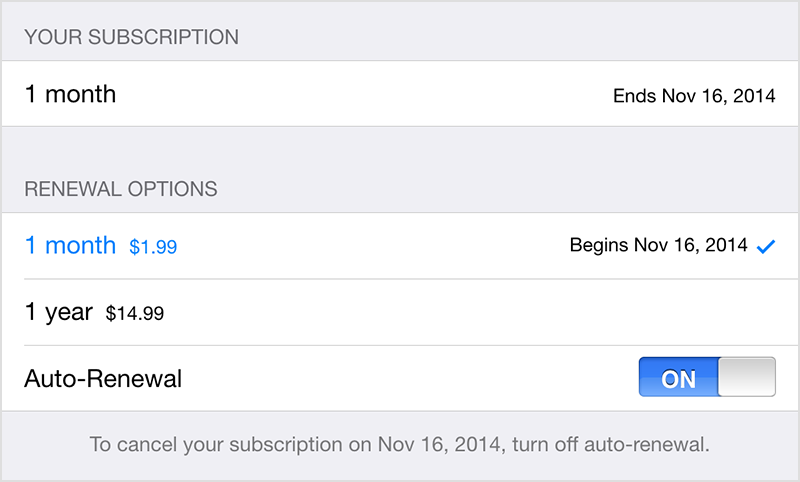
- Tap the subscription you want to manage, then choose a subscription category.
- Use the options to manage your subscription. You can choose a different subscription period, or turn off Auto-Renewal.
Report a problem with an item purchased from the iTunes Store, App Store, Mac App Store, or iBooks Store - Apple Support
http://support.apple.com/en-us/HT204084
I hope this information helps ....
- Judy
Hi I have tried the instructions , but i CANNOT turn the continuing Subscription button to OFF it remains green?? please advise as i really need to cancel this service .
I don't see mange app subscriptions on the screen
how to cancel an a purchased subscription