Thoughts on CleanMyMac 3?

I'm not looking to start any wars, here. Just wanted to see what y'all thought about CleanMyMac 3. I know it's been problematic with previous versions, but perhaps that's a thing of the past?


Thanks!

MacBook Pro (Retina, Mid 2012), OS X Yosemite (10.10.3), 2.7/16/512

Posted on Apr 17, 2015 12:09 PM

Reply
10 replies

Apr 17, 2015 12:22 PM in response to SoldOnMac

In general, issues that automatic cleaner programs address can be tackled in more specific ways. That being said, there are times when these programs have helped those who do not have the understanding of how to otherwise tackle the problems at hand. Of course, the recommendation here is to seek out exactly how to do so and not somewhat blindly rely on an automated routine to do so; however, there is possibility of these programs doing good in some situations. Conversely, there is the possibility of these programs causing problems if they encounter and act on a setup in ways that were unintended. This basically relies on the cleaner routine to know everything about your setup and be able to distinguish between everything you want vs that which you do not, and then execute the removal properly. This has been a challenge for most of these programs, which is why they can be harmful (note that this is just a possibility, just as much as they can help). Because there are usually alternative and more specific ways of tackling these problems, the recommendation to avoid the possibility of additional and unforeseen harm is to avoid these and do your best to tackle slowdowns and other problems one-by-one. If your Mac is not experiencing any problems, or any without an obvious cause, then you simply do not need to run any maintenance routines at all.

Apr 17, 2015 1:31 PM in response to SoldOnMac

Just to give a small sample of why such apps should be avoided, I downloaded and ran the unregistered version of CleanMyMac 3. It installs junk all over the place on your drive the first time it's run. Which I rather easily located with EasyFind after testing and cleaned up after CleanMyMac (there's an oxymoron if I ever saw one).


I keep my Mac's very clean. If I don't need it, I don't install it. No haxies, no junk apps. Everything on my system has a purpose. But CleanMyMac apparently needed to convince me there was something to do to justify itself. This is what it wanted to remove (about 530 MB of stuff).
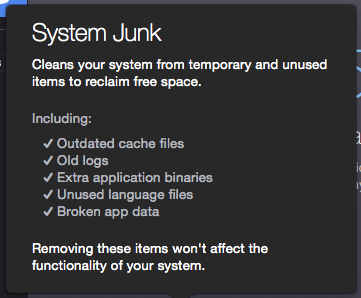

User uploaded file


Outdated cache files: How does it know that? And if it's old cache data from an app I haven't launched in a while, so what? Then that app will just have to recreate its cache data.


Old logs: Oh, please. Again, so what? Unless you have a runaway process growing a log to jumbo size, they're small.


Extra application binaries: Uh, no thanks. I'd rather leave a couple hundred MB of data on the drive than have this app possibly remove data that would prevent the app from launching.


Unused language files: The bad one. I already use Monolingual to remove these. Those few that are left are in apps which will not work if the extra language files are removed. I already know which ones those are and have Monolingual's preferences set to skip them. CleanMyMac would have broken Data Rescue 4 and a couple of others.


Broken app data: What's that supposed to mean to me as the user? Without telling me what those files are and where they are, there's no way I'd let CleanMyMac remove them.


As Topher noted, learn how to handle the installation and removal of software yourself. Blindly letting a tool like this dig through your system and removing items without specifically telling you what it's going to delete is not a good idea.


Apr 22, 2015 6:54 AM in response to Paul Gibian

Then you are part of the .001% of users who feel this type of software actually does something useful. OS X does not need "cleaning" or "speeding up" with any such software. They will all do just the opposite. Apps like CleanMyMac, MacKeeper, MacCleanse and others are all known to incorrectly remove system files. Sometimes to the point of having to reinstall the OS and/or your third party apps.

This thread has been closed by the system or the community team. You may vote for any posts you find helpful, or search the Community for additional answers.

Thoughts on CleanMyMac 3?

Welcome to Apple Support Community
A forum where Apple customers help each other with their products. Get started with your Apple Account.



