Just to give a small sample of why such apps should be avoided, I downloaded and ran the unregistered version of CleanMyMac 3. It installs junk all over the place on your drive the first time it's run. Which I rather easily located with EasyFind after testing and cleaned up after CleanMyMac (there's an oxymoron if I ever saw one).
I keep my Mac's very clean. If I don't need it, I don't install it. No haxies, no junk apps. Everything on my system has a purpose. But CleanMyMac apparently needed to convince me there was something to do to justify itself. This is what it wanted to remove (about 530 MB of stuff).
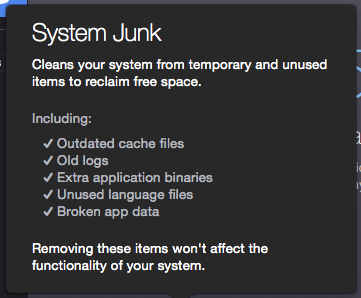
Outdated cache files: How does it know that? And if it's old cache data from an app I haven't launched in a while, so what? Then that app will just have to recreate its cache data.
Old logs: Oh, please. Again, so what? Unless you have a runaway process growing a log to jumbo size, they're small.
Extra application binaries: Uh, no thanks. I'd rather leave a couple hundred MB of data on the drive than have this app possibly remove data that would prevent the app from launching.
Unused language files: The bad one. I already use Monolingual to remove these. Those few that are left are in apps which will not work if the extra language files are removed. I already know which ones those are and have Monolingual's preferences set to skip them. CleanMyMac would have broken Data Rescue 4 and a couple of others.
Broken app data: What's that supposed to mean to me as the user? Without telling me what those files are and where they are, there's no way I'd let CleanMyMac remove them.
As Topher noted, learn how to handle the installation and removal of software yourself. Blindly letting a tool like this dig through your system and removing items without specifically telling you what it's going to delete is not a good idea.






