Safari is still blocking flash player plug in after installing the updates on Mac 10.10.2. Though same is working with latest flash player on Mac 10.9.5.

On Mac OS X 10.10.2, Safari by default blocks latest flash player 17 plug in for all websites. But flash is working fine on Mac OS X 10.9.5.

MacBook Pro, OS X Yosemite (10.10.2)

Posted on Apr 21, 2015 10:22 AM

Reply
8 replies

Apr 21, 2015 10:30 AM in response to cisco Gurgaon

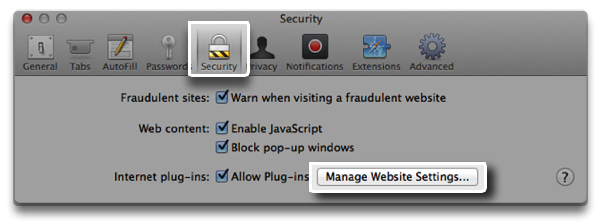
  1. Choose Safari > Preferences…
  2. Click the Security pane.
    User uploaded file
  3. Click Manage Website Settings to see plug-in details for a particular website.
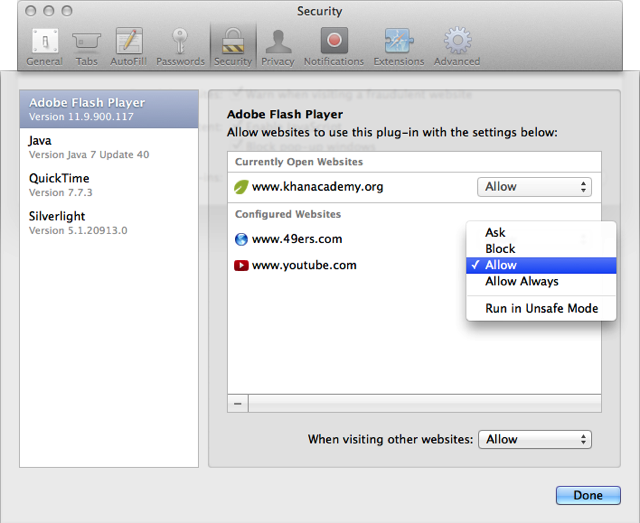
  4. Internet plug-ins installed on your computer appear on the left side of the plug-ins sheet. Select a plug-in to configure its website settings.
    User uploaded file
  5. Websites that are currently open in Safari appear on the right side of the plug-ins sheet. Websites that you have already configured by clicking "Trust" or "Cancel" also appear here.
  6. Use the following options to set how you want Safari to handle a specific Internet plug-in when visiting a website.

This thread has been closed by the system or the community team. You may vote for any posts you find helpful, or search the Community for additional answers.

Safari is still blocking flash player plug in after installing the updates on Mac 10.10.2. Though same is working with latest flash player on Mac 10.9.5.

Welcome to Apple Support Community
A forum where Apple customers help each other with their products. Get started with your Apple Account.