Hi,
Check the pic is in ~/Library/Messages/Attachments.
You will find many seemingly random names on the files so the Modification Column if shown is likely to give clues to the dates.
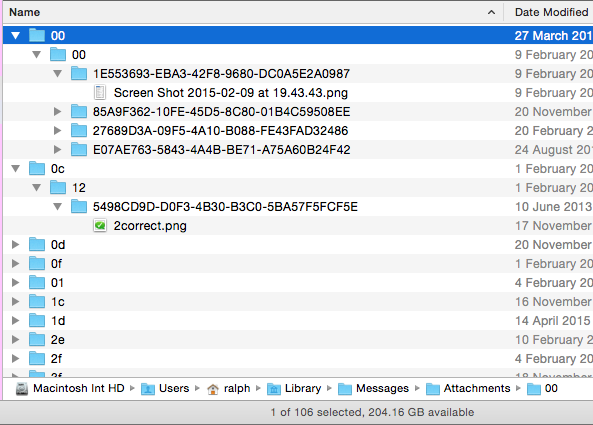
Even then the actual pic is still several sub folders deep.
In the Finder > View Menu is > Show Path Bar and this make the Path or route to the folder/file get shown across the bottom of the window.
The Modification option is also in the Finder > View Menu > Show View options
Once you know you can se the place(s) the pics are right click one and select Get Info
It should open an Info Panel and at the bottom is the Read and Write Permission.
Your Short Name (The same as the Little House Icon) should be listed.
You should have Read and Write permissions.
Highlight your Name and Unlock the padlock then use the little cogwheel type icon under the list.
This should read "Make yourShortName (Me) the Owner in greyed out text (already done).
Now right click and select Get info and repeat for all the folders back to the Library (I.e. the folder 00 in this case then Attachments then Messages)
If you don't have Read and Write Permissions to the folders then it may not be writing new pics to the folder.

10:09 pm Wednesday; April 29, 2015
iMac 2.5Ghz i5 2011 (Mavericks 10.9)
G4/1GhzDual MDD (Leopard 10.5.8)
MacBookPro 2Gb (Snow Leopard 10.6.8)
Mac OS X (10.6.8),
Couple of iPhones and an iPad


