Hello there, Brownhammer_25.
I can totally understand how frustrating that can be when others are signing into W-Fi just fine and you cannot. The following Knowledge Base article offers some practical first steps to try and troubleshoot the issue you are describing:
If your iPhone, iPad, or iPod touch won’t connect to a Wi-Fi network - Apple Support
If you're too far from your router you won't get a signal, so make sure you're within range.
Tap Settings > Wi-Fi and make sure Wi-Fi is turned on. Tap the name of your Wi-Fi network to join. A blue checkmark beside a network name means you're connected. Or get help if you can't turn on Wi-Fi.
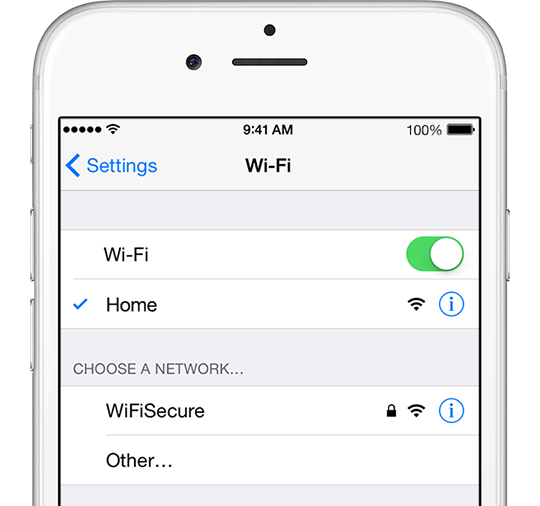
If prompted, enter the password for your Wi-Fi network. Learn what to do if you don’t know your password.
If you still can’t connect to your network or get online, make sure your router is connected to the modem and turned on.
For more help, try restarting your device, router, or cable/DSL modem. After each step, check to see if you fixed the issue.
• Restart your iOS device.
• Unplug your router and plug it back in.
• Unplug your cable or DSL modem and plug it back in.
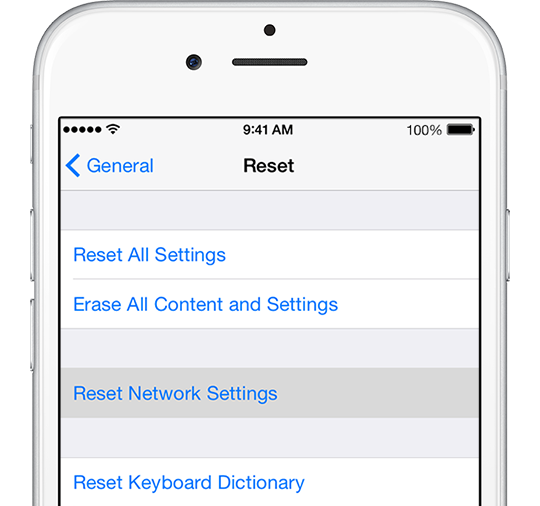
Reset your Network Settings. Tap Settings > General > Reset > Reset Network Settings. This also resets Wi-Fi networks and passwords, cellular settings, and VPN and APN settings that you’ve used before.
Thanks for being a part of Apple Support Communities.
Kind Regards.



