Hello
You might try the following Perl script, which can be run via AppleScript or Automator if you want to. To use it, copy the source range of table of Numbers to clipboard, run the script and it will put TSV text representation of value and frequency pairs in clipboard, which you can paste into target range. Results consist of data of which frequency > 1 and sorted by frequency in descending order.
#!/bin/bash
export LC_ALL=en_GB.UTF-8 # UTF-8 locale is required for pbpaste and pbcopy to treat Unicode text properly
/usr/bin/perl -CS -w <<'EOF' - <(pbpaste) | pbcopy
use strict;
my %h = ();
while (<>) {
chomp;
map { $h{$_}++ if $_ ne '' } split /\t/;
}
local $, = qq(\t);
local $\ = qq(\n);
for (sort { $h{$b} <=> $h{$a} || $a cmp $b } keys %h) {
last if $h{$_} < 2; # frequency threshold for output
print $_, $h{$_};
}
EOF
E.g.,
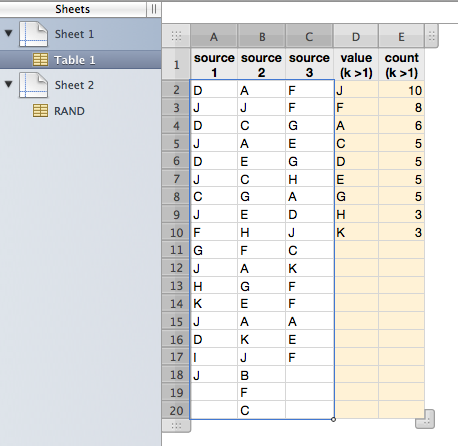
* Source range is selected.
---
To implement an AppleScript wrapper, use do shell script command such as:
do shell script "/bin/bash -s <<'HUM'
export LC_ALL=en_GB.UTF-8 # UTF-8 locale is required for pbpaste and pbcopy to treat Unicode text properly
/usr/bin/perl -CS -w <<'EOF' - <(pbpaste) | pbcopy
use strict;
my %h = ();
while (<>) {
chomp;
map { $h{$_}++ if $_ ne '' } split /\\t/;
}
local $, = qq(\\t);
local $\\ = qq(\\n);
for (sort { $h{$b} <=> $h{$a} || $a cmp $b } keys %h) {
last if $h{$_} < 2; # frequency threshold for output
print $_, $h{$_};
}
EOF
HUM"
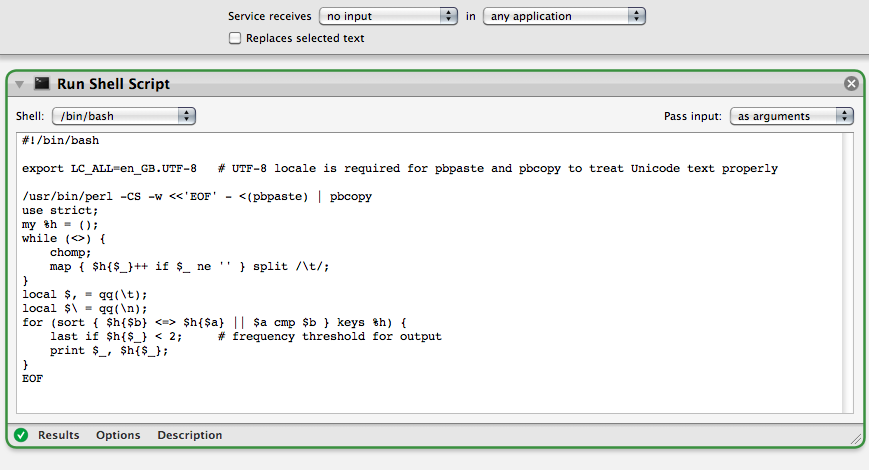
To implement an Automator service wrapper, use Run Shell Script action as follows.
Service properties
- Service receives [no input] in [any application] (or in [Numbers.app]
- [not selected] Replaces selected text
Run Shell Script action
- Shell = /bin/bash
- Pass input = as arguments
- Code = as listed first
Resulting service workflow will look like this:
Regards,
H

