Find Duplicates in Numbers - Calculate and sort them.

Hi I'm looking for a solution to find duplicate Image numbers in Column A to be separated into Column C and their Count in Column D


User uploaded file


What would be even better is if I can have the combined sum of Duplicates in Columns ABC to show up in Column D as only the top 5 Duplicates and their count in Column E.


User uploaded file


Thank you in advance.

iMac 24" 3.06, Mac OS X (10.5.4)

Posted on Sep 14, 2015 11:21 AM

Reply
2 replies

Sep 14, 2015 1:40 PM in response to bwild

Here's an approach using an Automator Service that simply requires selecting the source cells, choosing 'Count by Category' from the Numbers > Services menu, click a cell once, and Edit > Paste and Match Style.


Select the source cells:


User uploaded file


Choose 'Count by Category' from the Numbers > Services Menu:


User uploaded file


Click a cell once (here I chose A2) and choose Paste and Match Style from the Edit menu (after first formatting the destination cells as desired).


User uploaded file


Click the down 'triangle' beside the column letter and choose 'Sort Descending':


User uploaded file


Giving this:


User uploaded file


Then delete row 2 (if you don't want to count the number of blanks) and also rows 8 and below.


This service is for general use in obtaining counts of selected values, but if you're doing this particular operation often then the script within the Automator Service can easily be customized to fit your needs (to omit 'missing value', to automatically sort, etc). Feel free to post if that is the case.


The link to the Automator Service and installation instructions are below.


SG


INSTALLATION:


Count by Category Automator Service (Dropbox download).


To install, double-click downloaded .workflow package and if necessary click 'Download Anyway' in System Preferences > Security and Privacy. It will then appear automatically in your Numbers > Services menu. To uninstall just go to Library > Services and Move to Trash the way you would any other item in Finder.

Sep 14, 2015 5:51 PM in response to bwild

Hello


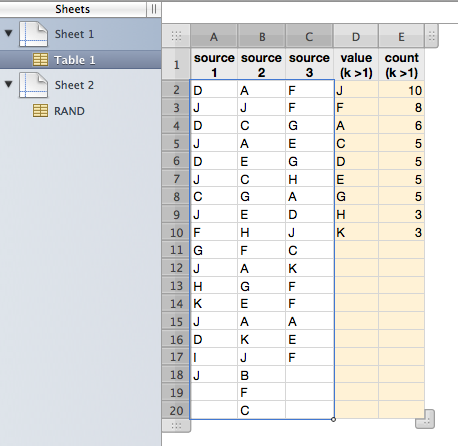
You might try the following Perl script, which can be run via AppleScript or Automator if you want to. To use it, copy the source range of table of Numbers to clipboard, run the script and it will put TSV text representation of value and frequency pairs in clipboard, which you can paste into target range. Results consist of data of which frequency > 1 and sorted by frequency in descending order.


#!/bin/bash export LC_ALL=en_GB.UTF-8 # UTF-8 locale is required for pbpaste and pbcopy to treat Unicode text properly /usr/bin/perl -CS -w <<'EOF' - <(pbpaste) | pbcopy use strict; my %h = (); while (<>) { chomp; map { $h{$_}++ if $_ ne '' } split /\t/; } local $, = qq(\t); local $\ = qq(\n); for (sort { $h{$b} <=> $h{$a} || $a cmp $b } keys %h) { last if $h{$_} < 2; # frequency threshold for output print $_, $h{$_}; } EOF


E.g.,

User uploaded file


* Source range is selected.


---

To implement an AppleScript wrapper, use do shell script command such as:


do shell script "/bin/bash -s <<'HUM' export LC_ALL=en_GB.UTF-8 # UTF-8 locale is required for pbpaste and pbcopy to treat Unicode text properly /usr/bin/perl -CS -w <<'EOF' - <(pbpaste) | pbcopy use strict; my %h = (); while (<>) { chomp; map { $h{$_}++ if $_ ne '' } split /\\t/; } local $, = qq(\\t); local $\\ = qq(\\n); for (sort { $h{$b} <=> $h{$a} || $a cmp $b } keys %h) { last if $h{$_} < 2; # frequency threshold for output print $_, $h{$_}; } EOF HUM"


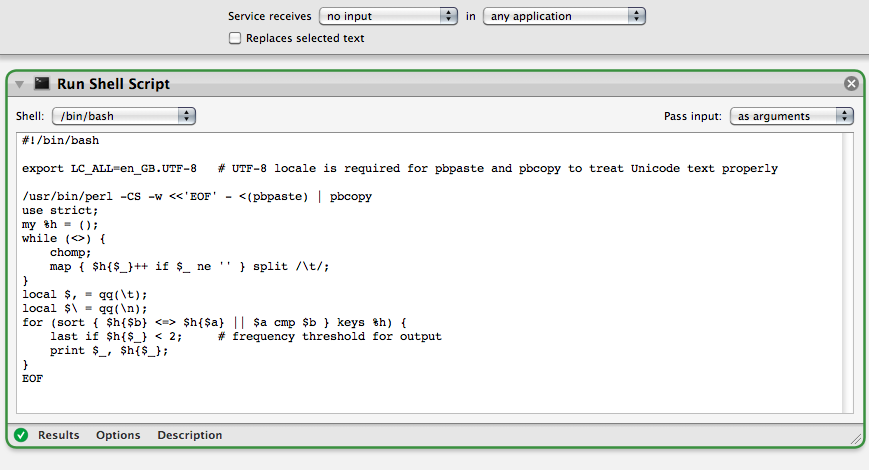
To implement an Automator service wrapper, use Run Shell Script action as follows.


Service properties - Service receives [no input] in [any application] (or in [Numbers.app] - [not selected] Replaces selected text Run Shell Script action - Shell = /bin/bash - Pass input = as arguments - Code = as listed first


Resulting service workflow will look like this:

User uploaded file


Regards,

H

This thread has been closed by the system or the community team. You may vote for any posts you find helpful, or search the Community for additional answers.

Find Duplicates in Numbers - Calculate and sort them.

Welcome to Apple Support Community
A forum where Apple customers help each other with their products. Get started with your Apple Account.
