Can't Get Anywhere on my Computer!! I have Finals in a Week!!!

Hey I can't get into my computer anymore. I've tried to log back in through safe mode, but underneath my ID it says Update Needed. I then tried to proceed into the guest account to try to figure things out but all I had available was Safari. Now I've tried hard rebooting my Mac but I don't have any of my files backed up. Is there any way I can restart my computer from a previous time before I had all these crashes and problems? Or am I completely out of luck! Someone please help

MacBook Pro, OS X Yosemite (10.10.5)

Posted on Dec 5, 2015 9:10 PM

Reply
49 replies

Dec 5, 2015 11:25 PM in response to FriedWaffle

Lol idk. But give me a sec. everytime I have to go back and forth, thank you so much for being patient.


I made a "new image" of disk1 which contains the OS X Base System in it (and when I hover my mouse over it it says start-up disk. disk1 gives me an option to create a new image but Base System does not. I think I'm doing what you're talking about.)


The disk image created from disk1 which I saved to my external hard drive is

using: 1.3 MB

capacity: 31.3 MB

Dec 5, 2015 11:38 PM in response to Kyle Good

Ah, there's the problem. That's not your startup disk. That's the recovery partition. You want to create an image from what will probably be called "Macintosh HD", which will usually be the second option in the list. Depending on how many documents and pictures you have, it should be no less than 20GB in size at the bare minimum, and is likely much larger. This will take more than five minutes to do. Take a look at the screenshot for additional information.


User uploaded file

Dec 6, 2015 11:23 AM in response to Kyle Good

I thought that might happen. Looks like you will need to partition the external drive, and restore the startup disk to the partition on the external drive. The only hiccup in this process may be the actual partitioning of the external drive. Depending on what format the external drive is, you may not be able to modify the partitions without deleting the current partition. It will tell you if you are unable to simply resize the partitions. Look for something similar to what is in the red box in the image below. Also, if you can resize the partitions, the + won't be grayed out, and you will be able to drag the divider between the partitions (represented as white boxes on the left) in order to resize them.

User uploaded file


Make sure that you make the partition big enough to hold the startup disk ("Macintosh HD"). An example size can be seen in the red box in the image below. I'd give it at least a 5GB cushion.


User uploaded file


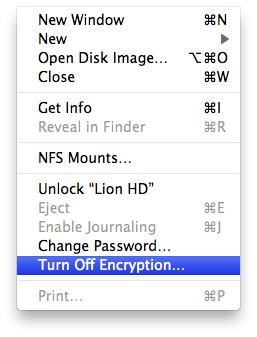
Once you do that/if this doesn't work, go ahead and attempt to turn off the encryption on the disk. You can find that under the File menu, as shown below. Enter your password when necessary, and if it's grayed out, you may need to unlock it first, as detailed above.

User uploaded file


Hopefully this can resolve your issue. If not, I strongly recommend taking it in to the nearest Certified Repair shop.


Dec 6, 2015 12:13 PM in response to Kyle Good

Wether you did it or not I think you have FileVault enabled. What I mean is if you installed Yosemite from the app store it may have got enabled during the install. I would try booting by going to safe mode. Hold the shift key down at startup. And if you can ,go to system preferences security- FileVault and disable it. It will ask for a password which should be the same as your administrator password or your apple id password. If you cannot do this. Post back as you will have to go to recovery and use terminal.

This thread has been closed by the system or the community team. You may vote for any posts you find helpful, or search the Community for additional answers.

Can't Get Anywhere on my Computer!! I have Finals in a Week!!!

Welcome to Apple Support Community
A forum where Apple customers help each other with their products. Get started with your Apple Account.
