How do I separate images in a burst in Photos?
How do I separate images in a burst in Photos?
How do I separate images in a burst in Photos?
See this Help page: https://help.apple.com/photos/mac/1.0/?lang=en#/pht56eafa987
When you import a photo burst into Photos, it appears in the imported moment and in the Bursts album. When you open a burst, you can view all the shots in the burst and select your favorites to work with individually.
- Double-click the burst in the moment or in the Bursts album.
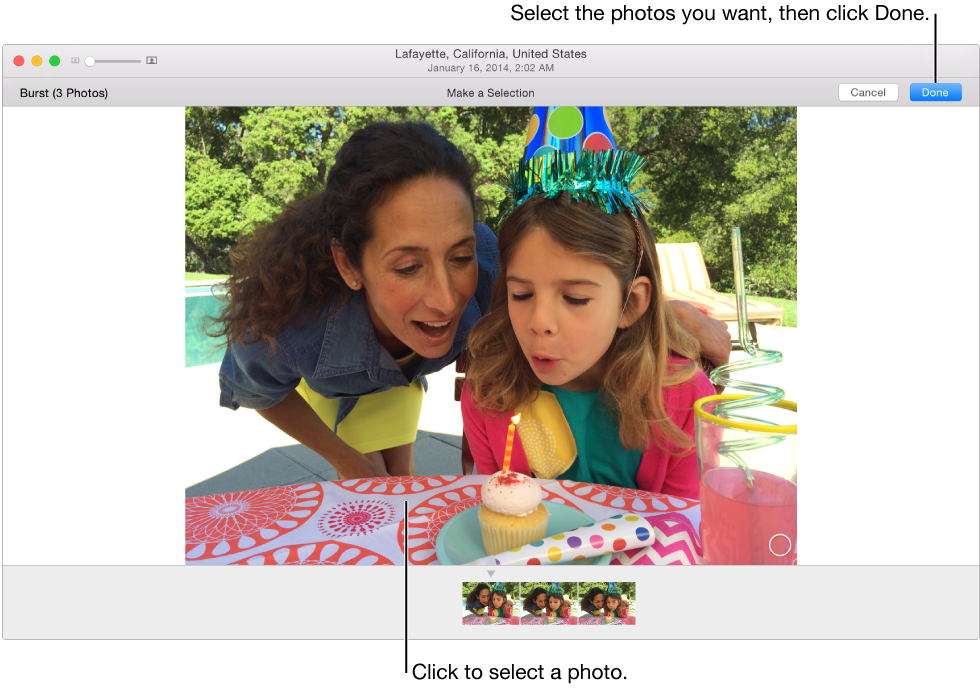
- To select photos from the burst, click the Make a Selection button in the upper-left corner of the photo.
- Click the photos that you’d like to have as individual photos, then click the Done button.
- Do one of the following:
- Keep the selected photos and delete the others in the burst: Click Keep Only Selection.The selected photos appear individually in the moment and unselected photos are placed in the Recently Deleted album. The burst no longer appears in the moment or in the Burst album.
- Make the selected photos appear individually and keep all of the photos in the burst: Click Keep Everything.The selected photos appear individually and the photo burst remains unchanged.
How do I separate images in a burst in Photos?