Jabber Google Talk

HI everybody,


I'm using the latest version of El Capitan and I have an issue with google talk account. Let me explain.

I have an iCloud account with gmail address with iMessage over it. I configured configured a jabber account to manage my Google Talk conversation via iMessagge. Everything is perfect but every time I do the login on the system, jabber asks me to prompt "continue" with a secure pwd transmission.

I have googled and read many posts about that with different solutions but none of them works.


How can I stop the prompt request without deactivating google talk jabber ?


Thank you,

Dario

Posted on Jan 14, 2016 12:10 PM

Reply
7 replies

Jan 14, 2016 2:07 PM in response to dario848

HI,


The App is called Messages and it can run an iMessage account as well as Jabber (Google is one) and AIM, Yahoo and the Bonjour account.

The Google option is separate because they use a different naming protocol to other Jabber servers.


In Addition Google have decided th they don't think SSL is secure enough and use their own oauth Tokens (I am not sure I have the spelling correct)

This means that as Messages in a Google account logs in using SSL you have to set the "Allow Less Secure Apps" option in your account setting on the Google web site.


You may have to turn Off 2 Step Verification a Google if you are using it.


Bizarrely the Mail app also uses SSL but does not get this message.


User uploaded file

10:07 pm Thursday; January 14, 2016


 iMac 2.5Ghz i5 2011 (Mavericks 10.9)
 G4/1GhzDual MDD (Leopard 10.5.8)
 MacBookPro 2Gb (Snow Leopard 10.6.8)
 Mac OS X (10.6.8),
 Couple of iPhones and an iPad

Jan 15, 2016 11:22 AM in response to dario848

Hi,


Lets see if I have understood the other information as well.


You have a Google Account and you use as an Apple ID that is linked to iCloud and as an Apple ID it is the iMessages account ID.

Separate from that is a Jabber/Google Login in the App as well.

Therefore the Accounts List include iMessages, Bonjour as the standard ones and hen the Google account.


To be clear the Google account although it is a Jabber account should be set up through the Google Option as this deals with the Server Name issue.


Your first post still reads to be that it was the Jabber Google account that was asking for the Password.
Had you attempted to set the Google 2 step Verification ?

I don't use it myself and reading the Posts here it is confusing whether it can or can't be used with the "Less Secure Apps" setting.


User uploaded file

7:22 pm Friday; January 15, 2016


 iMac 2.5Ghz i5 2011 (Mavericks 10.9)
 G4/1GhzDual MDD (Leopard 10.5.8)
 MacBookPro 2Gb (Snow Leopard 10.6.8)
 Mac OS X (10.6.8),
 Couple of iPhones and an iPad

Jan 17, 2016 11:46 AM in response to dario848

And the bits about the ID being used as an Apple ID in the iMessages Account as well as a Google Account ?


And the it about checking you set it up as a Google option rather than using "Other" then a Jabber option ?


User uploaded file

7:46 pm Sunday; January 17, 2016


 iMac 2.5Ghz i5 2011 (Mavericks 10.9)
 G4/1GhzDual MDD (Leopard 10.5.8)
 MacBookPro 2Gb (Snow Leopard 10.6.8)
 Mac OS X (10.6.8),
 Couple of iPhones and an iPad

Jan 18, 2016 12:50 PM in response to dario848

Hi,


The point is you can do both.


I have an Apple ID that is an old email from a Dial-Up account I once had.

I linked that to iCloud when it came out and got given an @me.com ID at the time and later an @iCloud one as well.


It so happens that AIM recognises the Apple issued ID as valid Screen Names so I can add AIM/AOL accounts using those whilst still using the Apple ID as the iMessages ID


User uploaded file

In this Pic the one I am showing is the @icloud.com based ID.

Lower down is the "me.com" one that speak for itself.


It could just as easily that my Google ID is the Apple ID used in Messages or even a Yahoo one and also set up an Yahoo account.


In the case of the AIM/Apple IDs entries the Passwords are the same as I use at Apple because AIM and Apple have and agreement the ID will be recognised as Valid Screen Names.

External (to Apple) email IDs can't be used with AIM but if they are Google or Yahoo then they can be used to set up those accounts.

It is likely though in these cases you use a different password with the email ID at Apple to the one you use with Google or Yahoo.


It might be easier to explain in the other way round.


Before Messages and the iMessages account the app was called iChat.

By the time it became iChat 6 you could have AIM accounts, Jabber accounts Including Google as a separate item and Yahoos accounts as well as the LAN based Bonjour account.

You could register at AIM for a Screen Name but Apples @mac.com, @me.com (if linked to iCloud now) and @icloud.com IDs are recognised by AIM as valid Screen Names.

From when I used iChat I have several AIM registered Names, some Apple IDs that works as AIM Screen Names and a Google ID and A Yahoo ID set up.

I used to have a Jabber ID as well but the server I was using has closed down.

These were all present in System Preferences > Internet Accounts (And iCloud) before I upgraded to OS X 10.8 which gave us Messages version 7 (the numbering for the app continued from where iChat stopped).

I then added the Apple ID I use as the iMessages ID separate from all the ones I had set up already.


Therefore you should be able to do both - set up the Google ID as an Google Account without having to use the Add Other and then enter the Google info as well as Add it as the Apple ID iMessages account.


If you do use the "Other" option and choose Jabber and then add the Google ID you will have the same problem as doing so in iChat 3

Google do not follow the same naming format for ID and server as other Jabber/XMPP servers do.

All other Jabber servers are named as the second part of the ID.

Therefore if you joined a server called Jabberapple.com then your User Name/Jabber ID would be dario848@jabberapple.com

As you add this in the Add settings the process strips the User ID part away and names the severs fro the remaining part so it automatically calls it jabberapple.com.

this does not happen with Google which is why it has a separate entry choice to add the account.

Google IDs can be either @gmail.com or @googlemail.com.

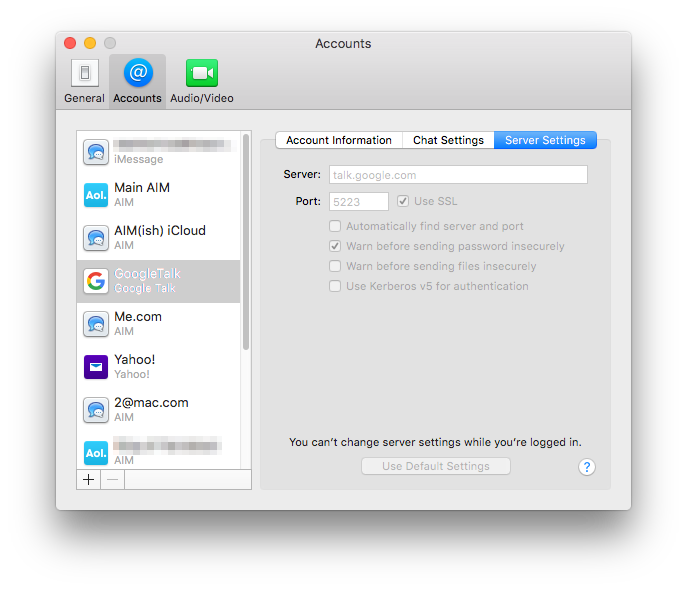
To resolve this issue with two type of email Names Google called there Server talk.google.com

You can see this in the Server Settings when you use the Google option to set up the account.
User uploaded file


I hope that helps make it clear.


User uploaded file

8:50 pm Monday; January 18, 2016


 iMac 2.5Ghz i5 2011 (Mavericks 10.9)
 G4/1GhzDual MDD (Leopard 10.5.8)
 MacBookPro 2Gb (Snow Leopard 10.6.8)
 Mac OS X (10.6.8),
 Couple of iPhones and an iPad

This thread has been closed by the system or the community team. You may vote for any posts you find helpful, or search the Community for additional answers.

Jabber Google Talk

Welcome to Apple Support Community
A forum where Apple customers help each other with their products. Get started with your Apple Account.