Hi,
The point is you can do both.
I have an Apple ID that is an old email from a Dial-Up account I once had.
I linked that to iCloud when it came out and got given an @me.com ID at the time and later an @iCloud one as well.
It so happens that AIM recognises the Apple issued ID as valid Screen Names so I can add AIM/AOL accounts using those whilst still using the Apple ID as the iMessages ID

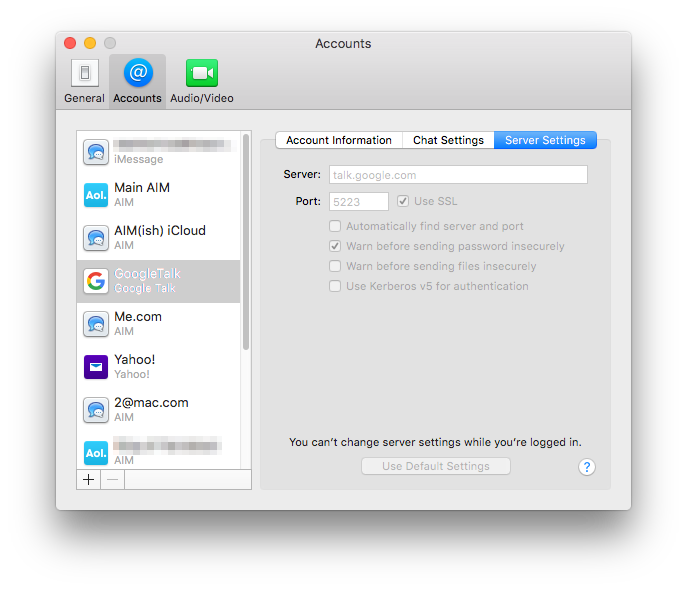
In this Pic the one I am showing is the @icloud.com based ID.
Lower down is the "me.com" one that speak for itself.
It could just as easily that my Google ID is the Apple ID used in Messages or even a Yahoo one and also set up an Yahoo account.
In the case of the AIM/Apple IDs entries the Passwords are the same as I use at Apple because AIM and Apple have and agreement the ID will be recognised as Valid Screen Names.
External (to Apple) email IDs can't be used with AIM but if they are Google or Yahoo then they can be used to set up those accounts.
It is likely though in these cases you use a different password with the email ID at Apple to the one you use with Google or Yahoo.
It might be easier to explain in the other way round.
Before Messages and the iMessages account the app was called iChat.
By the time it became iChat 6 you could have AIM accounts, Jabber accounts Including Google as a separate item and Yahoos accounts as well as the LAN based Bonjour account.
You could register at AIM for a Screen Name but Apples @mac.com, @me.com (if linked to iCloud now) and @icloud.com IDs are recognised by AIM as valid Screen Names.
From when I used iChat I have several AIM registered Names, some Apple IDs that works as AIM Screen Names and a Google ID and A Yahoo ID set up.
I used to have a Jabber ID as well but the server I was using has closed down.
These were all present in System Preferences > Internet Accounts (And iCloud) before I upgraded to OS X 10.8 which gave us Messages version 7 (the numbering for the app continued from where iChat stopped).
I then added the Apple ID I use as the iMessages ID separate from all the ones I had set up already.
Therefore you should be able to do both - set up the Google ID as an Google Account without having to use the Add Other and then enter the Google info as well as Add it as the Apple ID iMessages account.
If you do use the "Other" option and choose Jabber and then add the Google ID you will have the same problem as doing so in iChat 3
Google do not follow the same naming format for ID and server as other Jabber/XMPP servers do.
All other Jabber servers are named as the second part of the ID.
Therefore if you joined a server called Jabberapple.com then your User Name/Jabber ID would be dario848@jabberapple.com
As you add this in the Add settings the process strips the User ID part away and names the severs fro the remaining part so it automatically calls it jabberapple.com.
this does not happen with Google which is why it has a separate entry choice to add the account.
Google IDs can be either @gmail.com or @googlemail.com.
To resolve this issue with two type of email Names Google called there Server talk.google.com
You can see this in the Server Settings when you use the Google option to set up the account.
I hope that helps make it clear.

8:50 pm Monday; January 18, 2016
iMac 2.5Ghz i5 2011 (Mavericks 10.9)
G4/1GhzDual MDD (Leopard 10.5.8)
MacBookPro 2Gb (Snow Leopard 10.6.8)
Mac OS X (10.6.8),
Couple of iPhones and an iPad

