Importing zip codes from csv without losing leading 0

I found some older instructions in the Support Community for creating a custom setting in my Zip code column which suggests a cell pulldown to "custom" then the drop-down to formatting with Text and Numbers. That option is not available in my version of Numbers 3.6.1. We have over 6000 names in a maiing list to import with zip codes, and the leading zero is always lost. Other than using the Find and Replace feature in the imported file, is there another way to keep the leading zero in the Numbers spreadsheet?

iMac, Mac OS X (10.7.5)

Posted on Mar 22, 2016 6:19 AM

Reply
10 replies

Mar 23, 2016 5:44 AM in response to we04ndy

Hi we04ndy,

"custom" then the drop-down to formatting with Text and Numbers. That option is not available in my version of Numbers 3.6.1.


Numbers 3.6.1

Select the cells, then Format Panel > Data Format > Create Custom Format

Untick Show Separator (the thousands separator);

Tick Show Zeroes for Unused Digits;

Choose number of Digits.


User uploaded file


Another way is to use Numeral System, Base 10 as the Data Format. Set the number of places to insert leading zeroes.

User uploaded file


Regards,

Ian.

Mar 22, 2016 8:53 AM in response to we04ndy

If you are dealing with 5-digit zip codes then you can use the following script to restore the leading zeros after import.


User uploaded file


  1. Copy-paste script below into Script Editor (in Applications > Utilities folder)
  2. Select the cells with the zip codes (in this example A2:A5)
  3. With the cells selected click the 'run' button.


Be sure to test on a copy of your data first to make sure it is doing the right thing.


SG


tell application "Numbers"

tell front document to tell active sheet

tell (first table whose selection range's class is range)

repeat with c in (get selection range)'s cells

set v to c'sformatted value

set l to v's length

if l < 5 then

set c's value to ¬

"'" & "00000"'s characters 1 thru (5 - l) & v

else

set c's value to "'" & v

end if

end repeat

end tell

end tell

end tell

Mar 23, 2016 1:43 PM in response to we04ndy

Hi we04ndy,


Note that the script does something a little different from the two formatting approaches Ian illustrates.


The script actually adds back the leading "zeros" and converts the zip codes to "text." The text format is the common convention in spreadsheets and databases for columns that contain zip codes.


The formatting approaches, on the other hand, only display the leading zeros. They do not change the underlying values, which (because of the limitations in how Numbers imports CSV) remain as "numbers."


User uploaded file


User uploaded file


In many cases just changing how the values are displayed and leaving them as numbers will be good enough. But often it is better to restore the actual "text" value that existed in the source.


BTW, using the script requires no knowledge of ApplesScript. Just copy-paste into Script Editor, select the cells that need fixing, and click 'run'.


SG

Mar 25, 2016 10:59 AM in response to we04ndy

Hi we04ndy,


Here's a third approach—a formula that adds back the missing zeros. Two versions—the simple version in column B is suitable if you are dealing only with the original five digit Zip codes (note what it does when faced with the newer 5 + 4 extended version); the 'smarter' version in column C checks the length of the original, then edits it only if has fewer than seven characters*.

User uploaded file

B2 (and filled down column B): =RIGHT("00000"&A,5)


C2 (and filled down column C): =IF(LEN(A)<7,RIGHT("00000"&A,5),A)


*Why seven?

All properly formatted Zip codes have either five characters (all digits) or 10 characters (fine digits, a separator, four digits).

Any string of digits that includes an internal non-numeric character will be recognized by Numbers as a text string.

Any string of characters that goes through RIGHT("00000"&A,5) part of the formula will be converted to a text string.

Any "number" (such as 12345) that does not go through RIGHT("00000"&A,5) will remain a number.

Setting the bar high enough to capture the five digit Zips gives a consistent format (Text) to all of the values in column C; setting it low enough to exclude the extended Zip (already recognized as text) keeps these from being shortened as in column B.


Should your mailing list include addresses in Canada (postal codes in the format A1A 1A1), that seven should be increased to <8.


Regards,

Barry

Jul 4, 2016 10:39 PM in response to jimjepson

Hi Jim,


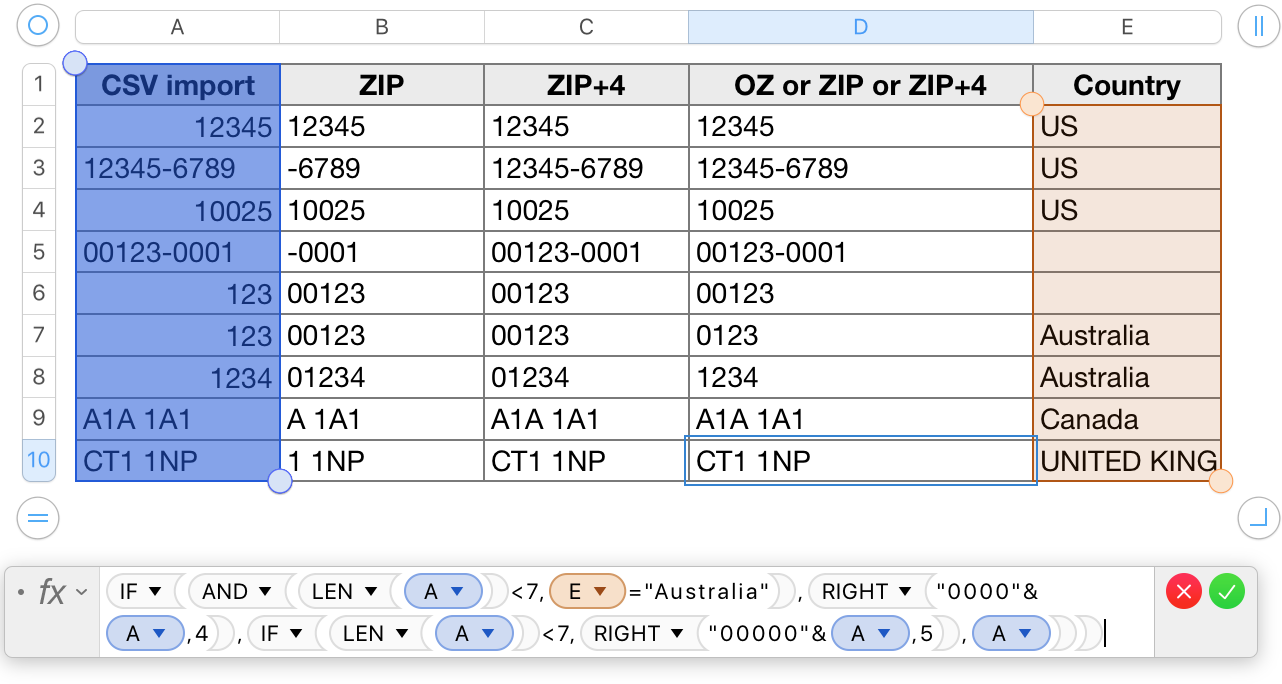
To my understanding, "ZIP code" refers to the specific Zone Improvement Plan code once registered as a Service Mark by the US Postal Service. Within that definition, ZIP and ZIP+4 codes are correctly handled by several of the solutions offered here.


If you are sending mail from the US to Australia (or to any other country), USPS address format requires the bottom line of the address to consist of the name of the country. Considering that name is probably included in the address information in your database, it should not be too difficult to modify a formula or script based solution to take that into account, and format Australian addresses to Australian PostCode standards.
User uploaded file

The leading zero issue affects only codes using a digits only format; Postcodes like those of Great Britain and Postal Codes like those of Canada, using a mix of alphanumeric characters are treated like text, and do not lose their leading zeros ( if, unlike Canadian and British versions, they do have leading zeros).


Badunit's suggestion of using a script or Service to convert the CSV file to a tab separated version, then paste the result into a column set to Text format will also handle all numeric codes with leading zeros without losing the zeros, regardless of the length of the codes.


SG's script is currently written to handle only five digit US ZIP codes, but is likely modifiable to accept other formats if given a means of determining which item is in which original format.


"Sure wish Apple could fix this simple problem."


It's unlikely to happen unless there's a demand for it.


Numbers menu > Provide Numbers Feedback

Make a feature request.

Briefly describe what you want. Tell why it would be a benefit, and to whom.

Make the request.


Apple does read requests via the feedback channel, and forwards them to development teams where appropriate. You are unlikely to receive a direct response unless it is a request for more details, and any result is unlikely to appear before the next full number release.


Regards,

Barry

This thread has been closed by the system or the community team. You may vote for any posts you find helpful, or search the Community for additional answers.

Importing zip codes from csv without losing leading 0

Welcome to Apple Support Community
A forum where Apple customers help each other with their products. Get started with your Apple Account.

