Reset Password page says "is not an apple id"

We recently replaced a hard drive. After restoring stuff, I tried to play a song on iTunes and got the message saying "This computer is not authorized..." and it gave me a chance to enter the password with the Apple ID already filled in. No password worked, so I just clicked "Forgot?" and was taken to the Apple page to reset the password. The Apple ID was already entered, so I clicked "continue". At that point, however, the page popped up a message saying "<myemail@address> is not an Apple ID".


I don't understand because that is the email address with which the song was purchased. What do I do now?


iTunes 12.3.2.35

Windows 7

iTunes-OTHER, Windows 7

Posted on Apr 6, 2016 6:37 PM

Reply
6 replies

Jan 16, 2017 6:17 PM in response to brenden dv

This happened to me as well. My first Apple ID was created with my first iPhone 4. I BOUGHT OVER 1,100 SONGS UNDER THAT APPLE ID!!!!

Nope, not a typo!! I spent over $1,100 over a 2-3 yr period. Later on, I created a 2nd apple ID ( why I did so is a long story) when I got my 2nd Apple phone, an iPhone 5. I still had my old iPhone 4 and access to all my music I paid Apple well OVER a grand for. I used this old phone as an iPod, sort of. I got cancer and fighting it took almost a year of my life... I took a break from purchasing from I Tunes for a bit. Fast forward to 2 yrs ago & my iPhone 6 purchase. I decided to use my OLD APPLE ID and download all my music ( that I'd paid Apple the right to access & listen to) onto this new phone. WRONG!! Apple tells me that my old Apple ID is not an " Apple ID"!! I have maintained the email address I used for that ID and it was purchased on the SAME DEBIT CARD!! I can show you 500+ songs I dowloaded onto my PC with my name and the NON EXISTANT APPLE ID is plainly visible!! I don't know what games Apple is playing with their customers, but I've read many similiar stories online. What's the deal?? I've TRIED TO RECOVER THE PASSWORD, reser everything and NOTHING WORKS. I went to the Apple store in Knoxville, TN amd nobody could help me. TWICE they've set up a call from Apple at a certain date/time...but when I try to take the call, a malfunction occurred and I was disconnected. I'm heartsick without my music... It's helped me through so many tough times in my life and now that I'm sick again, I'd love to have my beloved music to listen to. Idk what to do... but I feel betrayed and I'm not keen on continuing as an Apple customer.

Apr 8, 2016 6:48 AM in response to iNoodles4118

Hi iNoodles4118,


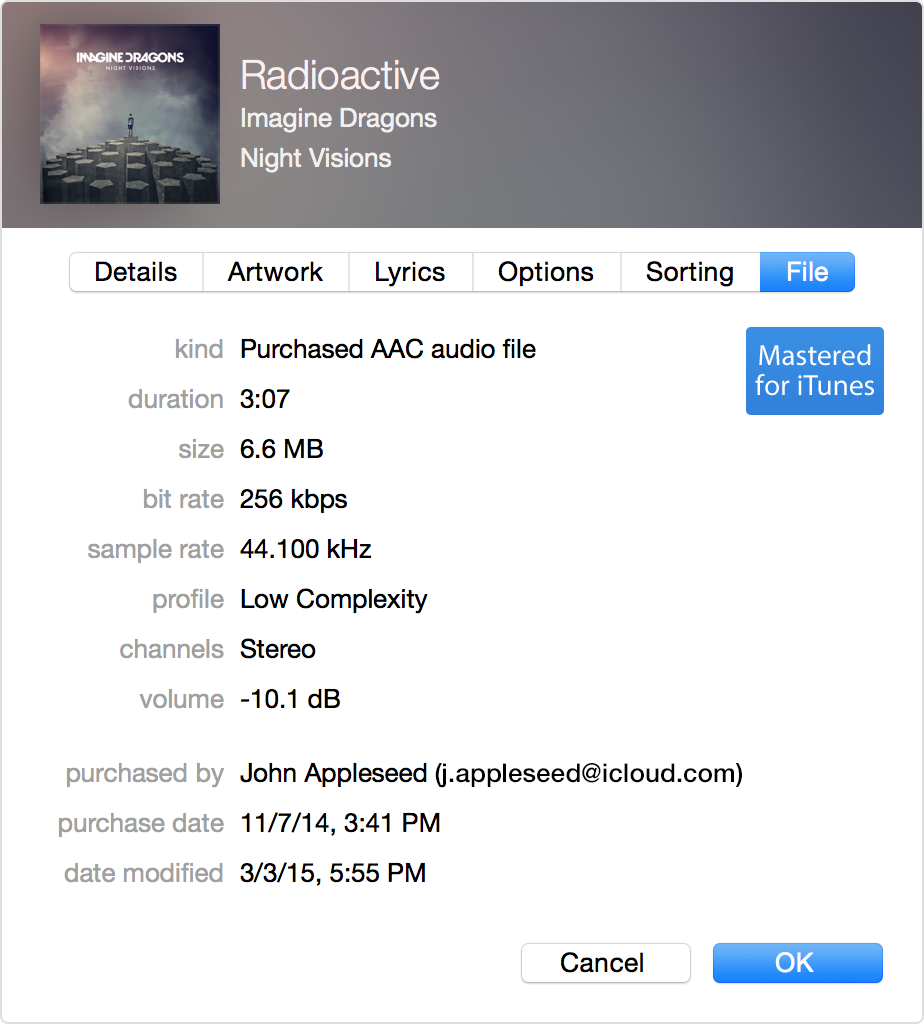
Welcome to the Apple Support Communities! I'm sorry to hear that you are having these issues with iTunes and your Apple ID. I'm a bit unclear if the Apple ID that was already filled in on the authorization page when you tried to play the song is your current Apple ID, or possibly a previous or even an unknown ID. You may want to double-check to see what Apple ID the song was purchased under, as outlined below:


Check iTunes for previous purchases

If you previously bought something in the iTunes Store, you can check which account was used to purchase it.

User uploaded file

If the Apple ID has changed since, then the name in File Info won't work.

  1. Open iTunes.
  2. Click one of your purchases. You can find your purchases under My Music or Playlists.
  3. Choose File > Get Info.
  4. Click the File tab.
  5. The ‘purchased by’ will show your Apple ID in parenthesis that was used to buy the item.

If you find your Apple ID, but still don’t remember your password, reset your password.


If you forgot your Apple ID - Apple Support


If this is your current Apple ID, you should be able to verify that your password is correct and working by going to the main Apple ID page:


Manage your Apple ID


You may also find the information and steps outlined in these articles helpful:


Authorize your computer in iTunes - Apple Support

If iTunes repeatedly prompts you to authorize your computer - Apple Support


Regards

Apr 10, 2016 8:25 PM in response to brenden dv

Hi Brendan,


I did as you suggested by finding out the Apple ID that was used to purchase the song. Yes, that's the same Apple ID that is presented when I try to play the song. When I try to play it, here's what I get:


User uploaded file


So, I then click "Forgot?" and a browser is opened to the password reset page. That page has the same Apple ID filled in, so I click on "Continue". At that point, here's what I get:


User uploaded file


So that's why I'm stuck. Clearly, it's a valid Apple ID since that's what was used to purchase the song. But, the password reset site claims that it is *not* an Apple ID. Any other suggestions?


Thank you for trying to help!

Apr 13, 2016 5:19 PM in response to brenden dv

Well, we managed to figure it out. The Apple ID (email address) that was used to purchase the song was changed to use a different email address. Apparently, though, the original Apple ID (email address) is somehow stored with the song and is not updated when the email address is changed. So, to unlock the song, we entered the new email address with the known password and that caused the computer to be authorized.


Very confusing, so hopefully these posts will save someone else some time.


Thank you for your replies and trying to help.

This thread has been closed by the system or the community team. You may vote for any posts you find helpful, or search the Community for additional answers.

Reset Password page says "is not an apple id"

Welcome to Apple Support Community
A forum where Apple customers help each other with their products. Get started with your Apple Account.