use itunes to backup pdfs from ipad ibooks
I want to back up pdfs from my ipad to my pc using itunes. Step by step, how do I do that?
I want to back up pdfs from my ipad to my pc using itunes. Step by step, how do I do that?
Hi Polaris593,
I understand you would like to get copies of your PDFs that are currently on your iPad to your Windows computer. Your post doesn't indicate what version of the iOS you are working with, so I'll include the most recent information and we'll go from there.
Sync your iPhone, iPad, or iPod touch with iTunes using USB
In addition to Music, Movies, and TV shows your tabs might include:
Info: Sync your contacts and calendars.
Apps: Manage your apps and file sharing.
Podcasts: Sync your podcasts.
iTunes U: Sync your iTunes U courses.
Books: Sync your books and and PDF documents.
Audiobooks: Sync your audiobooks.
Tones: Sync your ring(tones) and other alert tones.
Photos: Sync your photos. Learn how to sync photos with iTunes. Turn on syncing.
iTunes can't sync certain content, including mail accounts, notes, or bookmarks.
Use iBooks with PDF documents on your iPhone, iPad, or iPod touch
iBooks comes pre-installed on iOS 8 and later. To install the latest compatible version of iBooks on an older version of iOS, follow these steps.
You can sync PDF documents to your computer from iBooks in iOS and iTunes 10.1 or later.
Sync and save PDFs
The first time that you open iBooks after you update to iOS 9.3 or OS X 10.11.4, you'll be prompted to use iCloud. Learn more about syncing your books and PDFs using iCloud.
You can also add PDFs to your iTunes library on your computer by dragging and dropping the PDF into your iTunes Book library. The files will appear when you are preparing your device to sync. If you're using OS X Mavericks or later, drag and drop your PDFs into your iBooks library using iBooks for Mac. All PDF or iBook files in your iBooks library are available to sync to your iOS device via iTunes.
To sync a PDF from your computer to iBooks on your iPhone, iPad, or iPod touch:
- Select your iOS device. (Learn how to sync your data with iTunes.)
- Under Settings, click Books.
- Select Sync Books.
- If iTunes is set to sync only selected books, make sure that there's a check in the checkbox next to the PDF you want to sync.
- Click Sync.
You can also use iTunes to back up your PDF files. To transfer PDFs to your computer and back them up, transfer purchases from your iOS device to your computer. These files are not in an iTunes Backup. Learn more about what's contained in iTunes and iCloud backups.
If you only have a few PDF files, emailing them is the simplest method:
Email and print PDFs
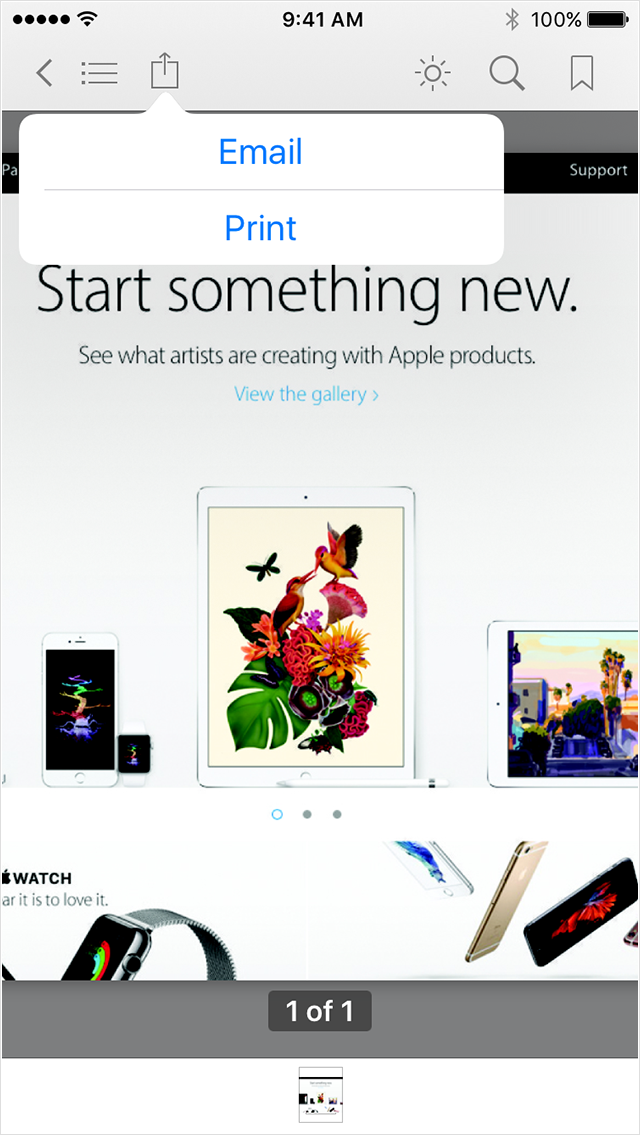
To print or email your PDFs or notes in iBooks for iOS:
- Open iBooks.
- Tap the menu at the top of the screen.
Depending on which view you're on, this menu might be called All Books, Books, PDFs, or the name of a collection you created.- Select PDFs from the pop-up menu.
- Tap the PDF that you want to print or email.
- Tap the Share icon
in the top menu bar. You might need to tap once anywhere on the screen for the menu to appear.
- Tap Print or Email, depending on what you want to do.
- Print: Select an AirPrint printer, page range, and number of copies. Then tap Print.
Email: Enter the email address you'd like to send the PDF to, and add a message to the body, if you want. Then tap Send.
Set up and use iCloud for Windows
See your files with iCloud Drive
When you turn on iCloud Drive, iCloud for Windows creates an iCloud Drive folder in File Explorer. Any documents that you've stored in iCloud will automatically download to the iCloud Drive folder in File Explorer. Files that you create on your PC and save to this folder will automatically appear on your other devices.
Take care,
use itunes to backup pdfs from ipad ibooks