Unable to auto indent first line of paragraph in Word using Mac Dictation

I have a new MacBook Air and I am using Word for my manuscripts per my publisher. I have my document configured to auto indent the first line of every paragraph. This works fine when typing. When I dictate using the built-in dictation, it refuses to indent the first line whenever I say 'new line' or 'new paragraph'. This is extremely frustrating and it's a total deal-breaker for me. If I dictate in Pages, it works fine. I need this to work in Word. I can't keep working in one program and copying and pasting into Word. I have tried creating a new dictation command, but it will not accept pressing ENTER as a shortcut key. Is there something I'm missing? I desperately need help with this.


Posted on May 31, 2016 11:19 PM

Reply
5 replies

Sep 12, 2017 11:38 PM in response to Nikkielynn

Apple products work best for Macs. To indent the first line of a paragraph in a TextEdit document, drag the Indent slider right of the left end of Ruler. To save this indent, open menu ‘Format › Font › Styles… › Add to favorites’ and name your indent style ‘My Indent’. Siri can then be given two commands: ‘Choose a paragraph style’ and ‘My Indent’. TextEdit will continue to apply the indent to subsequent paragraphs.

User uploaded file

Jun 2, 2016 9:46 AM in response to Nikkielynn

Hello there, Nikkielynn.


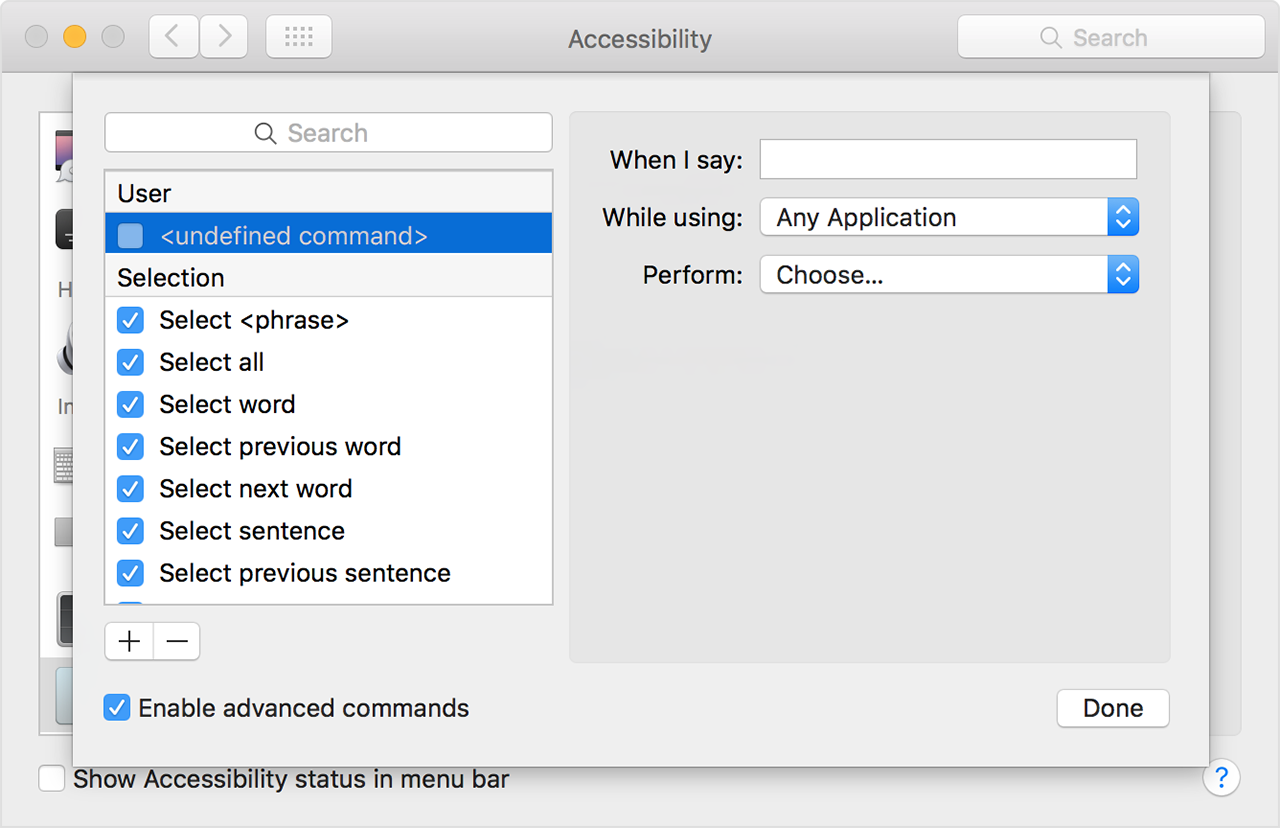
It sounds like you're not seeing desired behavior from your Mac when using Dictation with Microsoft's Word application. The following Knowledge Base article offers up some great guidance on creating/customizing commands in dictation that may help in creating the desired behavior in Dication:


Use your voice to tell your Mac what to do


Create your own commands

After you select “Enable advanced commands,” an Add User uploaded file button appears beneath the list of commands.

  1. Click the Add User uploaded file button to add “undefined command” to the list of commands.
  2. Click the undefined command to select it, then configure these options:
    • When I say: Enter the word or phrase that you want to speak to perform the action.
    • While using: Choose whether your Mac performs the action only when you're using a particular app.
    • Perform: Choose the action to perform. You can open a Finder item, open a URL, paste text, paste data from the clipboard, press a keyboard shortcut, select a menu item, or run an Automator workflow.

User uploaded file

User uploaded file

To learn more about dictation, choose Help from the Finder menu bar, then search for “dictation.”


One thing you can also try, to further isolate the behavior, is to test in another application such as TextEdit or Pages. This article provides some explanation on how to accomplish that:


Mac OS X: How to troubleshoot a software issue


Thanks for participating in Apple Support Communities.


Kind Regards.

Jun 8, 2016 4:56 PM in response to Nikkielynn

I think that this is a 'bug' in Word. MS has a reputation for using their own code instead of calling the Apple APIs, which mean MS apps don't integrate well with things like dictation. In this case, the code that actually renders the style doesn't seem to execute when the 'new line' instruction is dictated.

As a workaround, I would suggest you stick with dictating your text into another application, such as Text Edit. Then, when you're done copy and paste the lines into Word and apply your desired paragraph style to the whole lot in one go.

Another workaround is to save the document in another format, such as RTF, and then reopen it again. This seems to reapply the paragraph style(s) correctly.


C.

This thread has been closed by the system or the community team. You may vote for any posts you find helpful, or search the Community for additional answers.

Unable to auto indent first line of paragraph in Word using Mac Dictation

Welcome to Apple Support Community
A forum where Apple customers help each other with their products. Get started with your Apple Account.