How to delete songs from iPod (5th generation)?

Dear all,


I have an old iPod (5th generation) 80 GB.

On it i have music and audio lessons. There is almost no more capacity for new songs, so i wanted to clean it up and remove some.

But ... i can't : via iTunes i select a playlist form the iPod and i click on Delete. However, this action only removes the playlist from the menu, the files are still on it - i can see that the amount of space on the device is still the same.


Please help: how can i physically delete the songs from my old device?


Thank you !

Atanas

iPod (5th generation)-OTHER

Posted on Jul 2, 2016 11:27 AM

Reply
11 replies

Jul 3, 2016 11:08 AM in response to Super Moon

Hi Super Moon,


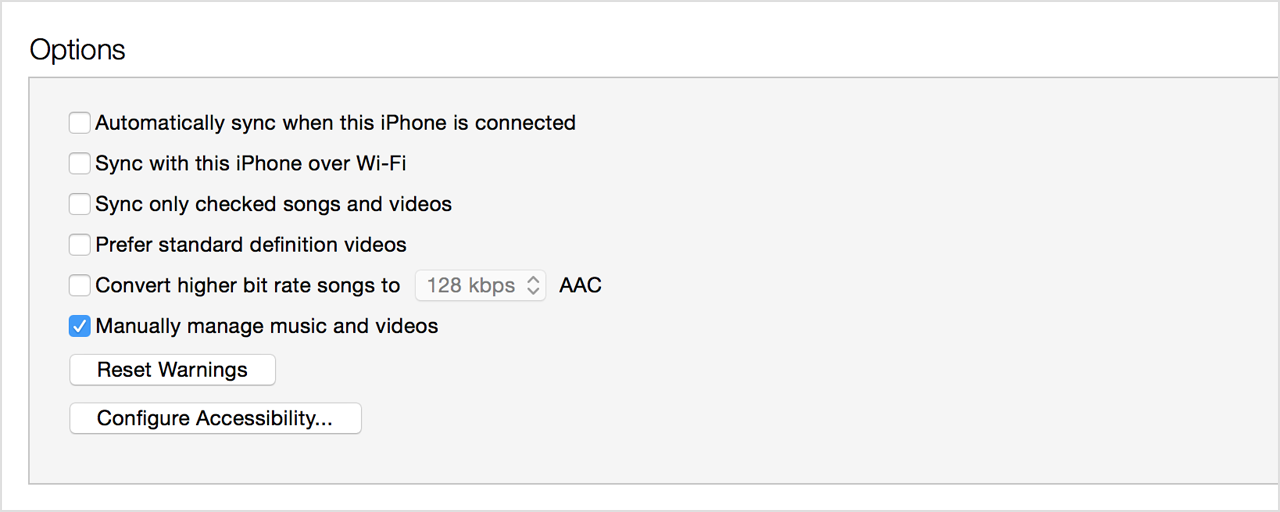
I see that you're looking to remove some songs on your iPod to make room for new content to sync over. I'd like to help you remove these songs from your device. To easily manage your content, I'd recommend using the "Manually manage music and videos" setting.


Please follow the instructions here to make sure this setting is enabled:


If you can't manually add or remove content from your device

Check to make sure that the "Manually manage music and videos" option is turned on:

  1. Connect your device to your computer.
  2. Open iTunes. Make sure that you have the latest version.
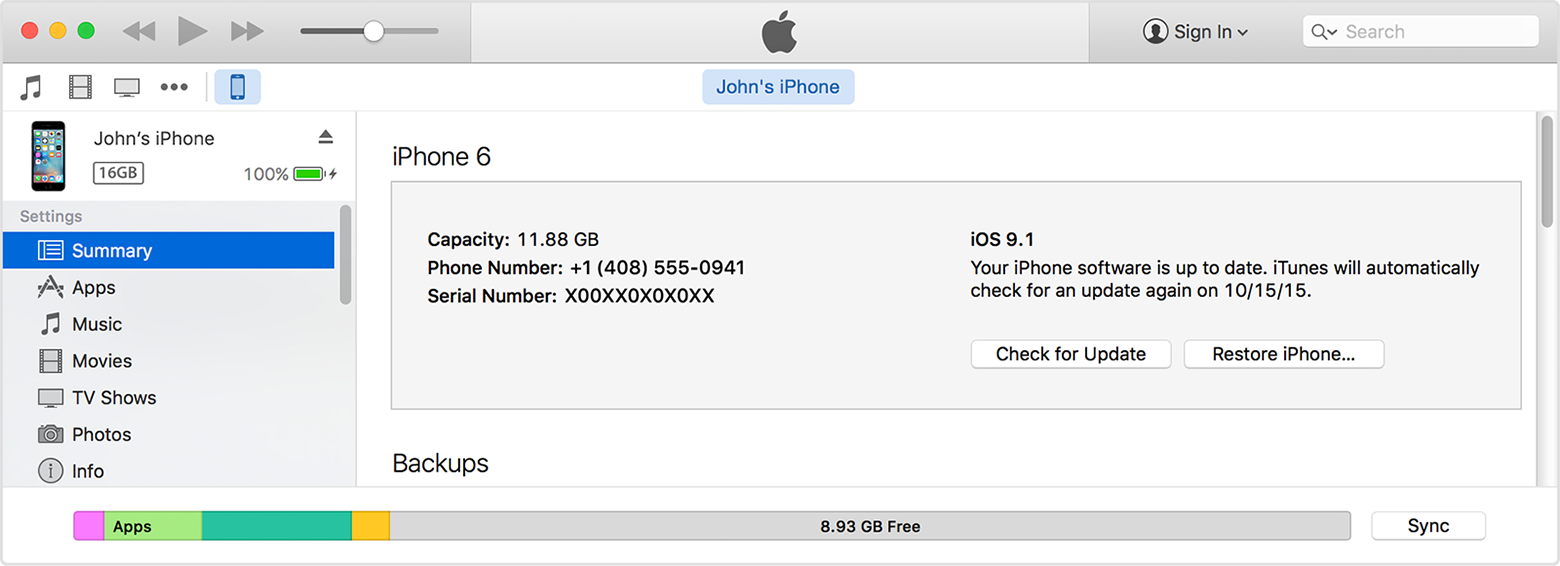
  3. Locate and click on your device.
    User uploaded file
  4. In the left sidebar, click Summary.
  5. Scroll down to the Options section.
  6. Click the box next to "Manually manage music and videos."
    User uploaded file
  7. Click Apply.


Once you've done this, select your iPod from the iTunes sidebar. If you need to enable the sidebar in iTunes, you can do this using View > Show Sidebar. Click the disclosure triangle next to the iPod, then choose "Music" from the indented list under the iPod. This will show you all of the songs that you're currently storing on your iPod. From here, you can select the songs that you no longer want on the device, then press the delete key on your keyboard to remove them.


The steps quoted above were taken from this Apple resource:

Move content from iTunes on your computer to your iPhone, iPad, or iPod touch - Apple Support


Cheers!

Jul 4, 2016 11:53 AM in response to Super Moon

Hello Super Moon,


Since you're not able to remove the songs normally, I'd recommend that you follow these steps to restore your iPod back to factory settings:


Restore your device to factory settings

  1. Open iTunes on your Mac or PC.
  2. Connect your iPhone, iPad, or iPod to your computer with the cable that came with your device.
  3. If a message asks for your device passcode or to Trust This Computer, follow the onscreen steps. If you forgot your passcode, get help.
  4. Select your iPhone, iPad, or iPod when it appears in iTunes.
  5. In the Summary panel, click Restore [device].
    User uploaded file
  6. Click Restore again to confirm. Then iTunes erases your device and installs the latest iOS or iPod software.
    User uploaded file


Use iTunes on your Mac or PC to restore your iPhone, iPad, or iPod to factory settings - Apple Support


After the restore is complete, you can then sync the desired content back to the iPod and test to see if any issues arise.


Take care!

Jul 4, 2016 11:36 AM in response to rose_10

Hi Sarah,


Thank you for the exhaustive explanation. Please note that i have followed those steps several times, but with no luck.

After deleting the songs, my device is still showing the same amount of free space i.e. the songs seem to not be physically removed - only taken out of the playlists - see below. And it doesn't matter how much i delete, the remaining space is still the same.

User uploaded file


I checked the information about the device in the Finder, and here is what i found: Format is MS-DOS, while all my computers (nowadays) are Apples:

User uploaded file

Can that be the problem that due to the MS-supported file format i cannot delete from a Mac?


I am still not able to free up some space in my old iPOD and this is a big concern.


Any ideas how to overcome this challenge?


Kind regards,

Atanas

Jul 7, 2016 11:57 AM in response to Super Moon

See my user tip Recover media from an iPod. You have the files, but they need to be added to iTunes which will hopefully find all the metadata that is still inside the files and can then group them properly by artist and album. Once they are in iTunes you use it to copy the tracks back to the device, not Finder. Note make sure your folders and tracks are not hidden if you are going to use the Automatically Add to iTunes folder to add them to iTunes since when testing (at least with Windows) I discovered that iTunes would discard hidden files instead of adding them to the library.


There would have been an opportunity to extract playlists from the device too, but that was lost when you restored the device before preparing everything in the library. 😟


tt2

Jul 4, 2016 11:58 AM in response to Corrie84

Hi Corrie,


thank you for the answer. I am afraid i cannot simply reset my iPod - i have invested endless time and efforts to build this collection of music and lessons, so i cannot simply erase all for the sake of going back to original settings. This is an old iPod (dating from 2003), so i do not know even what original settings would mean 🙂. Backups are not supported anymore, as you can see form my screenshots.


P.S. I can't believe that nobody else has not had the same problem and there is no answer in the Mac community about this problem ..


Kind regards,

Atanas

Jul 7, 2016 2:50 AM in response to Super Moon

A playlist is an ordered list of track references. The same track can be added to multiple lists without taking up more space. Deleting a playlist from a manually managed device won't delete the songs it is comprised of. You should be able to select On My Device > Music and then delete individual items from that location. If that really isn't working to reclaim used space then that would suggest that something has gone with the file management system on the device. The usual approach would be to wipe out the device and reload the content, but that presupposes you have all of the content in your main library. If you don't the link I have provided shows how to recover all of the media into the library so that you are in a position that wiping the device and reloading it becomes a practical proposition.


tt2

Jul 7, 2016 11:27 AM in response to turingtest2

Hi TT2,


I do not keep all my records in the local computer / library, since they are collected through the years and uploaded via various computers to this iPod.


Nevertheless, I followed all the steps you mentioned to backup my files from the iPod.

Then i reset it, which erased all. I copied back all the files, but ... the songs are not visible in playlists of the iPod.

So, i cannot play them anymore. The metadata could not be recognised. I see that the Pod is full, but not readable. Possibly because it has been formatted as MSDOS, and after the reset it became OS-compatible.


I will start collecting my songs again ... 😟.


Kind regards,

Atanas

This thread has been closed by the system or the community team. You may vote for any posts you find helpful, or search the Community for additional answers.

How to delete songs from iPod (5th generation)?

Welcome to Apple Support Community
A forum where Apple customers help each other with their products. Get started with your Apple Account.