Can't block sms with no number

I can't block SMS from senders without numbers(there's a description instead).


In IOS 9, I could block everybody, including the senders without numbers, and the ones I added while running IOS 9, still works.

But now, I cannot block new senders where there are no phone number but only a description instead of a number. I can how ever mute them so I don't get woken op 10 times throughout the night.


When I press the (I) info button, and then I press the description(where the number should be), I CAN create a new contact, and there's then a block option available to me, but i does nothing.

If I go to settings and try to block the created contact from the address book, it is grey and cannot be selected.


Am I the only one who has this problem?

iPhone SE, iOS 10.0.2

Posted on Oct 1, 2016 2:46 PM

Reply
Question marked as Top-ranking reply

Posted on Apr 7, 2017 3:38 AM

I would like to offer a better solution to this problem. It has been bugging me too.


  • Open your messages app and click on the spammy message.
  • Click on the "i" icon at the upper right corner.
  • You will see the "Details" page. Notice the phone icon at the right side of the name.
  • When you click it your phone will try to call a number, that was hidden until now. Immediately cancel the call.
  • Now go to "Phone > Recents" You will see that number on the top.
  • Again click the "i" icon besides it and you will have the option to block it permanently


Cheers.

22 replies
Question marked as Top-ranking reply

Apr 7, 2017 3:38 AM in response to MartinRJ

I would like to offer a better solution to this problem. It has been bugging me too.


  • Open your messages app and click on the spammy message.
  • Click on the "i" icon at the upper right corner.
  • You will see the "Details" page. Notice the phone icon at the right side of the name.
  • When you click it your phone will try to call a number, that was hidden until now. Immediately cancel the call.
  • Now go to "Phone > Recents" You will see that number on the top.
  • Again click the "i" icon besides it and you will have the option to block it permanently


Cheers.

Oct 2, 2016 4:45 PM in response to MartinRJ

Hi MartinRJ,

I understand that you are wanting to block contacts that don't have a number and instead only offer a description. I know it's important to have control over who can contact you, so I'm happy to help.

This article offers some good information and alternatives to work around this issue:

Block phone numbers and contacts or filter messages on your iPhone, iPad or iPod Touch - Apple Support

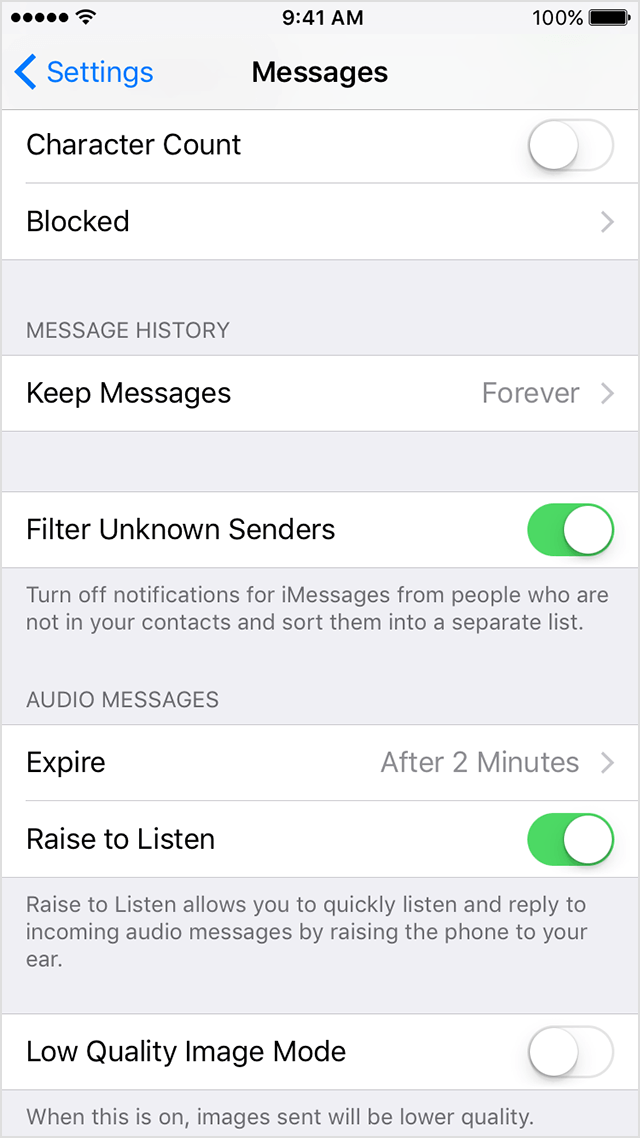
One good suggestion that may work for you in there is to filter messages from unknown senders:

Filter iMessages from unknown senders

You can filter iMessages from people who aren't saved in your Contacts.

User uploaded file

To filter iMessages, go to Settings > Messages and turn on Filter Unknown Senders.

User uploaded file

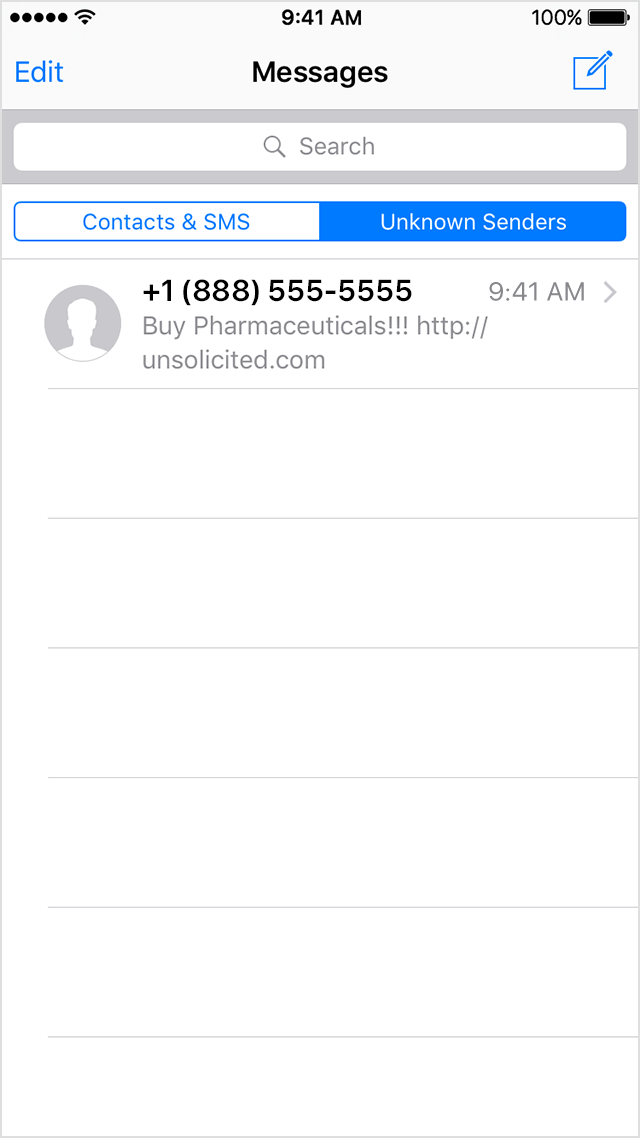
In Messages, you'll see a new tab for Unknown Senders but you won't get notifications for these iMessages.


In addition, you may be able to use third party apps to manage this:

Detect and block spam phone calls with third-party apps - Apple Support

Thanks for using the Apple Support Communities. Cheers!

Sep 13, 2017 5:54 AM in response to raina_b22

This is not helpful. After enabling Filter Unknown Senders, it still places the unknown SMS with no number and a name into the "Contacts & SMS" tab. Clearly there is something broken in the way this is handled.


Personally I'd love Apple to add an automatically block all SMSs which don't provide a number, since it is always spam. I have never seen a legitimate SMS that withholds its number.

Oct 24, 2017 11:14 PM in response to sakshi003

Yes, sakshi003, this is the problem: there is no option to block the sender, there is no number to save and block in contacts, and calling back only displays the sender's title (with certain letters replaced with commas) with no number to call. The Original Poster mentioned that iOS 9 allowed anything to be blocked but iOS 10 fails to do so. So Apple disabled a feature, either on purpose or accidentally. Filtering ALL unknown senders is clearly not

desirable for users who may want to receive texts from people not yet in contacts. Wish I could upgrade past iOS 10.3.3 to iOS 11 but all I can afford is an iPhone 5.


Does anyone know how this type of spammer has managed to hack AppleiOS 10 with unblockable, untraceable text messages that originate from a title replacing some letters with commas?


See screen shots below. Pressing the "i" button does not offer a block option. Calling back does not succeed but changes letters of the sender's identity into commas (HAPPYPUPPY becomes HA,,Y,U,,Y) and the call hangs indefinitely. H

anging up and pressing "Call Back" produces an "Unknown Error" gray screen.


Thanks for helping us identify the root cause here.


User uploaded file

This thread has been closed by the system or the community team. You may vote for any posts you find helpful, or search the Community for additional answers.

Can't block sms with no number

Welcome to Apple Support Community
A forum where Apple customers help each other with their products. Get started with your Apple Account.