«Cannot Connect to App Store»

I have a new iPhone 7, and on 4G I can't connect to the app store. Either it's just loading (featured) or it says it cannot connect ... (categories). My 4G connection is excellent and the internet works on the phone. It's onlye app store.


On wi-fi it app store always works fine.


I had the exact same problem on my iPhone 5. What's wrong?User uploaded file

iPhone 7, iOS 10.0.3, null

Posted on Oct 23, 2016 11:24 AM

Reply
Question marked as Top-ranking reply

Posted on Oct 24, 2016 11:12 AM

Celluar is on, roaming is on. 4G works fine, I can surf and use the internet everywhere. It's only App Store which doesn't work 😟

9 replies

Oct 24, 2016 8:16 AM in response to madswam

Hello madswam,


Thanks for that info and choosing the Apple Support Communities. I know how important being able to use the App Store on your iPhone is to you! If I understand correctly, you are unable to connect to the App Store on your iPhone 7 and iPhone 5 when on cellular data, but have no issues if the devices are on a Wi-Fi network. This sounds like it narrows it down to the cellular connection, especially if both iPhones are using the same carrier. I would recommend walking through each of these steps and test your issue with the App Store to help resolve your issue:


  1. Check your coverage area to make sure that you're in an area with cellular network coverage.
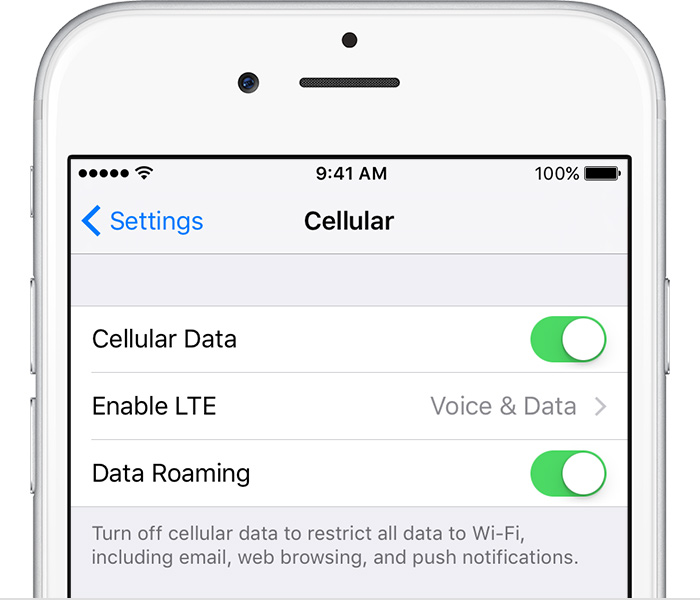
    • If you can't connect to a cellular network on your iPhone, make sure that cellular data is on in Settings > Cellular*. On your iPad, go to Settings > Cellular Data.
    • If you're traveling internationally, make sure that your device is set up for data roaming. Go to Settings > Cellular > Data Roaming.
      User uploaded file
  2. Restart your iPhone or iPad.
  3. Check for a Carrier Settings Update.
  4. Update your iPhone or iPad to the latest version of iOS.
  5. Take out the SIM card and put it back in. If the SIM card is damaged, or doesn't fit in the SIM tray, contact your carrier.
  6. Reset your Network Settings. Tap Settings > General > Reset > Reset Network Settings. This also resets Wi-Fi networks and passwords, cellular settings, and VPN and APN settings that you've used before.
  7. If you have another device, see if you can connect your carrier's network with it in that location.
  8. Contact your carrier to:
    • Verify that your account is active and in good standing.
    • Make sure there are no outages in your area.
    • Check that your device isn't blocked from receiving cellular services and is set up with the right data plan.

If you still can't connect to a cellular network, and have confirmed with your carrier that there isn't an issue with your account or network, try restoring your device.


If you can't connect to a cellular network or cellular data


Cheers!

Oct 24, 2016 10:11 AM in response to madswam

Thanks for replying and that screenshot, it really helps! In some countries, you might see Mobile instead of Cellular. For example, you might see Settings > Mobile or Settings > Mobile > Mobile Data Network instead of Settings > Cellular or Settings > Cellular > Cellular Data Network. So you can still follow the directions and article above, just substitute Settings > Mobile Data for Settings > Cellular in any of the steps.


Have a great day and thanks for using the Apple Support Communities!

This thread has been closed by the system or the community team. You may vote for any posts you find helpful, or search the Community for additional answers.

«Cannot Connect to App Store»

Welcome to Apple Support Community
A forum where Apple customers help each other with their products. Get started with your Apple Account.