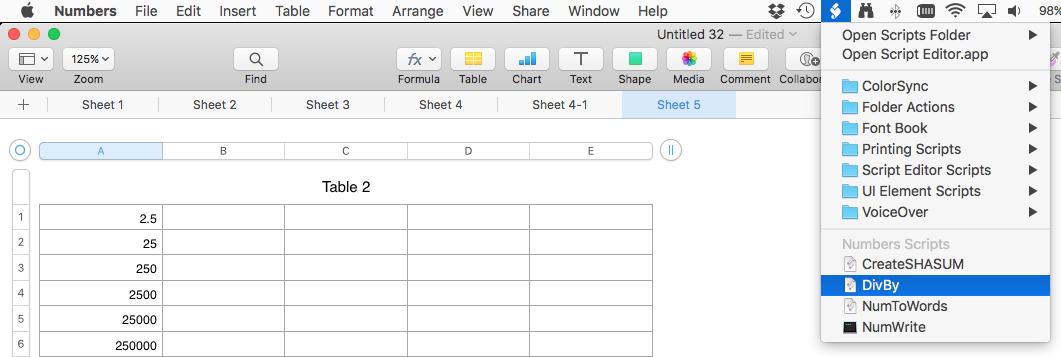
If you do not see the script menu in the menu bar you may need to enable the menu by launching the application "ScriptEditor" in the folder /Applications/Utilities
then open the preferences for ScriptEditor by selecting the menu item "ScriptEditor > Preferences…" and check the box "Show Script menu in menu bar":
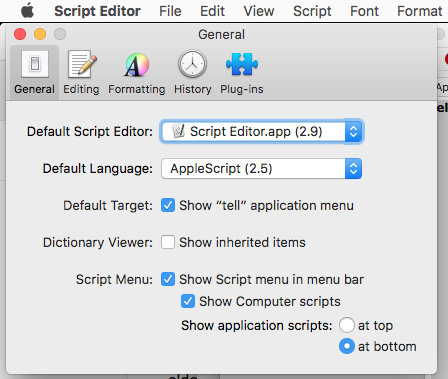
If you had to do this you may have to quit Numbers and restart it.
Now open the Numbers script folder.
2) In ScriptEditor, create a new script by selecting the menu item "File > New"
3) save the document in the Numbers script folder and name the file "DivBy"
4) copy the following from here and paste into the script document:
tell application "Numbers"
set dividend to (text returned of (display dialog "Enter Divsor" default answer "0"))
-- display dialog "you want to divide by " & dividend
tell front document to tell active sheet
tell (first table whose selection range's class is range)
set selectionRange to column 1 of selection range
set destRange to range
repeat with aCell in selectionRange'scells
set value of aCell to the (value of aCell) / dividend
end repeat
end tell
end tell
end tell
Now save the document.
to use the script, select the column of data, then select the menu item "Scripts > DivBy", then enter the dividend when prompted