Numbers Divide whole column

Hello


I have just starting to use Numbers and im trying to figure out before in similar program.


example of numbers i have

Header
350
250
433


What i want to achieve with a formula. divide all numbers by 10


Header 1
35,0
25,0
43,3


In the software im use to work in i was able ti just copy 10 and the paste with special. all done.


Best regards


Robert

Posted on Nov 3, 2016 3:52 AM

Reply
2 replies

Nov 3, 2016 4:43 AM in response to Robertsvantesson

You can use an extra column like this:


1) add a new column to the right of the column you want to divide.

2) add the formula (assuming the original data is in column A)

B2=A2/10

this is shorthand for... select cell B2, then type (or copy and paste from here) the formula

=A2/10

3) select cell B2, copy

4) select cells B2 thru the end of column B, paste

5) select column B, copy

6) select column A, then use the formula "Edit > Paste Formula Results"

7) remove column B


OR you could write an apple script to perform the task in place. To do this

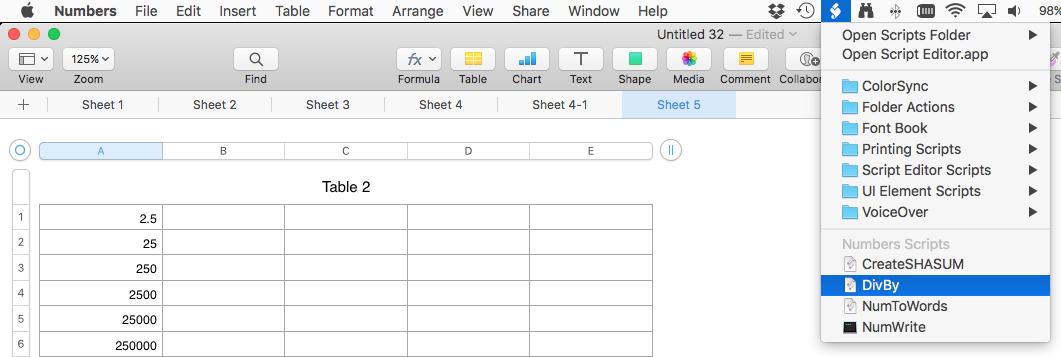
1) locate the Numbers script folder by opening the menu item "Scripts > Open Scripts Folder > Open Numbers Scripts Folder":


the word scripts should actually be the scripts icon shown in the menu bar of the screenshot

User uploaded file


I will finish this post shortly... I have to go

Nov 3, 2016 5:25 AM in response to Wayne Contello

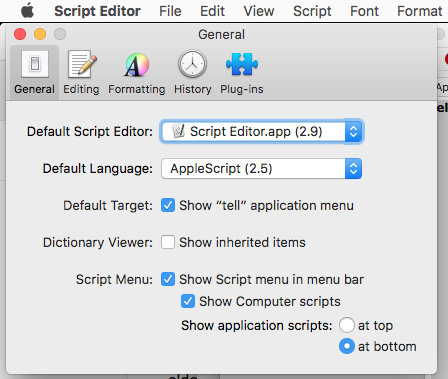
If you do not see the script menu in the menu bar you may need to enable the menu by launching the application "ScriptEditor" in the folder /Applications/Utilities


then open the preferences for ScriptEditor by selecting the menu item "ScriptEditor > Preferences…" and check the box "Show Script menu in menu bar":
User uploaded file

If you had to do this you may have to quit Numbers and restart it.

Now open the Numbers script folder.


2) In ScriptEditor, create a new script by selecting the menu item "File > New"

3) save the document in the Numbers script folder and name the file "DivBy"

4) copy the following from here and paste into the script document:


tell application "Numbers"

set dividend to (text returned of (display dialog "Enter Divsor" default answer "0"))


-- display dialog "you want to divide by " & dividend

tell front document to tell active sheet

tell (first table whose selection range's class is range)

set selectionRange to column 1 of selection range

set destRange to range

repeat with aCell in selectionRange'scells

set value of aCell to the (value of aCell) / dividend


end repeat

end tell

end tell

end tell

Now save the document.


to use the script, select the column of data, then select the menu item "Scripts > DivBy", then enter the dividend when prompted

User uploaded file

This thread has been closed by the system or the community team. You may vote for any posts you find helpful, or search the Community for additional answers.

Numbers Divide whole column

Welcome to Apple Support Community
A forum where Apple customers help each other with their products. Get started with your Apple Account.