unread message count shows incorrect number

In the VIP mailbox of Mail on my desktop, the unread message count shows 3 unread messages from one VIP contact, but when I scroll through the messages in that mailbox, there aren’t any unread messages. I tried right-clicking on that mailbox and selecting Mark All Messages as Read, but the icon still says 3. When I log in to iCloud.com and check for mail, there aren’t any unread messages in the VIP mailbox. Closing and re-opening the Mail app doesn’t fix the problem. How can I clear this counter or find the unread messages that it thinks I have?

iMac, OS X Yosemite (10.10.5), 3.4GHz Core i7 27 in. (mid 2011)

Posted on Nov 14, 2016 4:38 PM

Reply
3 replies

Nov 15, 2016 12:23 PM in response to William M.

Hello William M.

Thanks for the detailed information you provided on the issue you're experiencing. If I’m understanding you correctly, you're unable to remove the unread badge icon for your VIP Smart Mailbox on your Mac. I understand the importance of having Mail organized to your liking, so I’m happy to help you find a resolution.

The first thing I recommend doing is closing out of Mail and then completely restarting your Mac by clicking on the  and then "Restart" from the Apple menu bar located in the upper-left corner of your screen. Once you're logged back into your user account, check Mail to see if that unread number badge has gone away. If it hasn’t, and you have any other devices or software programs that are set up to receive mail from your email accounts, check them to see if they show the same un-read number for your VIP's. If you find the same thing in another program on your computer(s), or on another device, see if you can locate the unread messages there, mark them as read, and then restart Mail on your Mac to see if this resolves it.

If the issue persists, since this is only happening with one of your VIP contacts, I recommend removing that contacts VIP status and then re-add that contact back to the VIP list. You can find steps on how to do this in Mail for Mac: Find messages from VIP senders , specifically this section:

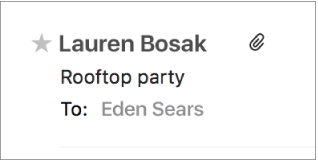
Make someone a VIP: In a message, move the pointer next to the person’s name in the message header, then click the star User uploaded file that appears.

User uploaded file

Remove someone’s VIP status and mailbox: In a message from the VIP, click the star next to the person’s name. The person’s VIP mailbox is removed from the Favorites bar (the person’s messages remain in the Inbox).


Thanks for using Apple Support Communities.

Take care.

Nov 18, 2016 11:44 AM in response to Teddy_B

  1. Restarted Mac, nothing changed.
  2. Checked for messages from that VIP in the Inbox on my iPhone and there were no unread messages appearing there.
  3. Removed that person as a VIP, then re-added them. The 3 unread message icon reappeared. I again looked through all the messages in that Inbox and none were marked as unread.


When I right-click on that VIP mailbox in the Mailbox List and then click on Mark All Messages as Read, it still shows that there are 3 unread messages. Something’s still not working correctly.

This thread has been closed by the system or the community team. You may vote for any posts you find helpful, or search the Community for additional answers.

unread message count shows incorrect number

Welcome to Apple Support Community
A forum where Apple customers help each other with their products. Get started with your Apple Account.