I can't download music videos from iTunes

I can't download music videos from iTunes to my iPhone 6+ running iOS 10.1.1. I have over 35 GB OF FREE SPACE SO THAT's not an issue. It starts to download and just before it reaches 100%, I get an error message that states Download Error, tap )the down arrow) to retry. Another problem is I don't know how to cancel the downloads. Every time I sihn onto my phone the downloads continue to try in the background. I will be watching a video or texting and the error messages continually pops up with the same error message, asking if I''m done or want to retry. Even if I select Done, it will still continue to try. I've powered down the phone numerous times but that doesn't help. Has anyone had a similar issue and if so, where you able to fix the problem. Any help would be greatly appreciated. Thanks.

Posted on Nov 30, 2016 10:57 AM

Reply
6 replies

Dec 1, 2016 1:54 PM in response to wagnerdm

Hello wagnerdm,

Thanks for reaching out to the Apple Support Community. I understand you've been unable to download music videos to your iPhone and I'd like to help. You were off to a good start when you restarted your iPhone, but if the issue persists I'd recommend signing out of the iTunes store entirely and then back in to establish a fresh connection to the server.

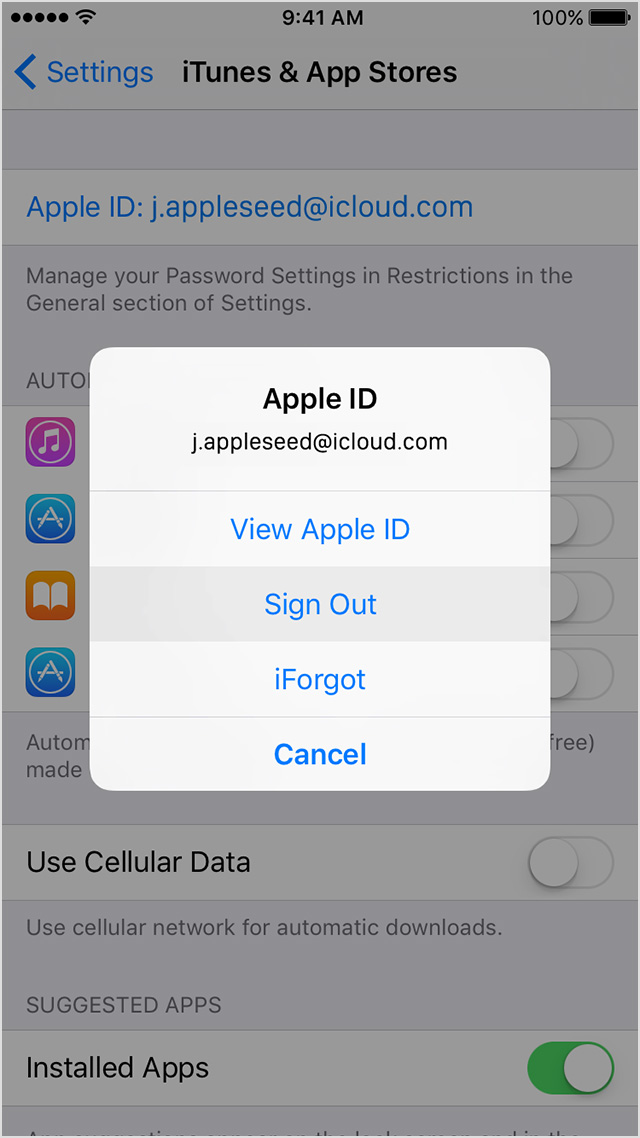
To sign out you can tap on Settings > iTunes & App Store, then tap your Apple ID and select "Sign out". Afterward, restart your phone again and sign back in and try to download again.
  1. Tap Settings > iTunes & App Store.
  2. Tap your Apple ID.
  1. Tap Sign Out.
    User uploaded file
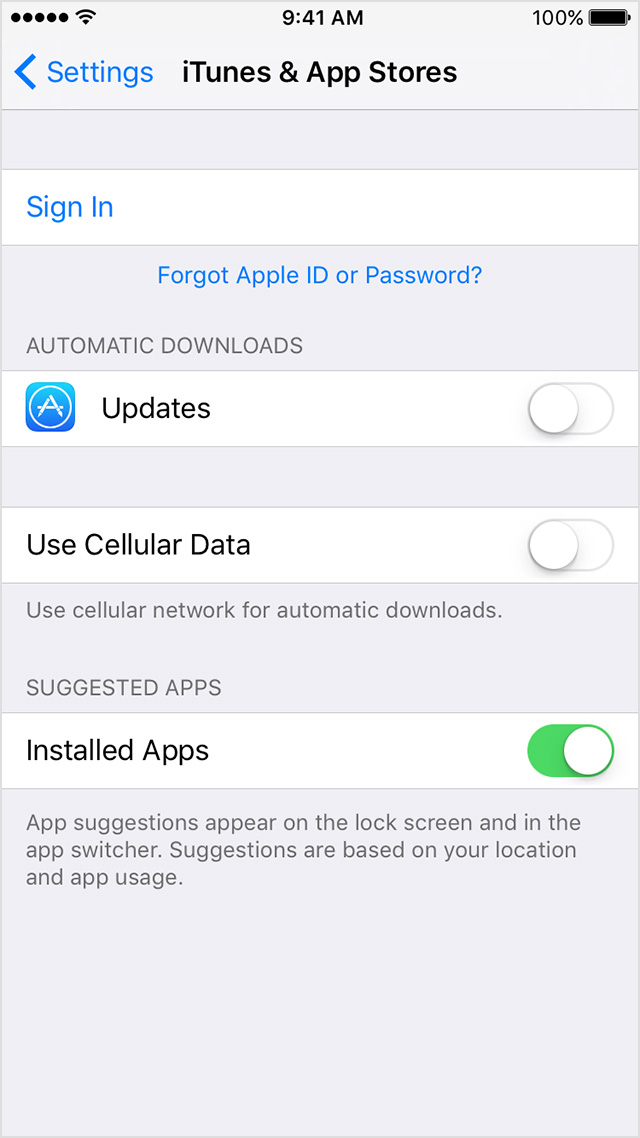
  2. Go to Settings > iTunes & App Store.
  3. Tap Sign In, then enter your Apple ID and password.
    User uploaded file


Sign in with a different Apple ID on your iPhone, iPad, or iPod touch


If the behavior persists, or you run into any trouble we're here to help.
Best Regards.

Dec 12, 2016 12:46 AM in response to wagnerdm

I have same problem. Purchased Music audio files download without error but the Purchased music videos download but at the end it says there was an error and to try again. I subscribe to Apple Music and Streaming the Video works perfectly. I have read everything online and in the support communities. I think it is a programming defect because the streaming works fine and I wish Apple would acknowledge and correct problem.

Dec 1, 2016 2:09 PM in response to Ulexes138

Thank you for your assistance. The first individual who provided help had me sign out of my iTunes account as one of the steps, which I did, but to no avail. I am able to download the music videos on my 2nd generation iPad that still runs iOS 9. I was able to download music videos before this latest update of iOS 10. The videos seem to download fine but error out as their 'Processing'. Also, I can watch the videos online, I just cann successfuly download to view offline.

Dec 3, 2016 12:43 PM in response to wagnerdm

I have this same problem and get the error message "Unable to download music video".


Whilst try to figure out how to transfer all things to my new cell phone, I sync'ed my music with iTunes. Since then I have the error. I already had version 10.x.x iOS. I have the same error on both my new and old iphones.


I had PREVIOUSLY used the same computer to help my wife transfer her songs with a new ipod purchase, (1 year ago). Fast forward to today... When I "sync'ed" trying to transfer to my new iPhone, I suddenly had all her songs, but my previous "downloaded" songs refuse to re "download". And I can watch and listen to the songs, but they error when downloading, so I know my permissions are not the issue.


Maybe this helps someone. I am still working on it. Also Wagnerdm, if you turn off (in Settings, iCloud, iTunes) automatic downloads, they may stop trying to download. If that is already OFF, then manually scroll through your iTunes to the songs that refuse to download and click on the little red STOP square. It should change to a little red CLOUD, that will keep it from constantly trying and sending the error messages, which are most annoying, :-)

Dec 12, 2016 1:02 AM in response to drtmd

How can we get apple to ackowledge this issue and provide a fix for it? At this point I would just like them to empty my music video download queue so that the 20 music videos I have been trying to dowload would stop try to, well, download. It's very annoying when I'm looking for music or movies on iTunes and I constantly get those **** pop-up error messages. Doesn't Apple have a moderator perusing these forums who might be able to assist? I've been in direct contact Apple's Customer Support regarding this matter, and for such a large enterprise, their customer support team seems to be a little clieless.

This thread has been closed by the system or the community team. You may vote for any posts you find helpful, or search the Community for additional answers.

I can't download music videos from iTunes

Welcome to Apple Support Community
A forum where Apple customers help each other with their products. Get started with your Apple Account.