I cannot view HD downloaded content on Netflix: "failed to connect to netflix. please check your device's network connection (- 102)"

I downloaded HD movie on Netflix but when I try to play it I get this error: "failed to connect to netflix. please check your device's network connection (- 102)"


If I delete the HD version and download the SD version then it plays no problem. So the issue is with HD contentd.


I experience this issue on iPhone and iPad.


All the trouble-shooting steps from Netflix do not fix this issue.

iPad (3rd gen) Wi-Fi + Cellular, iOS 9.3.5

Posted on Dec 23, 2016 8:18 PM

Reply
7 replies

Apr 29, 2017 9:58 AM in response to scotty_24seven

I'm late for this but I was just having the same issue. I downloaded some movies for a road trip for my son and when I went into Netflix to play, it said Network Error no connection or something like that. Annoying for sure! So after what seemed like forever, i finally got it working! Here's what I did. First I had to go into iPad setting and click off cellular data (I wasn't even subscribed to it so didn't need it on). Then I went into iPad Netflix app settings (not the app itself) and reset Netflix settings and turned off cellular data in that too. Then I had to turn on my hotspot on my phone to get signed back into Netflix (Im on the road). Once signed back in, I turned off my hotspot and the movies played just fine on the ipad. I think my issue had something to do with the cellular data that I didn't have and Netflix being set to use it. If you don't have that, maybe try doing the ipad settings Netflix reset when you have access to WiFi since you have to be signed in to watch the downloaded content. Good luck!

Dec 24, 2016 10:40 AM in response to 32mhz

Hey 32mhz!

I understand you're having some trouble watching videos on your iPad. I'd be happy to help you out.

When it comes to third-party apps, there are only so many steps we can take to resolve an issue before you have to consult the developer of that app - especially if the only connection issue you're having is with Netflix. I know you mentioned trying some of their encouraged troubleshooting steps, but seeing about working with any customer service they might offer would be a good idea, as well. As for what we can do, I want you to follow these steps and test that HD download after each one:

Restart the app

Close the app and open it again.

Restart your device

Turn your device off and back on.

Check for iOS and app updates

  1. Make sure that you're using latest version of iOS.
  2. Open the App Store and tap Updates.
  3. If updates are available, tap Update All.
  4. If asked, enter your Apple ID password.

You might need a Wi-Fi connection to update some apps.

Install another app from the App Store

Try installing a different app that you don't have on your device. Find a free app from the App Store, and remember to use the same Apple ID that you used to download the app that you're having issues with.

Delete and reinstall the app

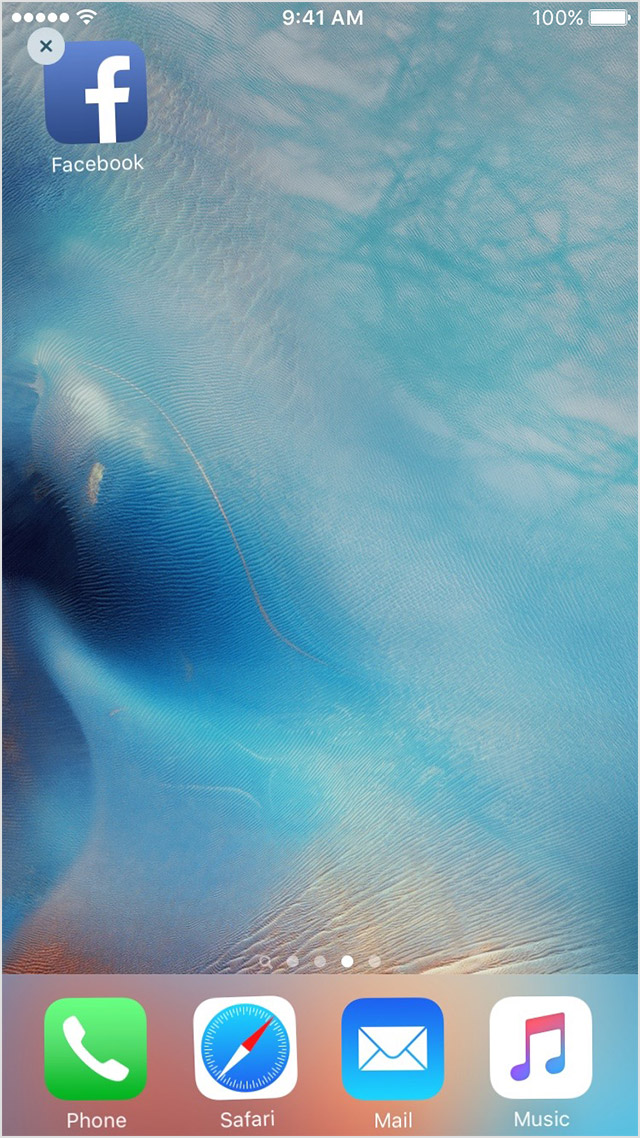
  1. Tap and hold the app until it jiggles.
  2. Tap the User uploaded file on the app.
    User uploaded file
  3. Press the Home button.
  4. Go to the App Store and download the app again.
  5. Wait for the app to download, then open it from the Home screen.

Contact the app developer

If you see this issue again, contact the app developer for help:

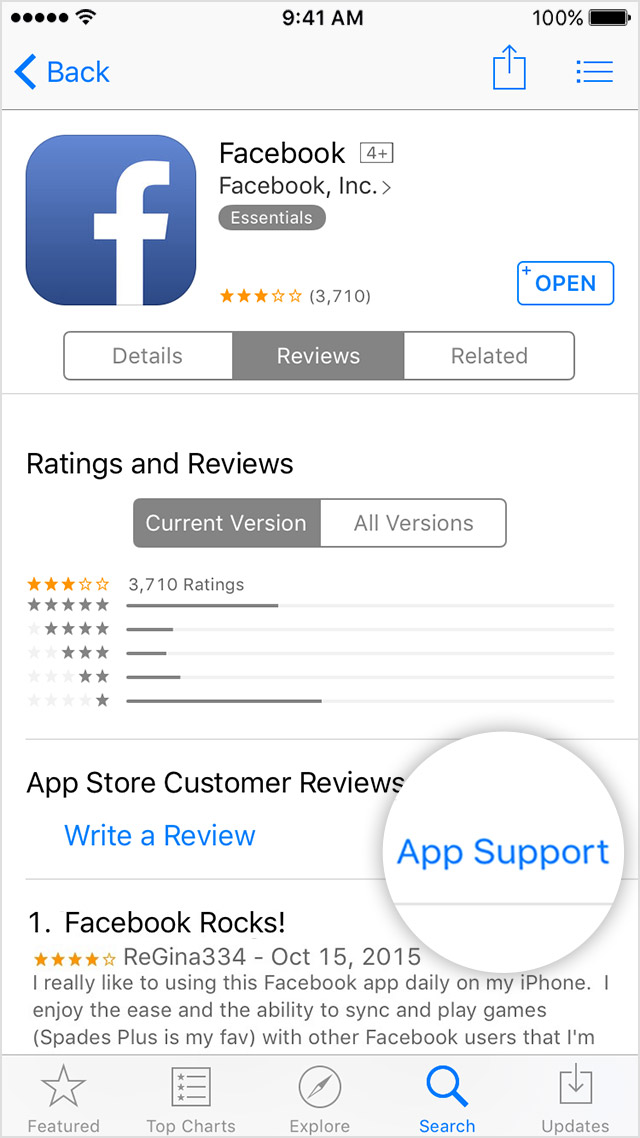
  1. Find the app in the App Store.
  2. Tap the app, then tap Reviews.
  3. Underneath App Store Customer Reviews, tap App Support.
    User uploaded file
If an app you installed unexpectedly quits, stops responding, or won’t open - Apple Support

Even though the title of the article specifically addresses apps that won't open, close at random, or won't respond, these steps are just as pertinent for an issue like this. Hopefully this helps you to resolve the issue. Cheers!

Dec 31, 2016 9:13 AM in response to 32mhz

Yeah i have this problem too, so annoying. Downloaded HD versions sat down to watch and .... error -102!


It has nothing to do with internet download speeds/routers/networks, deleting and reinstalling does nothing, all the obvious tricks already tried and failed.


Leaves only the Netflix app developers as responsible - i don't rate them as there have been issues with this app for ages now; app crashes, login fails, and now download and playback issues.....


If i hear of a solution, i'll post it up!


Good luck

This thread has been closed by the system or the community team. You may vote for any posts you find helpful, or search the Community for additional answers.

I cannot view HD downloaded content on Netflix: "failed to connect to netflix. please check your device's network connection (- 102)"

Welcome to Apple Support Community
A forum where Apple customers help each other with their products. Get started with your Apple Account.