How to turn off shuffle mode on computer

I want to listen to my downloaded CDs in order on my computer. It keeps shuffling. How do I turn shuffle off?

I searched Internet and learned how to turn it off on the iPhone, but no luck finding how to do it on the computer version. I have a Windows 10 operating system on a Surface Pro tablet.

Windows 10, Surface Pro tablet

Posted on Dec 26, 2016 11:51 PM

Reply
1 reply

Dec 27, 2016 2:59 PM in response to Anc-user

Greetings Anc-user,


Thanks for posting to the Apple Support Communities. I see that you are wanting to play your songs in order and not shuffled. I know that sometimes it’s nice to shuffle the music around, but also nice to play it in order. I will be happy to help!


Take a look at this article: iTunes for Windows: Play songs


In particular this part here:


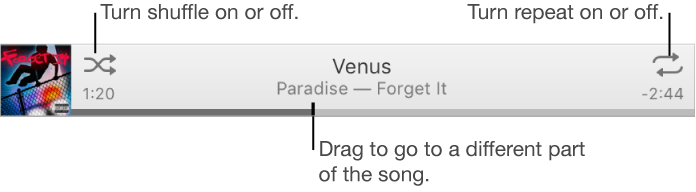
To play a song in your iTunes library, double-click it, or select it and click the Play button. You can use the controls in the iTunes window to repeat songs, change the order they play in, and more.
User uploaded file

To view your music library, choose Music from the pop-up menu at the top left.

Shuffle or repeat songs

Turn shuffle on or off: Click the Shuffle button User uploaded file.

Shuffle is on when a gray box appears User uploaded file.


Let us know if this helps.


Take care!

This thread has been closed by the system or the community team. You may vote for any posts you find helpful, or search the Community for additional answers.

How to turn off shuffle mode on computer

Welcome to Apple Support Community
A forum where Apple customers help each other with their products. Get started with your Apple Account.
