How can I remove MyWay from my iMac

I downloaded a weather app. and the MyWay search engine got installed at the same time. And I have no idea how to remove it. I would appreciate some help if possible. I am running an Imac 3.06 core 2 Duo. With OS 10.6.8. And Firefox 48.0.2 browser.

Posted on Jan 24, 2017 5:20 AM

Reply
5 replies

Jan 24, 2017 6:21 AM in response to Duelin

Hi,


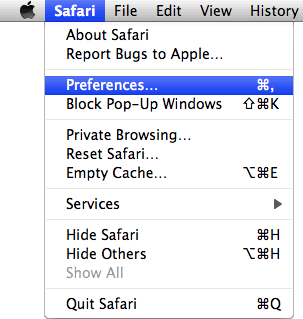
  1. From the Safari menu, select “Preferences".User uploaded file
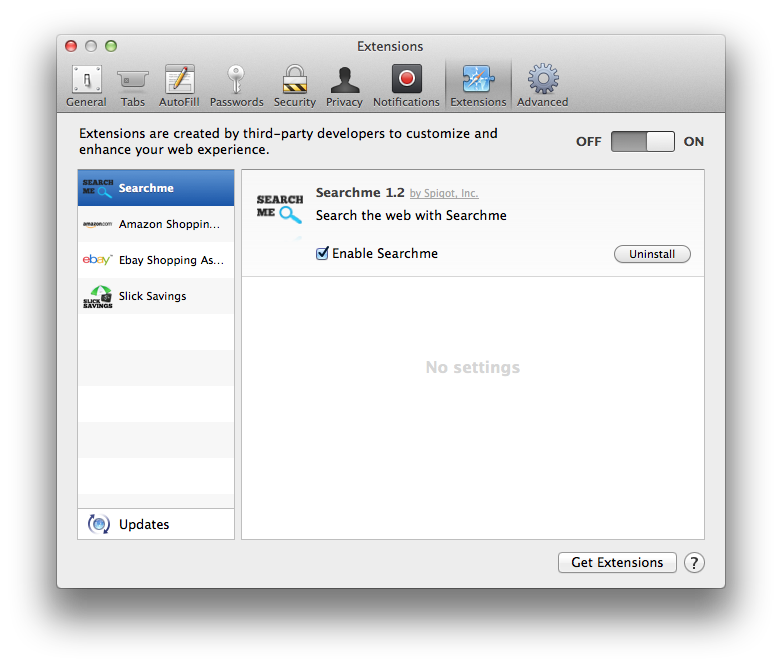
    In the Safari Preferences window, click the “Extensions” tab. Find any unknown plugin, then click on the “Uninstall” button.
    Known malicious extensions: Searchme , MacSaver, MacVX (and variants like MacVaX), MacCaptain, MacPriceCut, SaveOnMac, Mac Global Deals or MacDeals, MacSter, MacXcoupon, Shop Brain (or variants like SShoP Braaiin), PalMall, MacShop, MacSmart, News Ticker Remover, Shopper Helper Pro, Photo Zoom, Best YouTube Downloader, ArcadeYum, Extended protection, Video download helper, FlashFree or GoldenBoy.User uploaded file
  2. Next, select “Preferences“, go to the “General” tab and change the “Default Search Engine” to Google. Then, in the “General” tab, find the “Home Page” and change it to “google.com”.

Jan 24, 2017 6:50 AM in response to Duelin

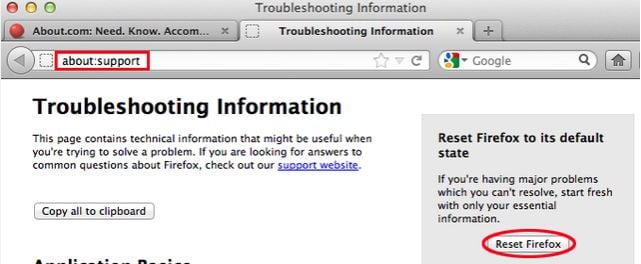
  1. In the Firefox’s address bar type: about:support, then click on Enter.
  2. Click the “Reset Firefox” button in the upper-right corner of the “Troubleshooting Information” page.User uploaded file
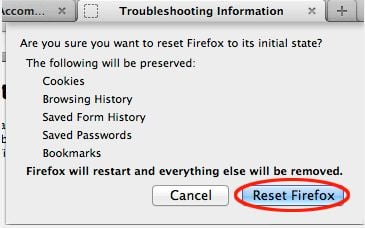
  3. To continue, click on the “Reset Firefox” button in the new confirmation window that opens.User uploaded file
  4. Firefox will close itself and will revert to its default settings. When it’s done, a window will list the information that was imported. Click on the “Finish“.

Jan 24, 2017 7:30 AM in response to anonyme4321

Anonyme sorry that I haven't thanked you for your response and help. You don't know how much i appreciate it. I am in my middle 70s and all this technology has kind of passed me by. I even had a problem getting back to this site. So in situations like this I need all the help I can get.

Anyway I followed your instructions. There was no Reset Firefox button. On mine there is a Refresh Firefox button. I tried that and it seems to have worked. That MYWay was sitting on the new tab button. So every time I needed a new tab that would pop up. And god only knows what it was doing.


So thanks millions I really appreciate your time.


Thanks Again

Duelin

This thread has been closed by the system or the community team. You may vote for any posts you find helpful, or search the Community for additional answers.

How can I remove MyWay from my iMac

Welcome to Apple Support Community
A forum where Apple customers help each other with their products. Get started with your Apple Account.